
How to install and use MySQL-based SSL/TLS encrypted Connection add-on?
MySQL/Mariadb/ProxySQL databases come with a special feature called “encryption in transit.” This feature keeps your data safe by using SSL/TLS encryption when it travels between servers. Once you install this feature, it takes care of everything automatically, like encrypting data before sending it, authenticating endpoints, decrypting content, and verifying data when it reaches its destination.

Add-On Installation
You can add the extra feature on your MySQL/MariaDB/Percona and ProxySQL nodes (for database groups) only.
Step 1. On the platform dashboard, go to the Add-Ons section of the appropriate database layer, and click Install for the SSL/TLS Encrypted Connection solution.
Important Note: You can also get the extra feature from the Marketplace or import it from the correct GitHub repository.


Step 2. In the installation window that opens, choose the target Environment and Node Group(s) where you want to install the extra feature.
Note: For the clustered solution, select both MySQL/MariaDB/Percona and ProxySQL (if added) layers.
Click Install to proceed.

Step 3. In a minute, your database will be set up to use an encrypted connection.

Add-On Specifics
Certificate Generation Information:
To generate certificates, use the /usr/local/sbin/selfcertgen tool.
These certificates are self-made and created for the specific node’s hostname. This means that each node has its own set of certificates, and you should use the ones that match the accessed node for authentication.
The certificates are kept in the /var/lib/jelastic/keys/SSL-TLS folder (accessible through the “keys” shortcut in the file manager). There are two subfolders:
server: These certificates are used for TLS encryption when connecting to the PostgreSQL database.
client: Downloadable client certificates that can be used to verify the client’s connection to the database server.

Database Configurations for MySQL/MariaDB/Percona:
The configurations for these databases are set in a separate file called /etc/mysql/conf.d/ssl-config.cnf.
[mysqld]
ssl_cert=/var/lib/jelastic/keys/SSL-TLS/server/server.crt
ssl_key=/var/lib/jelastic/keys/SSL-TLS/server/server.key
ssl-cipher=ECDHE-RSA-AES256-GCM-SHA384:DHE-RSA-AES256-SHA
#require_secure_transport=ON

This file includes information like the paths to SSL files on the server and a list of supported encryption methods. There is also an option (currently commented out) that, if activated, would force the server only to accept secure, encrypted connections. If this option is uncommented, clients won’t be able to connect to the server without encryption.
ProxySQL Configurations:
For SSL on ProxySQL nodes, you need to adjust certain variables on all servers. By setting mysql-have_ssl to true, you enable SSL for frontend connections. Setting use_ssl to 1 in the mysql_servers column indicates that the backend nodes use SSL. These changes are made through a SQL query, and you need to update global variables and mysql_servers accordingly.
Changes are done with the following SQL query:
UPDATE global_variables SET variable_value=’true’ WHERE variable_name=’mysql-have_ssl’;
LOAD MYSQL VARIABLES TO RUNTIME; SAVE MYSQL VARIABLES TO DISK;
UPDATE mysql_servers SET use_ssl=1 WHERE port=3306;
LOAD MYSQL VARIABLES TO RUNTIME; LOAD MYSQL SERVERS TO RUNTIME; SAVE MYSQL SERVERS TO DISK;
Configuration:
Once installed, you can find the add-on in the Add-Ons tab for the relevant layer(s). From here, you can generate new SSL certificates by clicking the Re-issue certificates button, useful if you suspect compromise or accidental removal.
To remove the add-on from the layer, along with custom configurations and generated SSL certificates, go to the top-right corner of the panel, expand the menu, and click Uninstall.

to MySQL/MariaDB/Percona
Step 1. After installing the add-on, the “encryption in transit” (server-side encryption) feature starts working right away. You can test it by connecting to the database using the credentials sent to you via email. For a remote connection, you can add an endpoint or public IP:

Use this command to connect to the database:
mysql –ssl-mode=required -h {host} -P {port} -u {user} -p
Note: If you are using the MariaDB client, replace the “–ssl-mode=required” option with “–ssl.” Here’s what these placeholders mean:
{user} – the username for the database connection
{host} – the entry point to the database (endpoint in this case)
{port} – the connection port (from the endpoint in this case)
Once connected, run the status command and check for the SSL line in the output.
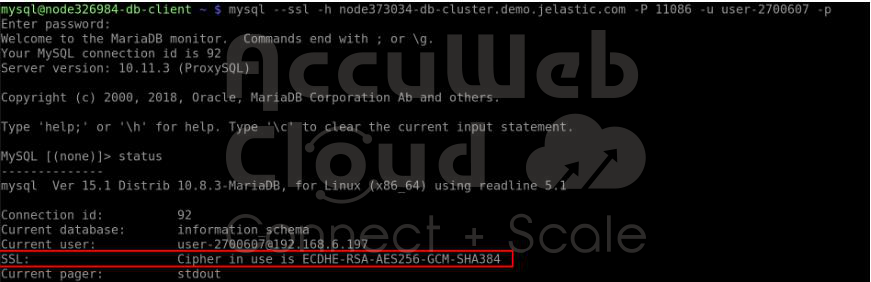
Step 2. While connected to the server, you can set up the use of client certificates for authentication to ensure both server- and client-side encryption. Execute the following command to make SSL authentication mandatory for the specified user (replace the {user} placeholder with the actual username from the email received after creating the environment):
FLUSH PRIVILEGES;
ALTER USER ‘{user}’@’%’ REQUIRE X509;
ALTER USER ‘{user}’@’localhost’ REQUIRE X509;
FLUSH PRIVILEGES;

If you only want to use certificates for login, you can also remove the password requirement with the ALTER USER command.
Now, provide the client server (computer/container/VM) with the necessary SSL certificate files, which can be downloaded from the /var/lib/jelastic/keys/SSL-TLS/client directory of the required target node. Once done, you can connect with the following command:
$ mysql –h {host} -P {port} -u {user} -p –ssl-mode=required –ssl-ca={path/to/root.crt} –ssl-cert={path/to/client.crt} –ssl-key={path/to/client.key}

Important Note: To avoid specifying certificates as arguments, you can add these options to the my.cnf file on the client server:
[client]
ssl-ca = {path/to/root.crt}
ssl-cert = {path/to/client.crt}
ssl-key = {path/to/client.key}
Conclusion:
In conclusion, installing and using the MySQL-based SSL/TLS Encrypted Connection add-on involves a straightforward process. After installation, the server-side encryption feature is immediately active. Users can connect securely to the database using specified credentials and can also configure client certificates for enhanced security.
Additionally, the process allows for flexibility in managing authentication methods and provides the option to use SSL certificates for login. The convenience extends to easy removal of the add-on when needed. Overall, the SSL/TLS Encrypted Connection add-on ensures a secure and encrypted connection for MySQL-based databases.