
How to Install and Access MongoDB 8.0 with Mongo Express via AccuWebCloud One-Click App
MongoDB is one of the most popular NoSQL databases used for modern, high-performance applications. With AccuWeb.Cloud One-Click Apps, you can deploy MongoDB 8.0 along with Mongo Express in just a few minutes, without manual installation or complex configuration.
In this guide, we’ll walk you through installing, accessing, and managing MongoDB 8.0 using Mongo Express and the MongoDB CLI on AccuWeb.Cloud.
What You will Learn in This Article
- How to log in to AccuWeb.cloud
- How to install MongoDB 8.0 using One-Click Apps
- How to verify the MongoDB installation
- How to access Mongo Express from your browser
- How to manage MongoDB databases using SSH and CLI
- Common real-world use cases of MongoDB
What Is MongoDB 8.0 and Mongo Express?
MongoDB 8.0
MongoDB is a document-oriented NoSQL database that stores data in flexible, JSON-like BSON documents. Version 8.0 brings improvements in performance, security, and scalability, making it ideal for modern cloud applications.
Mongo Express
Mongo Express is a web-based MongoDB administration interface that allows you to:
- Create and manage databases
- View collections and documents
- Perform CRUD operations
- Monitor MongoDB activity visually
Step 1: Log in to AccuWeb.Cloud and Select Your Server
- Register on AccuWeb.Cloud
- Visit https://app.cp-accuweb.cloud/
- Log in using your registered email and password
- Navigate to the Cloud Dashboard

Step 2: Install MongoDB 8.0 from One-Click Apps
1. Once logged in to your cloud dashboard, click on “Marketplace.”

2. Search for “MongoDB” in the search box. And then click the “Install” button.

3. Now, here you can give any name in the “Environment” and “Display Name”. Also, select the server location from the dropdown menu. After selecting the configuration as per your requirement, click on “Install”.
| US-NY-01 | New York |
| US-NY-01 | Frankfurt |
| US-NY-01 | Los Angeles |
| IN-MUM-01 | Mumbai |

4. The installation process will start and will take around five minutes to install all the packages.

Step 3: Post-Installation Verification of MongoDB
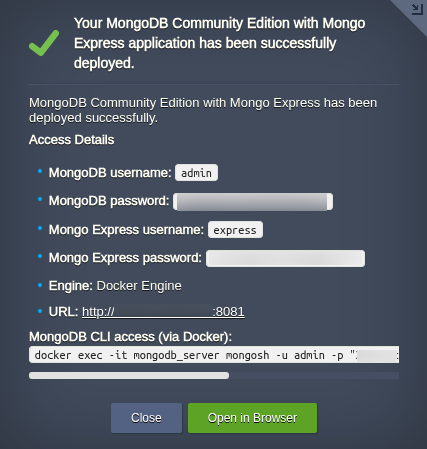
Once the installation is completed, you will see a pop-up with the
following details of your MongoDB environment.
- MongoDB username
- MongoDB password
- Monog Express username
- Mongo Express password
- URL
- MongoDB CLI access
Step 4: Open Mongo Express in Your Browser
- To open Mongo Express in your browser, kindly copy the URL from the post-installation pop-up and paste it into the browser. Now enter the login credentials from the last step.
- Once logged in, you can:
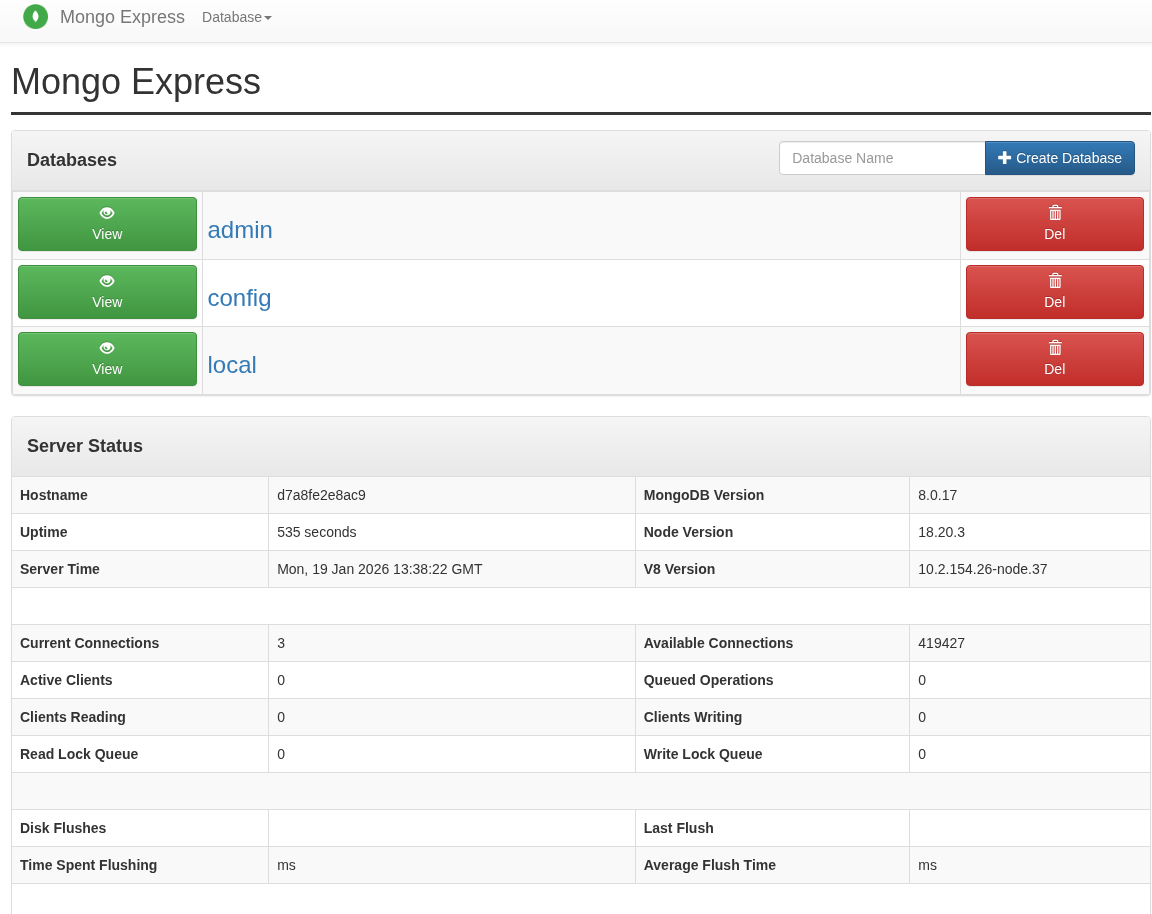
- View existing databases
- Create new databases
- Manage your databases
Step 5: Managing MongoDB Using CLI Over SSH
For advanced users and production environments, the MongoDB CLI offers more control.
- To access the MongoDB CLI, you need to run the command in your MongoDB shell that you got after MongoDB installation, “MongoDB CLI access (via Docker)”.
docker exec -it mongodb_server mongosh -u admin -p "password" --authenticationDatabase admin2. After pasting the above command, you will be successfully logged in to your MongoDB instance.
Common MongoDB CLI Commands
- Show databases
show dbs- Create or switch database
use mydatabase- Create a collection
db.createCollection("users")- Insert data
db.users.insertOne({ name: "John", role: "admin" })- View data
db.users.find().pretty()
Step 6: Use Cases for MongoDB Community Edition
MongoDB Community Edition is widely used in production environments for applications that require flexibility, scalability, and fast development cycles. When deployed as a Docker-based MongoDB container on AccuWeb.Cloud, it becomes even more powerful by offering isolation, portability, and easy upgrades.
Below are the most practical and commonly adopted use cases for MongoDB Community Edition.
1. Modern Web Applications (MEAN / MERN Stack)
MongoDB Community Edition is a natural fit for modern JavaScript-based applications.
- Schema-less design adapts to changing app requirements
- BSON documents map easily to JSON-based APIs
- High read/write performance for dynamic data
2. SaaS Platforms and Multi-Tenant Applications
MongoDB Community Edition is widely used in SaaS platforms where each tenant may have different data structures.
- Customer-specific configurations
- Tenant-based databases or collections
- Feature flags and application settings
3. Content Management Systems (CMS)
MongoDB is an excellent backend for content-heavy platforms.
- Blog posts and articles
- Media metadata
- Tags, categories, and comments
4. E-commerce Applications
Many e-commerce platforms use MongoDB Community Edition for non-transactional workloads.
- Product catalogs
- Inventory metadata
- Customer browsing behavior
- Wishlist and cart data
5. Logging, Monitoring, and Event Data
MongoDB Community Edition is commonly used as a log and event data store.
- Application logs
- User activity tracking
- Error and audit logs
- API request history
Why Use AccuWeb.Cloud One-Click MongoDB?
- Zero manual configuration
- Secure default setup
- Optimized cloud performance
- MongoDB + Mongo Express bundled
- Easy vertical scaling
Frequently Asked Questions
1. Is MongoDB 8.0 free on AccuWeb.Cloud?
Yes, MongoDB Community Edition is free. You only pay for the cloud resources you use.
2. Can I access MongoDB without Mongo Express?
Yes, you can fully manage MongoDB using the CLI via SSH.
3. Is Mongo Express secure?
Yes, Mongo Express is protected with authentication and runs behind controlled ports.
4. Can I use MongoDB for production workloads?
Absolutely. MongoDB 8.0 is production-ready and widely used in enterprise environments.
5. What is the benefit of using Docker-based MongoDB?
Docker-based MongoDB provides isolation, consistency, and portability. It ensures the same MongoDB environment across development, testing, and production, and makes upgrades, migrations, and redeployments easier.
Conclusion:
Setting up MongoDB Community Edition with Mongo Express on AccuWeb.Cloud is simple and hassle-free using the One-Click App. The Docker-based MongoDB deployment provides a clean and consistent environment, making it easier to manage, maintain, and scale your database as your application grows. Whether you prefer using Mongo Express for visual database management or the MongoDB CLI over SSH for more advanced operations, this setup offers the flexibility developers need. If you plan to use MongoDB for any of the use cases discussed above, AccuWeb.Cloud’s Docker-based MongoDB is a reliable and practical option to get started quickly.