Guaranteed 40% Cloud Savings OR Get 100% Money Back!*

How to manage quota for your clients?

How to manage quota for your clients?

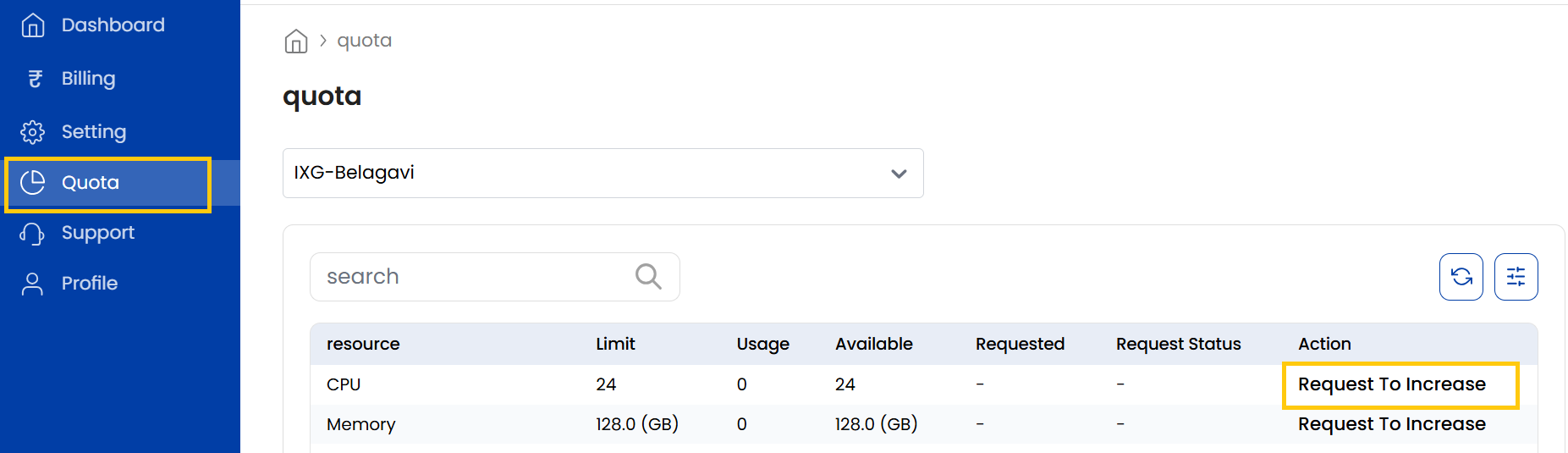
The Quota Tab manages resource limits for clients. Ensures clients operate within designated resource limits.

Steps

  • Log in to your Reseller Account.
  • Click Profile.
  • Open the Quota tab.

Request To Increase

  • By clicking on Request To Increase, you can also increase or decrease these quotas by adjusting the quantity limits.
* View Product limitations and legal policies

All third-party logos and trademarks displayed on AccuWeb Cloud are the property of their respective owners and are used only for identification purposes. Their use does not imply any endorsement or affiliation.

Product limitations and legal policies

* Pricing Policy
To know about how the pricing is calculated please refer to our Terms and Conditions.