
How to Optimize Database Performance?
A slow database can quietly drag down everything that depends on it: your website, your applications, even simple internal tools. Most of the time, people don’t notice the problem until pages start timing out or customers start complaining. The good news is that database performance issues are almost always fixable, and you don’t need to be a full-time DBA to handle the basics.
Here’s a practical guide to getting your database running the way it should.
Step 1: Find Out What’s Actually Slow
Before touching anything, figure out where the real bottleneck is. Check your slow query logs first, most databases like MySQL, PostgreSQL, and MongoDB let you enable this and it’ll show you exactly which queries are taking too long. Don’t guess, let the logs tell you.
Here’s how you can check it on MySQL. Log in to your MySQL server and run:
SHOW VARIABLES LIKE ‘slow_query_log’;
SHOW VARIABLES LIKE ‘long_query_time’;

If it’s off, turn it on and set a threshold like this:
SET GLOBAL slow_query_log = ‘ON’;
SET GLOBAL long_query_time = 2;
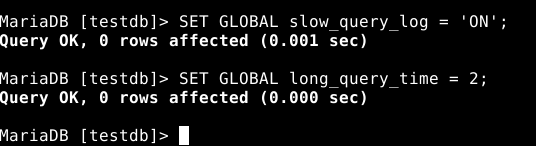
This tells MySQL to log any query that takes longer than 2 seconds. To find where the log is being written, run:
SHOW VARIABLES LIKE ‘slow_query_log_file’;
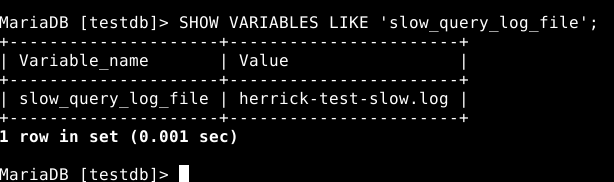
Open that file and you’ll see exactly which queries are dragging your database down.
Step 2: Add the Right Indexes
Missing indexes are one of the most common reasons queries slow down over time. If a query is scanning through thousands or millions of rows without an index, it’s going to be slow no matter how powerful your server is. Look at your slow queries, check which columns are being filtered or joined on, and add indexes there.
Say you have a table of orders and you keep running a query like this:
SELECT * FROM orders WHERE customer_id = 1023;

If customer_id isn’t indexed, MySQL has to scan the whole table every single time. Adding an index fixes that:
CREATE INDEX idx_customer_id ON orders(customer_id);

That one line can turn a query that takes several seconds into one that takes milliseconds. Just be careful not to over-index either, too many indexes can slow down writes since every insert or update has to update those indexes too.
Step 3: Clean Up and Optimize Your Queries
Sometimes the query itself is the problem, not the database. Avoid using SELECT * when you only need a few columns. Break down complex joins if they’re not necessary. Use EXPLAIN or EXPLAIN ANALYZE to see how your database is actually executing a query, this usually reveals exactly why it’s slow.
For example, instead of writing:
SELECT * FROM orders WHERE customer_id = 1023;
Only pull the columns you actually need:
SELECT order_id, order_date, total_amount FROM orders WHERE customer_id = 1023;
Now run EXPLAIN in front of it to see what’s happening behind the scenes:
EXPLAIN SELECT order_id, order_date, total_amount FROM orders WHERE customer_id = 1023;

The output will tell you whether the query is using an index or scanning the whole table (look at the “type” and “rows” columns in the result). If it shows a full table scan, that’s your cue to add an index or rewrite the query.
Step 4: Check Your Server Resources
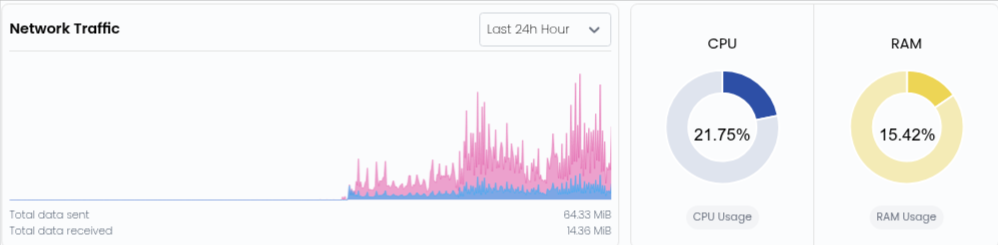
A lot of “database is slow” complaints actually come down to the server running out of resources. Keep an eye on CPU usage, RAM, and disk I/O. If your database is constantly swapping memory or your disk is maxed out, no amount of query tuning is going to fix that. Sometimes the real fix is just upgrading resources or moving to faster storage like SSD or NVMe.
You can check your instance resource usage from your Accuweb.cloud dashboard by visiting the URL below:
https://accuweb.cloud/resource/cs/monitor-resource-usage
Step 5: Tune Your Database Configuration
Default configurations are rarely built for production workloads. Things like buffer pool size, connection limits, and cache settings matter a lot. For MySQL, the setting to focus on first is innodb_buffer_pool_size, this controls how much memory MySQL uses to cache data and indexes in RAM instead of reading from disk every time.
Check what it’s currently set to:
SHOW VARIABLES LIKE ‘innodb_buffer_pool_size’;
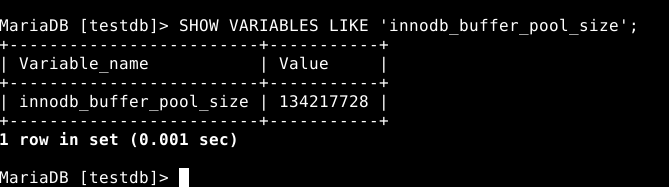
A common rule of thumb is to set this to around 60-70% of your server’s total RAM, if the server is dedicated to the database. So on a server with 8GB RAM, you might set it to around 5GB. You can update it in your MySQL config file (usually my.cnf or my.ini):
[mysqld]
innodb_buffer_pool_size = 512M

After saving the file, restart MySQL for the change to take effect:
sudo systemctl restart mysql
For PostgreSQL, the equivalent setting is shared_buffers in postgresql.conf, and the same general rule applies, don’t leave it at the default, size it based on your actual available memory. Small config changes like this often bring noticeable improvements without touching a single line of application code.
Step 6: Set Up Regular Maintenance
Databases need regular upkeep, just like anything else. Run routine tasks like vacuuming (PostgreSQL), optimizing tables (MySQL), or compacting collections (MongoDB) to keep things running smoothly. Old, bloated data and fragmented tables slow things down more than people realize.
Step 7: Use Caching Where It Makes Sense
Not every request needs to hit the database directly. Adding a caching layer like Redis or Memcached for frequently accessed data can take a huge load off your database and speed up response times significantly, especially for read heavy applications.
Step 8: Monitor Continuously
Optimization isn’t a one time task. Set up monitoring tools to track query performance, connection counts, and resource usage over time. This way you catch issues early, before they turn into outages or major slowdowns.
Conclusion
Database performance problems rarely have one single cause, it’s usually a mix of missing indexes, poor queries, resource limits, and configuration that was never tuned for your actual workload. Go through these steps one at a time, measure the impact, and you’ll see real improvement without needing to overhaul your entire setup. A well tuned database means faster applications, happier users, and a lot less firefighting for you down the line.