
Galera Cluster Limitations and Recovery
Galera Cluster failures can cause write locks, split-brain situations, or complete database downtime if not handled correctly.
This guide explains common Galera Cluster limitations and shows how to safely recover a MariaDB Galera Cluster after node crashes, network failures, or improper shutdowns using proven recovery steps.
Galera Cluster Recovery
To recover a Galera Cluster after a crash, identify the node with the highest sequence number, bootstrap the cluster from that node, and start the remaining nodes sequentially.
Common Galera Cluster Limitations
- Primary Key Requirement: All tables must contain a Primary Key.
- Stop/Start/Restart Specifics: Specific procedures must be followed for stopping, starting, or restarting nodes.
- Node with Maximum Transactions: Special handling is needed for the node with the highest transaction count.
- Starting Cluster after Crash: Procedures for safely starting the cluster after a crash.
- Single Node Failure: Steps to recover from the failure of a single node.
- Monitoring Galera Cluster: Techniques and tools for monitoring cluster health and performance.
For a comprehensive list of Galera Cluster limitations, visit the official website. Here are some key limitations relevant to the platform:
Primary Key Requirement in Galera Cluster
Use the following query to identify tables that violate Galera Cluster requirements:
All tables must have a Primary Key. To identify tables without a Primary Key,
run the following query:
select tab.table_schema as database_name,
tab.table_name
from information_schema.tables tab
left join information_schema.table_constraints tco
on tab.table_schema = tco.table_schema
and tab.table_name = tco.table_name
and tco.constraint_type = 'PRIMARY KEY'
where tco.constraint_type is null
and tab.table_schema not in ('mysql', 'information_schema',
'sys', 'performance_schema')
and tab.table_type = 'BASE TABLE'
order by tab.table_schema,
tab.table_name;
MyISAM Tables: An experimental parameter, wsrep_replicate_myisam, has been added to the configuration file to support MyISAM tables.
Galera Cluster Stop, Start, and Restart Behavior
Stopping a cluster requires a sequential shutdown of all its nodes. The final container sets itself in bootstrap mode, initiating the cluster startup from this node.
The platform streamlines this process, eliminating the need for manual intervention. You can manage the Galera Cluster like any other environment, initiating start/stop/restart actions via the dashboard. Special events handle all necessary actions, such as sequentially withdrawing nodes from the cluster, in the background.
When restarting a single node in the cluster, standard actions apply.
Identifying the Galera Node with Maximum Transactions
It’s crucial to create a backup for the /var/lib/mysql directory on each cluster node before proceeding with any actions.
How to Find the Correct Node for Cluster Bootstrap
During cluster recovery, identifying the node with the highest sequence number of the last transaction is essential, as the cluster should start from this node. You can retrieve the sequence number of the last transaction from the seqno value in the /var/lib/mysql/grastate.dat file of each node.
mysql @ node270011-env-0668554 ~ $ cat /var/lib/mysql/grastate.dat | grep seqno
seqno: 1133
mysql @ node270016-env-0668554 ~ $ cat /var/lib/mysql/grastate.dat | grep seqno
seqno: 1134
mysql @ node270017-env-0668554 ~ $ cat /var/lib/mysql/grastate.dat | grep seqno
seqno: 1134
Typically, selecting a node with the highest parameter value suffices. If multiple nodes share the same highest value, opt for any of them, preferably the master container of the layer.
However, if at least one node registers a value of -1, it indicates potential inconsistency among nodes (the parameter resets to -1 during service restart on a non-functional cluster). In such instances, data recovery requires starting mysqld with the –wsrep-recover parameter.
mysqld --wsrep-recoverRetrieve the recovered position data by examining the value at the end of the line after the colons (e.g., 85340 in the provided example).
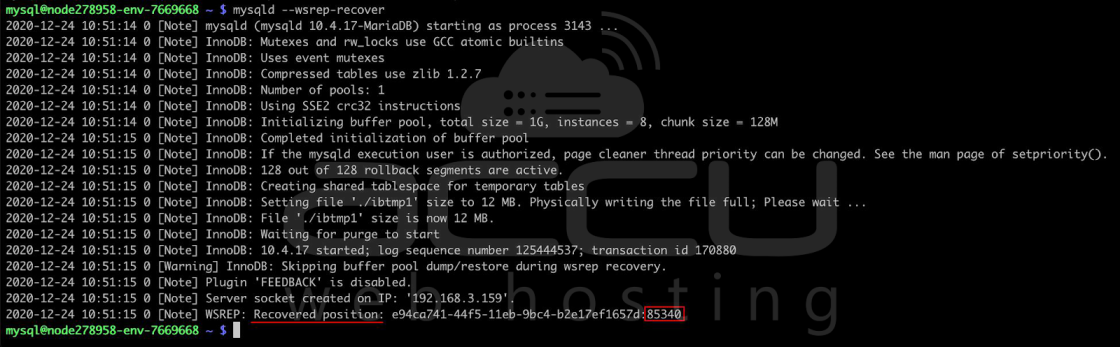
....2020-12-24 10:51:15 0 [Note] WSREP: Recovered position: e94ca741-44f5-11eb-9bc4-b2e17ef1657d:85340
....
Compare the recovered positions on all nodes. The node with the highest value should be selected for bootstrap. In case multiple nodes have the highest value, any of them can be chosen. Then, set the safe_to_bootstrap variable to 1 in the grastate.dat file and bootstrap from this node.
How to Start Galera Cluster After a Crash
Follow these steps carefully to avoid data loss when recovering a crashed Galera Cluster.
Verify the state of the MySQL processes on the nodes. Sometimes, these processes may appear as “running,” but they might not respond to normal operations like establishing a connection or stopping them via the init script. If this is the case, you’ll need to manually terminate these hung processes.
Once you’ve ensured that there are no lingering MySQL processes, proceed to restart all MySQL containers in your cluster.
Before initiating the cluster startup, check the value of the safe_to_bootstrap parameter in the /var/lib/mysql/grastate.dat file. This parameter should be set to 0 to ensure the safe startup of the cluster.
If it’s set to any other value, particularly 1, it could indicate an inconsistency in the cluster state and require further investigation or corrective actions.
grep safe_to_bootstrap /var/lib/mysql/grastate.dat safe_to_bootstrap: 0
Ensure that the safe_to_bootstrap parameter is set to 1 on the node with the highest transaction count before starting the MySQL process.
sed -i 's/safe_to_bootstrap: 0/safe_to_bootstrap: 1/g' /var/lib/mysql/grastate.dat
grep safe_to_bootstrap /var/lib/mysql/grastate.dat
safe_to_bootstrap: 1
service mysql start
Proceed by sequentially starting the MySQL process on the remaining nodes.
service mysql startYou can continue with the remaining nodes if MySQL starts successfully on the second node.
If an error occurs, inspect the mysqld.log on the second node. Look for a message resembling the following:
2020-11-19 16:55:20 0 [ERROR] WSREP: gcs/src/gcs_group.cpp:group_post_state_exchange():422: Reversing history: 3151891 -> 3150782, this member has applied 1109 more events than the primary component.Data loss is possible. Aborting.
If such a record is present, it indicates that your second node has more transactions than the initially selected one (i.e., the first node where you set safe_to_bootstrap to 1).
Please return to the beginning of this section and restart the process, using the second node in the fourth step.
Recovering from a Single Galera Node Failure
In the event of a single node failure, often caused by processing request limitations, you should:
1. Verify that no MySQL processes are running on the affected node.
2. Change the safe_to_bootstrap parameter to 0 in the /var/lib/mysql/grastate.dat file.
3. Restart the node using the init script.
/etc/init.d/mysql restart
Monitoring Galera Cluster Health
Use the following commands to verify Galera Cluster size, state, and node synchronization.
You can monitor the state and various parameters of the Galera Cluster by executing the SHOW GLOBAL STATUS LIKE command on any node within the cluster. This command allows you to view different aspects of the cluster’s status. For example, to check the cluster size, you can use the following command:
mysql -uuser -ppass -e "SHOW GLOBAL STATUS LIKE 'wsrep_cluster_size';"
+ -------------------- + ------- +
| Variable_name | Value |
+ -------------------- + ------- +
| wsrep_cluster_size | 3 |
+ -------------------- + ------- +
mysql -uuser -ppass -e "SHOW GLOBAL STATUS LIKE 'wsrep_cluster_status';"
+ ---------------------- + --------- +
| Variable_name | Value |
+ ---------------------- + --------- +
| wsrep_cluster_status | Primary |
+ ---------------------- + --------- +
mysql -uuser -ppass -e "SHOW GLOBAL STATUS LIKE 'wsrep_local_state_comment';"
+ --------------------------- + -------- +
| Variable_name | Value |
+ --------------------------- + -------- +
| wsrep_local_state_comment | Synced |
+ --------------------------- + -------- +
This will display the current size of the cluster. Additionally, if your cluster includes ProxySQL nodes, you can check their status by executing the following request on any ProxySQL node:
mysql -uadmin -padmin -P6032 -h127.0.0.1 -e "select * from runtime_mysql_servers;"
Warning: Using a password on the command line interface can be insecure.
+--------------+----------+------+-----------+--------+--------+-------------+-----------------+---------------------+---------+----------------+---------+
| hostgroup_id | hostname | port | gtid_port | status | weight | compression | max_connections | max_replication_lag | use_ssl | max_latency_ms | comment |
+--------------+----------+------+-----------+--------+--------+-------------+-----------------+---------------------+---------+----------------+---------+
| 2 | node3303 | 3306 | 0 | ONLINE | 1 | 0 | 1000 | 0 | 0 | 0 | |
| 3 | node3304 | 3306 | 0 | ONLINE | 1 | 0 | 1000 | 0 | 0 | 0 | |
| 3 | node3303 | 3306 | 0 | ONLINE | 1 | 0 | 1000 | 0 | 0 | 0 | |
| 2 | node3304 | 3306 | 0 | ONLINE | 1 | 0 | 1000 | 0 | 0 | 0 | |
+--------------+----------+------+-----------+--------+--------+-------------+------------
This command provides information about the status of each ProxySQL node in the cluster. All nodes should be ONLINE for the cluster to operate effectively.
FAQs
Q) What are the main limitations of a Galera Cluster?
A) Galera Cluster requires all tables to have a primary key, supports only the InnoDB storage engine for replication, and needs strict procedures for stopping, starting, and recovering nodes after failures.
Q) Why is a primary key mandatory in Galera Cluster?
A) Galera uses primary keys to ensure row-level consistency across nodes. Tables without a primary key cannot reliably replicate DELETE operations and may cause data inconsistency.
Q) What is split-brain in a Galera Cluster?
A) Split-brain occurs when cluster nodes lose connectivity and form separate primary components, potentially accepting conflicting writes and risking data inconsistency.
Q) How do I recover a Galera Cluster after a crash?
A) To recover a Galera Cluster, identify the node with the highest transaction sequence number, set safe_to_bootstrap=1 on that node, bootstrap the cluster, and then start the remaining nodes sequentially.
Q) How do I find the correct Galera node to bootstrap?
A) Check the seqno value in the /var/lib/mysql/grastate.dat file on each node. The node with the highest sequence number should be used for cluster bootstrap.
Q) What does safe_to_bootstrap mean in Galera Cluster?
A) The safe_to_bootstrap parameter indicates whether a node is safe to use for initializing the cluster after a crash. It must be set to 1 only on the selected bootstrap node.
Q) What should I do if seqno is set to -1?
A) A seqno value of -1 indicates an inconsistent cluster state. In this case, run mysqld –wsrep-recover to determine the last committed transaction before choosing the bootstrap node.
Q) Can a Galera Cluster recover automatically after a node failure?
A) Single node failures may recover automatically, but full cluster crashes or split-brain scenarios usually require manual recovery steps.
Q) How do I recover from a single Galera node failure?
A) Ensure no MySQL processes are running on the failed node, set safe_to_bootstrap to 0, and restart the node so it rejoins the cluster.
Q) How can I monitor the health of a Galera Cluster?
A) Cluster health can be monitored using SHOW GLOBAL STATUS commands such as wsrep_cluster_size, wsrep_cluster_status, and wsrep_local_state_comment.
Q) Is Galera Cluster suitable for production environments?
A) Yes. When properly configured with primary keys, monitoring, backups, and correct recovery procedures, Galera Cluster is suitable for production-grade MariaDB workloads.
Conclusion
Galera Cluster provides high availability for MariaDB, but recovery must be handled carefully after crashes, network failures, or split-brain situations. Understanding cluster limitations and following the correct recovery sequence is essential to avoid data loss and prolonged downtime.
By identifying the correct node to bootstrap, restarting nodes in the proper order, and continuously monitoring cluster health, you can safely restore a Galera Cluster to a consistent and operational state. With the right infrastructure and operational practices, Galera Cluster remains a reliable choice for production database workloads.