Guaranteed 40% Cloud Savings OR Get 100% Money Back!*

  • White Label Reseller
  • Cross Cloud Migration
    • Contact Sales
    • Get Support
    • Contact Us
AccuWeb.Cloud
Trusted by 50K+ businesses
Cloud Pricing
Pay-As-You-Go
Price & Features Comparison
vs Hyperscalers
Cost Estimator
Estimate monthly cost
Free Trial Offer
$100 credits + 30 days
Cloud VPS
1 Click App Hosting
Instant Launch
Auto Horizontal Scaling
Elastic capacity
Live Vertical Scaling
Zero downtime
Pay As You Go
Flexible billing
Blog Product Documentation FAQ API Reference Case Studies Tutorials
1 Click n8n Hosting Popular
LoginSign Up
Powered by AccuWeb.Cloud
  • Resources
  • FAQs
  • How can I enable an FTP account for an application from Accuweb.Cloud?

How can I enable an FTP account for an application from Accuweb.Cloud?

KB Product Documentation Development Tools FTP/FTPS Support FTP account Viewed: 152
0 0

How can I enable an FTP account for an application from Accuweb.Cloud?

FTP stands for File Transfer Protocol. An FTP account is a login that allows you to connect your computer to a web server so you can move files between them.

Think of it like a bridge between your local system and your website server.

What is it used for?

Developers/Designers use FTP to:

  • Upload website files such as HTML, CSS, images, or application code
  • Download files from the server for backup or editing
  • Update existing files when making changes to a website
  • Fix issues directly on the server
  • Manage folders and organize project files

How to Enable an FTP Account for an Application on AccuWeb.Cloud

Step 1: Log in to your AccuWeb.Cloud dashboard.

Step 2: Select the environment where you want to enable FTP and expand it. For example, you can choose the php-application environment.

Step 3: Open the Application Server and click on Add-Ons.
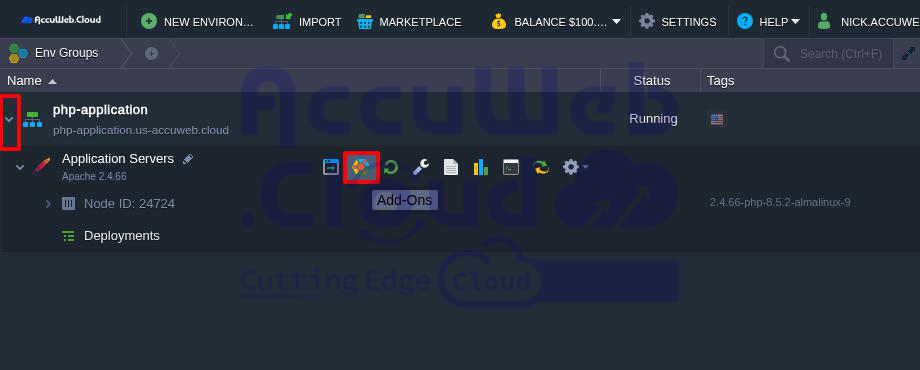
Application Server

Step 4: A section called Application Servers: Add-Ons will open below.

Step 5: Find the FTP option and click Install.
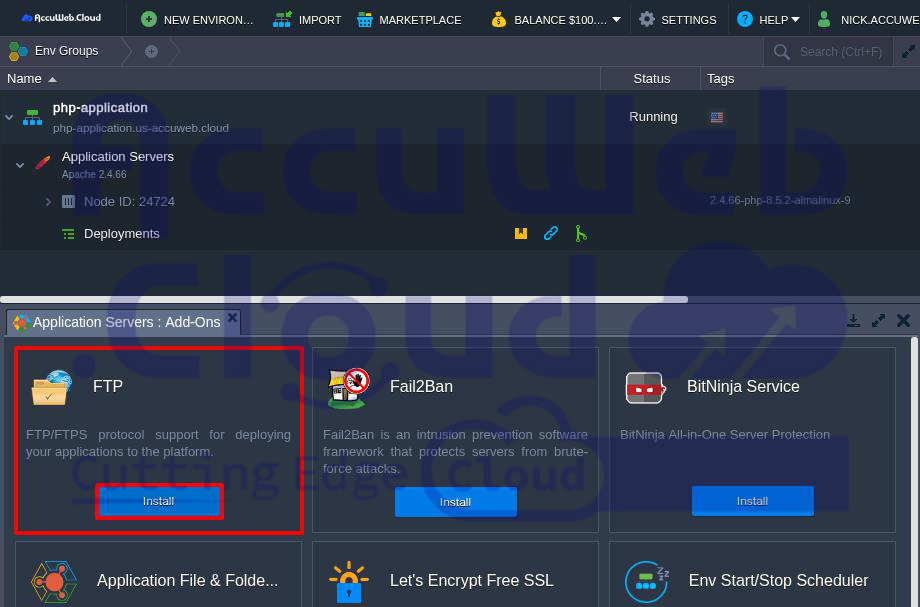
FTP

Note: If you do not see the FTP option, it means FTP is not supported for that application server. In this case, you cannot enable FTP for that application.

Step 6: Click Install in the FTP window. The installation will start and may take a few seconds.
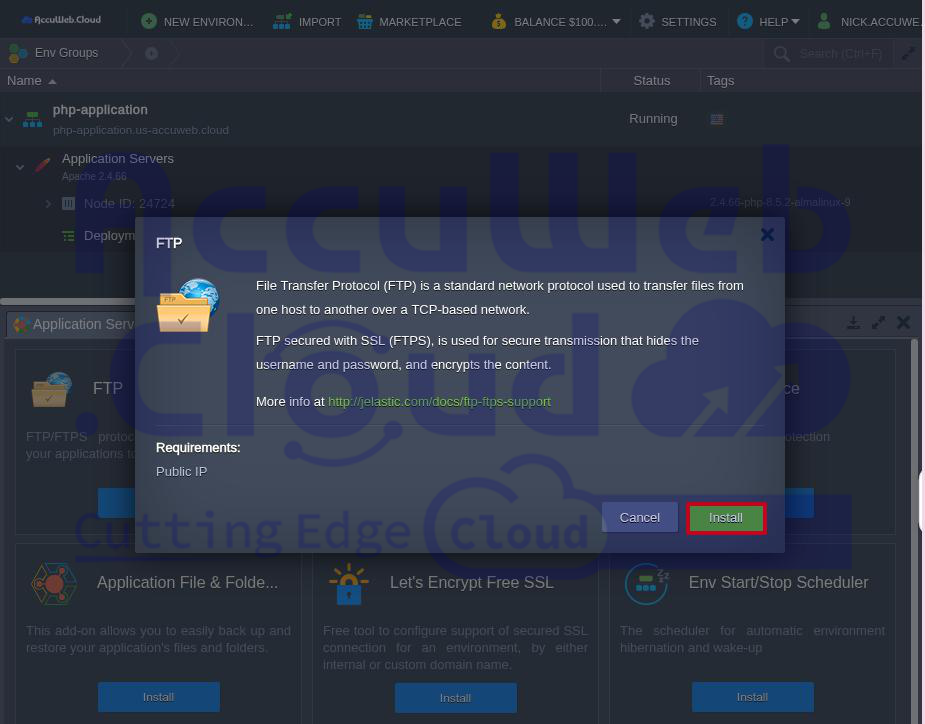
InstallFTP

Once completed, you will see the message:

“Your FTP application has been successfully deployed.”

The FTP login details will also be sent to your registered email address.
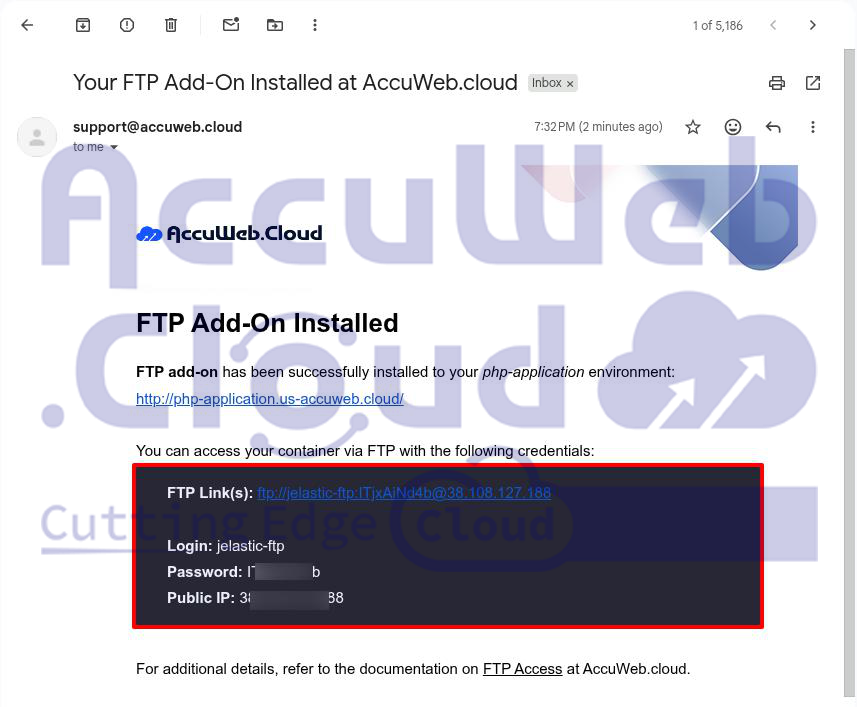
email

How to Access the FTP Account from Your Local System

Step 1: Download and install an FTP client such as FileZilla on your computer.

Step 2: Open FileZilla and enter the Host, Username, and Password that you received by email.

Step 3: Click Quickconnect to connect to the application server.

Step 4: If you see an SSL certificate warning, you can accept it. Select Always trust this certificate in future sessions, then click OK.
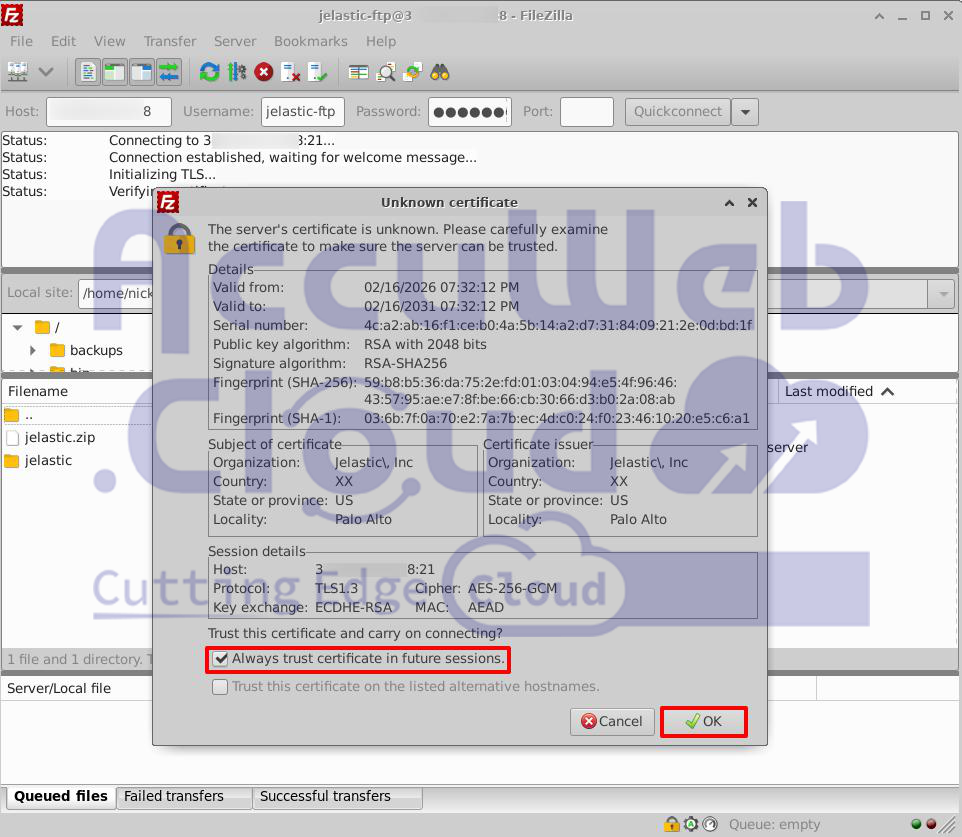
Local System

Step 5: Once connected, you will see your server files. This means the FTP connection is successful.
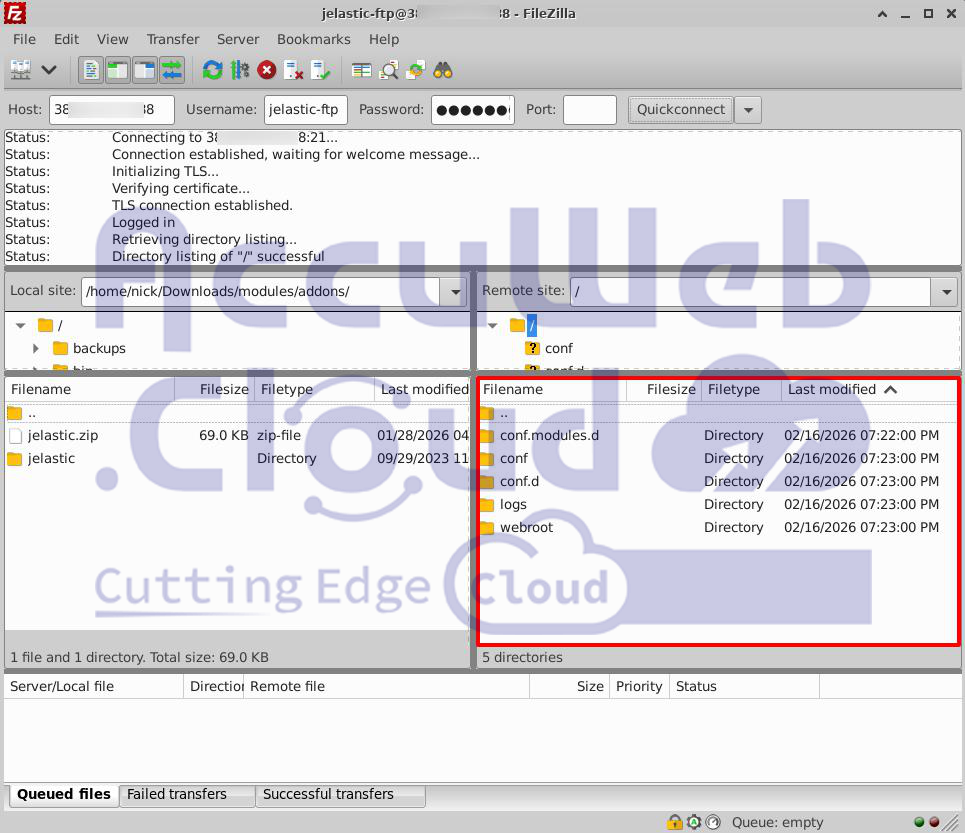
FTPconnection

You can now upload and download files between your local system and the AccuWeb.Cloud application server easily.

Conclusion

An FTP account is a simple and useful tool for managing website files. It allows developers to upload, download, update, and organize files directly on the server. This makes website management faster, easier, and more secure.

For anyone working on websites or applications, using FTP is a practical way to maintain control and keep everything running smoothly.

    • Product Documentation656
      • Quickstart5
      • Order Process2
      • Platform Overview17
      • Clusters5
      • Containers26
      • Environment Management41
      • Deployment10
      • Application Settings58
      • Backup and Restore10
      • Migrate11
      • Development Tools33
      • Java29
      • PHP25
      • Apache1
      • Node.js7
      • RUBY9
      • Python6
      • Go Lang2
      • .Net Core4
      • Databases54
      • Load Balancer12
      • Kubernetes Hosting24
      • Elastic VPS19
      • Data Storage Container12
      • Memcached4
      • Account & Pricing16
      • App. Platform (PaaS)34
      • Database Cloud Hosting2
      • Billing6
      • Storage14
      • Troubleshooting3
      • Tutorials146
      • Affiliates2
      • CMS6
      • OpenVPN2
      • Ubuntu10
      • Email1
      • Control Panel1
  • * View Product limitations and legal policies

    All third-party logos and trademarks displayed on AccuWeb Cloud are the property of their respective owners and are used only for identification purposes. Their use does not imply any endorsement or affiliation.

    Product limitations and legal policies

    * Pricing Policy
    To know about how the pricing is calculated please refer to our Terms and Conditions.
    AccuWeb.Cloud

    Enterprise-grade cloud hosting solutions trusted by businesses worldwide.

    Powered by AccuWebHosting

    Compute (IaaS)

    • Cloud VPS Hosting

    Database Cloud

    • MongoDB
    • PostgreSQL
    • MySQL
    • MariaDB
    • Redis

    Storage

    • Object Storage
    • Backup Storage
    • File Storage

    Managed Applications on Cloud (PaaS)

    • WordPress
    • Laravel
    • Magento
    • PHP
    • Node.JS
    • JAVA
    • Ruby
    • GitLab
    • Python
    • Go
    • Kubernetes
    • Docker
    • Joomla
    • Drupal
    • View more

    Pricing

    • Cloud Pricing
    • Price Comparison
    • Cost Estimator

    Resource

    • Blog
    • Knowledgebase
    • FAQ

    About AccuWeb

    • About us
    • Data Centers
    • Contact us
    • Careers
    • Scholarship Programs
    • Become a Provider
    • Affiliate Program
    • Terms of Service
    • Privacy Policy
    • Media Kit
    • Scholarship Programs
    • Sitemap
    • Testimonials

    Stay Updated

    Get the latest updates on new features, tutorials, and cloud hosting tips.

    Free Website Migration Support
    24/7 Support
    1-Click Cloud Hosting
    Privacy Policy Terms of Service

    © 2026 AccuWeb.Cloud. All rights reserved. | Powering 100,000+ cloud applications across 170+ countries.

    Get the latest updates on new features, tutorials, and cloud hosting tips.

    Compute (IaaS)

    • Cloud VPS Hosting

    Start & Scale

    • 1 Click App Hosting
    • Auto Horizontal Scaling
    • Live Vertical Scaling
    • Pay As You Go

    Storage

    • Backup Storage
    • File Storage

    Managed Applications

    • n8n Hosting
    • Odoo Hosting
    • ERPNext Hosting
    • Nextcloud Hosting
    • Python Hosting
    • Wordpress Hosting
    • Plausible Analytics
    • Kubernetes Hosting
    • Docker Hosting
    • Laravel Hosting
    • Java Hosting
    • Jitsi Hosting
    • View All Applications

    Support & Pricing

    • Cloud Pricing
    • Cost Estimator
    • Cloud Support 24x7
    • Fully Managed Support
    • Free Website Migration
    • Migration - AWS to CloudStack
    • Migration - GCP to CloudStack

    VPS Panels

    • cPanel
    • aaPanel
    • FastPanel

    Database

    • MongoDB Hosting
    • PostgreSQL Hosting
    • MySQL Hosting
    • MariaDB Hosting
    • Redis Hosting

    Ecosystem

    • AccuWeb.Cloud Partners
    • Case Studies
    • Become a Partner
    • Become a Reseller
    • Affiliate Program

    Resource

    • Knowledgebase
    • Blog
    • FAQ
    • Sitemap

    Security

    • Performance Report
    • Security & Compliance Report
    • Fail2Ban Security

    Programs

    • Scholarship Programs

    Company

    • About us
    • Media & Press Kit
    • Data Centers
    • Careers
    • Contact us
    • Privacy Policy
    • Terms of Service
    AccuWeb.Cloud
    Powered by AccuWebHosting

    © 2026 AccuWeb.Cloud. All rights reserved. | Powering 100,000+ cloud applications across 100+ countries.

    2026

    Most Viewed Articles

    • Container Management with Docker and Kubernetes
    • Deploy Wagtail CMS
    • Hosting Spring Boot Standalone and Clustered Java Applications with Jelastic Cloud
    • Deploy Go Git Service on AccuWeb.Cloud
    • Automatic Vertical Scaling
    • API Overview
    • Select A Product in Accuweb.Cloud
    • GlassFish & Payara Auto-Clustering
    • Zero Code Change Deploy
    • How can I enable an FTP account for an application from Accuweb.Cloud?

    Most Viewed Articles

    • How to Remove Spaces From a String in Python?
    • How to Read Binary File in Python?
    • How To Concatenate String and Int in Python?
    • Install Anaconda in Ubuntu 22.04 - Tutorial for Beginners
    • How to clone a Private Repo using a Personal Access Token (PAT)?
    • Python Break, Continue, Pass Statements with Examples
    • Explain Python ValueError Exception Handling with Examples
    • One Click Installation of Odoo Community Edition from Marketplace
    • Understanding the Arrow Operator in C
    • How to Convert String to Array in Vue JS?

    Website Security Check

    Powered by AccuWeb.Cloud