
Shift Your Java Applications to Containers with AccuWeb.Cloud
Migrate your VM-based Java applications to modern container clusters with AccuWeb.Cloud’s containerized PaaS.
In the past, hardware virtualization marked a significant improvement in application hosting, moving away from bare metal servers.
Hypervisors allowed numerous programs to run on a single hardware platform, maximizing resource utilization by consolidating different workloads inside the same infrastructure.
However, virtual machines (VMs) come with considerable overhead, as each VM requires a fully dedicated operating system.
Containerization enhances the benefits of virtualization by allowing containers to share the host’s operating system kernel, file system, network stack, and other
system resources while minimizing memory usage.
If your organization is hesitant about transitioning from VMs to containers, consider these advantages of containerization:
- Significantly more efficient resource utilization compared to VMs.
- Easier scaling, with the ability to resize container limits on the fly without requiring a reboot.
- Faster provisioning and start times for containers compared to VMs.
- More granular resource provisioning, allowing resource sharing among containers on the same host.
- Availability of publicly accessible container templates based on the Docker packaging standard, simplifying the creation of new images for specific projects.

AccuWeb.Cloud offers managed containerized environments for several different programming languages, including Python, Java, PHP, Ruby, Node.js, and.NET. Initially built on Virtuozzo containers, AccuWeb.Cloud leveraged its extensive experience in containerization to quickly integrate Docker support when Docker’s technology emerged.
With multi-cloud support, AccuWeb.Cloud PaaS can operate on various IaaS platforms, allowing clients to maximize container portability by combining different cloud services while managing everything through a unified UI and API.
AccuWeb.Cloud PaaS enables developers to transition from hypervisors to containers quickly and cost-effectively without changing application code.
To illustrate this process, I will explain the structure and scaling of a VM-based application running in GlassFish (a Java EE application server) and demonstrate how this monolithic application can be decomposed into containers using our technology.
Starting Point: GlassFish Server in a VM
In a typical GlassFish-based environment, the domain administration server (DAS) acts as the central management point, configuring and propagating all resources and applications in the cluster to each worker instance.
These workers host your web applications, web services, and other resources.
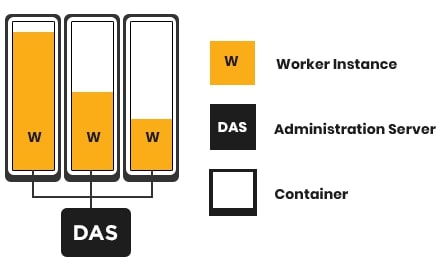
If you need additional resources for the same VM, you have to upgrade to a larger machine, which usually results in downtime during the migration. This makes VMs inefficient for vertical scaling. For horizontal scaling in a GlassFish cluster using VMs, you need to:
- Provision a new VM with a preconfigured GlassFish template.
- Configure SSH connectivity and add this VM as an SSH node to the DAS.
- Create a new remote worker instance on the node via the DAS UI or admin CLI.
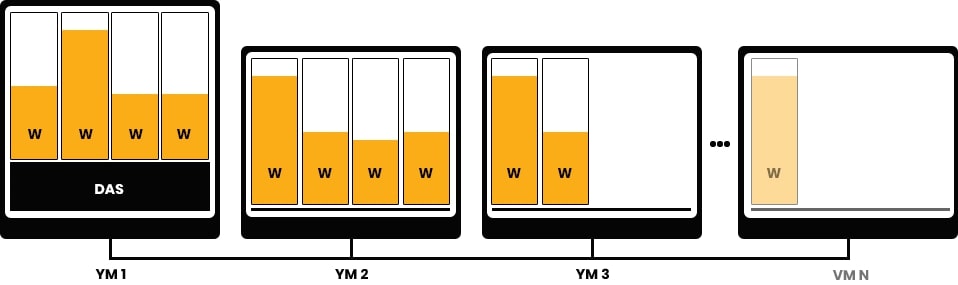
This procedure must be performed each time extra resources are required, taking a substantial amount of time and raising the possibility of human mistakesmistakes, which can have a severe influence on the whole project.
Making the Move: Decomposition to Containers
To migrate from VMs, you need to decompose the monolithic application into smaller logical components distributed among a set of interconnected containers. Each application component should be placed in an isolated container.
This approach can simplify the overall application architecture, potentially eliminating some specific parts of the project that may no longer be necessary in the new setup.
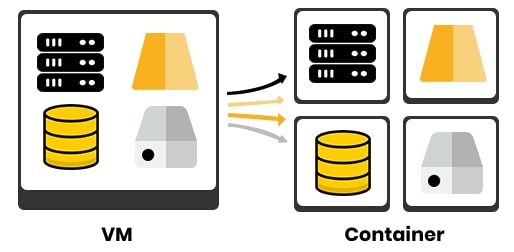
There are two types of containers to consider for running the project: application containers and system containers.
Application Containers
Application containers (such as Docker) typically run a single process. They are ideal for building new projects because it’s relatively easy to create the required images using publicly available Docker templates, aligning with cloud-native principles from the start.
System Containers
System containers (like LXD or Virtuozzo) function more like a full OS. They can run full-featured init systems such as Systemd, SysVinit, and OpenRC, allowing processes to spawn other processes like OpenSSH, Crond, or Syslogd within a single container.
This is preferable for monolithic and legacy applications, as it allows you to reuse existing architectures and configurations designed for VMs.
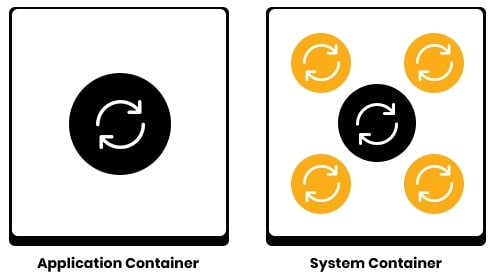
System containers provide various benefits when porting an existing legacy application. IP addresses, hostnames, and locally stored data are preserved during container downtime, minimizing the need for port mapping and improving isolation and resource virtualization.
Additionally, they are compatible with SSH-based configuration tools and support hibernation and live migration of the memory state.
The only noticeable drawback compared to application containers is a slower startup time due to the additional services required to run multiple processes.
In AccuWeb.Cloud, you can use both application and system containers. Unlike other PaaS vendors that mandate the Twelve-Factor App methodology,
AccuWeb.Cloud allows you to deploy cloud-native microservices and legacy monoliths without adhering to any specific approach or application design.
Developers do not need to modify their code to fit a proprietary API to deploy applications to the cloud. Projects can be launched in minutes using an application archive or a link to the project on GitHub.
This prevents vendor lock-in, expedites time to market, and streamlines the onboarding procedure.
Destination: GlassFish Server in a Container
The components of a GlassFish cluster remain the same in a container as they are in a VM, but they are distributed across separate, isolated containers.
Worker nodes can be automatically added or removed and connected to a DAS node using a container orchestration platform and integrated automation scripts.
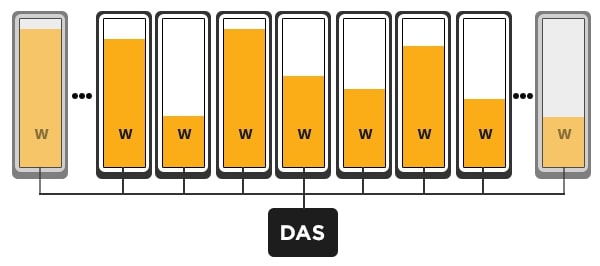
AccuWeb.Cloud simplifies migration and automates scaling and clustering. Once the application runs in a containerized environment, the PaaS manages all application lifecycle steps, including creating development, testing, and production environments, as well as vertical and horizontal scaling.
For instance, AccuWeb.Cloud offers a pre-configured, highly available GlassFish cluster with automatic provisioning of replicated instances, so developers can focus on coding without needing to write custom scripts for implementation.
Migrating from VMs to containers might seem daunting, but it’s quite straightforward, and the long-term benefits are substantial. Moving to containers allows you to run several apps on a single physical server, ease horizontal scaling, enable automated vertical scaling without restarting, and optimize resource utilization without compromising security.
One of the biggest advantages of containers is the inherent mobility they offer to transfer containers between cloud providers. Because of its adaptability, your company may benefit from cheaper cloud service prices without being locked into a provider.
Using AccuWeb.Cloud PaaS can ease the migration process and simplify the scaling and management of your containerized workloads throughout the application lifecycle. Developers and IT operations teams may profit from containers without needing deep technical knowledge with the right automation and orchestration, freeing them up to concentrate on their primary duties.
Don’t miss out on this chance to try out our platform and find the benefits your project might not be getting from your current cloud host. Click to explore our cloud services from our AccuWeb.Cloud’s website. Please do not hesitate to contact our support team if you want assistance throughout the migration.