
Price Estimation – AccuWeb.Cloud Dashboard
Managing your cloud costs on AccuWeb.Cloud is simple, transparent, and built around what truly matters to your application’s performance.
With our smart measurement tool called Cloudlets, you can easily scale resources up or down based on your app or website needs – no overpaying, no hidden costs.
These ready-to-install plans are
| Memory | vCPU | Storage | Price/Month |
| 512 MB | 600MHz | 10 GB | $1.80 |
| 1 GB | 1 vCPU | 10 GB | $3.95 |
| 2 GB | 1 vCPU | 10 GB | $6.99 |
| 4 GB | 2 vCPU | 10 GB | $13.99 |
| 6 GB | 4 vCPU | 10 GB | $28.99 |
| 16 GB | 8 vCPU | 10 GB | $55.99 |
| 32 GB | 16 vCPU | 10 GB | $111.99 |
| 64 GB | 16 vCPU | 10 GB | $179.99 |
| 128 GB | 16 vCPU | 10 GB | $359.99 |
Platform’s Cloudlets offer a range of plans, from Microlet to Large, to suit different applications and web servers. You can select the plan that best fits your needs.
Even after the selection of your plans, if you want to scale your application or change and add a new environment, you can do so through the dashboard directly.
Learn more about how you can do automatic scaling for your applications.
If you require an application that’s ready to be installed, there’s a suitable cloud plan for each type of requirement. To select the most effective plan for your needs, you can check out all the available plans on the pricing page.
Cloudlets, Cloud pricing is billed hourly/Daily/Monthly. If you create an environment and destroy it less than an hour later, you will still be charged the minimum charge.
What Are Cloudlets?
A Cloudlet is a small, flexible unit of computing power
1 Cloudlet = 128 MiB RAM + 200 MHz CPU.
Instead of buying fixed-size servers, your environment grows automatically as your workload increases. You only pay for what you actually use hourly, daily, or monthly.
💬 Example: If you create an environment and delete it within an hour, the minimum hourly charge applies – fair, simple, and predictable.
AccuWeb.Cloud provides a pay-as-you-go pricing model, and you can rest assured that you are only paying for what you need without any unnecessary charges.
The example demonstrates the calculation process for pricing and how discounts are applied.
It may be a hypothetical scenario or a real-life example to help people understand how pricing works and how discounts are factored in.
By following this example, individuals can better understand how much they will need to pay for a product or service, and how much they can save by applying discounts.

Learn more about How to view detailed cloud pricing.
Storage
- The cost of website files and data storage on the hosting provider’s servers is typically based on the required storage space.
- The cost of the storage will calculated on (Disk used (GB) x Price (Per Month/Hours) = Final storage price)
- Up to 10 GB storage is complimentary with every account if the disk is used more than that, pricing will be:
| Plans Name | Disk used | Prices Per GB / Month |
| Storage1 | Up to 10GB | Complimentary with every Account |
| Storage2 | 10 GB – 99 GB | $0.10 |
| Storage3 | 100 GB – 299 GB | $0.08 |
| Storage4 | 300 GB or above | $0.07 |
Data Transfer
| External traffic last month | Free/Hour | Price per GB/Month |
| 0GB – 1GB | – | Complimentary with every plan |
| 1GB – 499GB | 1GB | $0.0440 |
| 500GB – 999GB | 1GB | $0.0383 |
| 1000GB – 1999GB | 1GB | $0.0329 |
| 2000GB – 4999GB | 1GB | $0.0272 |
| 5000GB – onwards | 1GB | $0.0215 |
IP Address
| Name | Count | Price Per IP / Hour | Price Per IP / Month |
| Public IPv4 | 1 | $0.004861 | $3.5 |
Estimate Cloud Costing
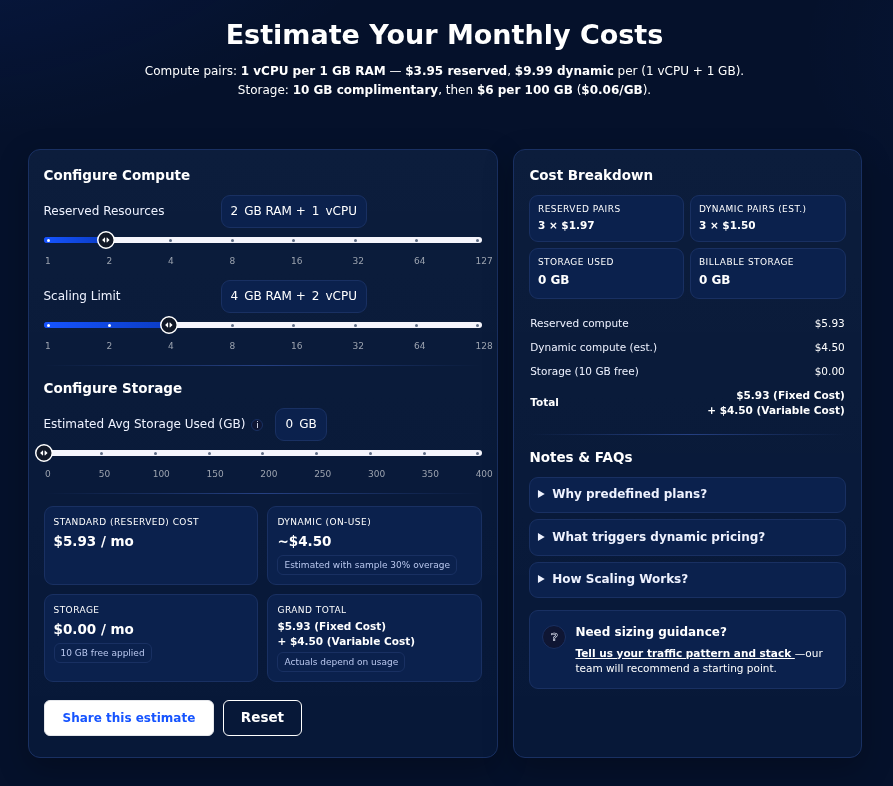
View container resource cost estimation monthly or hourly. Identify overall accurate estimate cost and fulfill your requirements.
For example, You’re building a new SaaS application with a microservices architecture. Each microservice might need independent scaling and resource requirements.
1. Then create an environment of Java or Node.Js container.
2. Set different scaling limits according to your application requirements (Eg. 4 Reserved and 10 limits)
3. Now you pay what your application used, If it grew faster, it would not impact the cost or performance of other parts of the application.
| Container Resources | Reserved Cloudlet | Dynamic Cloudlet |
| Application Server | 4 | 10 |
| Database | 1 | 16 |
| Total | 5 Reserved | 26 Scaling limits |
| 640 MiB, 1000 MHz | 3.25 GiB, 5.20 GHz |
4. Add Disk space – 10 GB/hour
5. Public IP (As per your requirement)
6. External Traffic (1 GB/Hour)
Now you pay what your application used, If it grew faster, it would not impact the cost or performance of other parts of the application.
Next step
Learn how to allocate resources of dynamic and reserved cloudlets.
If your system’s memory usage is consistently high, it may lead to maxing out and swapping to disk, while CPU usage remains low or moderate.