
Kubernetes Cluster: Exposing Services
Introduction
In the dynamic landscape of modern applications, establishing external connections is crucial for enabling seamless interaction between your services and external clients. In this guide, we’ll explore how to expose services in your AccuWeb.Cloud Kubernetes cluster, ensuring both internal and external accessibility while leveraging the power of Kubernetes service types.
Understanding Kubernetes Service Types
Kubernetes provides three primary service types for managing internal and external connections to applications:
- ClusterIP
- NodePort
- LoadBalancer
ClusterIP
The ClusterIP service type is the default option in Kubernetes. It allows applications to communicate within the cluster via service names but does not provide external access. Here’s a simple example of a ClusterIP service configuration:
kind: Service
apiVersion: v1
metadata:
name: nginx1
namespace: test
spec:
type: ClusterIP
selector:
app: nginx
ports:
- port: 80
NodePort
NodePort is a fundamental method for enabling external connectivity to a service in Kubernetes. It involves exposing a specific port on the nodes, and directing any incoming traffic on that port to the respective service. Typically, the NodePort assigned to your service is randomly chosen from the range of 30000 to 32767 by default.
Below is an example of the NodePort service configuration:
kind: Service
apiVersion: v1
metadata:
name: nginx1
namespace: test
labels:
run: nginx
spec:
type: NodePort
selector:
run: nginx
ports:
- port: 80
targetPort: 80
If necessary, a specific nodePort can be selected for your service. For instance, you can use the following code to configure a redirect from port 30984:
If a public IP is attached to the Kubernetes worker nodes, no additional actions are required.
If a public IP is not attached to the Kubernetes worker nodes, the obtained port should be exposed from the platform side. To do this, navigate to the Kubernetes environment Settings > Endpoints and follow these steps:
- Click on “Add” to open the endpoint creation frame.
- Choose any worker node from the list as the “Node.”
- Set any preferred endpoint name under “Name.”
- Provide the nodePort obtained from the previous step as the “Private Port.”
- Select the “TCP” option for the Protocol.
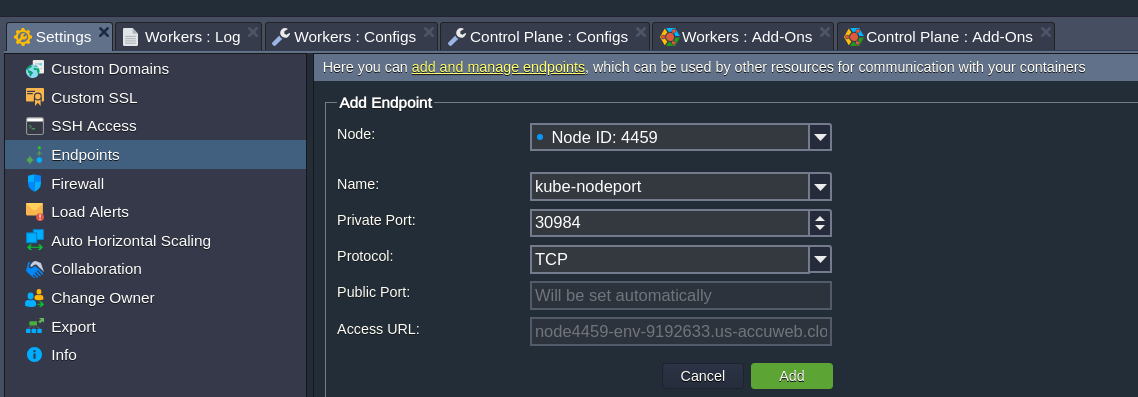
After providing the necessary data, click on “Add” to confirm the endpoint creation. Please note that it may take up to a few minutes for the platform to expose the port and redirect requests to the NodePort service.
LoadBalancer
The LoadBalancer service type is a widely used method to make a service accessible on the Internet. It necessitates having a public IP attached to any worker node.
It’s important to note that with the LoadBalancer type, all traffic is directly forwarded to the service without any filtering or routing. The port parameter represents an incoming port on the Internet that the service maps to a targetPort on the application side.
kind: Service
apiVersion: v1
metadata:
name: nginx1
namespace: test
spec:
type: LoadBalancer
selector:
app: nginx
ports:
- port: 80
targetPort: 8080
Conclusion
AccuWeb.Cloud Kubernetes empowers you to effectively expose your services, catering to internal an external connectivity requirements. By understanding and utilizing Kubernetes service types such as ClusterIP, NodePort, and LoadBalancer, you can ensure seamless communication between your applications and external clients, thereby enhancing the accessibility and scalability of your AccuWeb.Cloud Kubernetes cluster.