
Note: This article applies to our previous Jelastic-based platform. AccuWeb.Cloud has now evolved to Apache CloudStack. For current documentation, visit: https://accuweb.cloud/resource/cs
Methods for Restarting your Services OR Node | AccuWeb.Cloud
Step 1. First, create your environment and go to your dashboard.

Step 2. Once you have your environment ready and you want to restart your node via GUI, just go to the dashboard, and you will find the option of restarting the node. Just click on the option restart node.

This way, you can restart your node using the GUI.
How to restart nodes by CLI
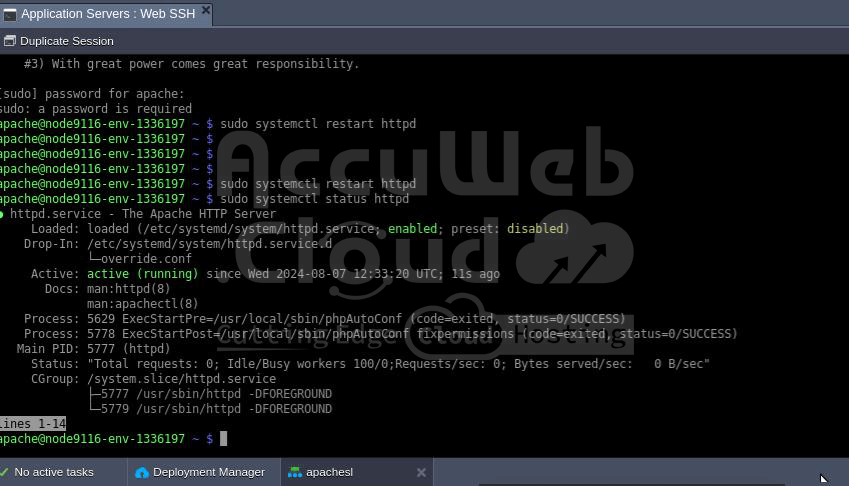
You can use it in web SSH by running commands to restart the services.
TIP SECTION
TIP: Here’s the set of commands for restarting common services across different Linux distributions, formatted as examples:
CentOS/RHEL (Including AlmaLinux)
- Apache HTTP Server: sudo systemctl restart httpd
- Nginx: sudo systemctl restart nginx
MySQL/MariaDB
- For MySQL: sudo systemctl restart mysqld
- For MariaDB: sudo systemctl restart mariadb
- PostgreSQL: sudo systemctl restart postgresql
Ubuntu/Debian
- Apache HTTP Server: sudo systemctl restart apache2
- Nginx: sudo systemctl restart nginx
MySQL/MariaDB
- For MySQL: sudo systemctl restart mysql
- For MariaDB: sudo systemctl restart mariadb
- PostgreSQL: sudo systemctl restart postgresql
Alternative Commands (If Not Using systemd)
If your system uses init.d or service instead of systemd,
here are example commands:
Apache HTTP Server
- For Ubuntu/Debian: sudo service apache2 restart
- For CentOS/RHEL: sudo service httpd restart
- Nginx: sudo service nginx restart
MySQL/MariaDB
- For Ubuntu/Debian: sudo service mysql restart
- For CentOS/RHEL: sudo service mysql restart