Guaranteed 40% Cloud Savings OR Get 100% Money Back!*

  • Become a Solution Partner
  • Become an Affiliate
  • Become a Reseller
    • Contact Sales
    • Get Support
    • Contact Us
AccuWeb.Cloud
Trusted by 50K+ businesses
  • Compute

    Compute Solutions

    Enterprise-grade cloud infrastructure

    Trustpilot 4.9/5 Ratings
    HostAdvice 5.0/5 Ratings
    Start 30 Day Free Trial with $100 Credits
  • Applications 100+

    Enterprise Applications Hosting

    One-click deployment for 100+ applications

    Applications
    Quick Access
    Explore More
  • Database

    Database Solutions

    Enterprise-grade cloud infrastructure

    Trustpilot 4.9/5 Ratings
    HostAdvice 5.0/5 Ratings
    Start 30 Day Free Trial with $100 Credits
  • Storage

    Storage Solutions

    Enterprise-grade cloud infrastructure

    Trustpilot 4.9/5 Ratings
    HostAdvice 5.0/5 Ratings
    Start 30 Day Free Trial with $100 Credits
  • Pricing 40% OFF
    Cloud Pricing
    Pay-As-You-Go
    Price & Features Comparison
    with Hyperscalers
    Cost Estimator
    Estimate your monthly cost
    Free Trial Offer
    with $100 credits
  • Partner

    Partner Solutions

    Enterprise-grade cloud infrastructure

    Trustpilot 4.9/5 Ratings
    HostAdvice 5.0/5 Ratings
    Start 30 Day Free Trial with $100 Credits
  • Developers
    Start & Scale
    1 Click App Hosting
    Instant Launch
    Auto Horizontal Scaling
    Auto Scaling
    Live Vertical Scaling
    Live Upgrade
    Pay As You Go
    Flexible Billing
    Partner & Grow
    Become Solution Partner
    Build With Us
    White Label Reseller
    Earn with Us
    Affiliate Program
    Share & Earn
    Customer Enablement
    Unlock Growth
    Free Migration
    Quick Transfer
    Learn & Explore
    Our Tutorials
    Step-by-Step Guide
    FAQs
    Help Center
    Marketplace
    Solutions
    API Reference
    API Documentation
    Blog
    Insights & Updates
    Customer Success Stories
    Case Studies
    Docs & Guides
    Product Documentation
    Documentation
    Application Platform
    Getting Started
    Security
    Performance Report
    Measure to Improve
    Security & Compliance Report
    Secure & Certified
    Fail2Ban Security
    Threats Blocked
    Website Security Check
    Scan your website for vulnerabilities
Login Sign Up
Search Documentation
Type to search
AccuWeb.Cloud
Trusted by 50K+ businesses
Login Sign Up
Enterprise Solutions
Cloud VPS Free Trial Offer Free Migration White Label Reseller
Odoo WordPress Python Node.Js Plausible ERPNext Nextcloud Laravel Vtiger PHP Java View All Applications →
MongoDB PostgreSQL MariaDB MySQL Redis Database Clusters
S3 Compatible Storage File Storage Backup Storage
Featured Applications
Odoo Popular
Odoo
CRM
WordPress
WordPress
CMS
Python
Python
Language
Plausible
Plausible
Analytics
ERPNext
ERPNext
ERP
Nextcloud
Nextcloud
Storage
Laravel
Laravel
Framework
Vtiger
Vtiger
CRM
Intelligent Search
Intelligent
Search
View All Applications →
White Label Reseller Pricing Support Free Trial Offer API Reference Blog Product Documentation Free Migration
Sign Up
  • Resources
  • FAQs
  • How to recover VPS or other service login details from the AccuWeb.Cloud dashboard?

How to recover VPS or other service login details from the AccuWeb.Cloud dashboard?

KB Product Documentation Environment Management How to recover VPS Login Detail Viewed: 5644
0 0

When you install an application from the Marketplace or manually through a new environment on the AccuWeb.Cloud dashboard , the system sends the login details to your registered email.

These login details cannot be sent again.

If you lose or don’t receive the email with the login details, you can reset the application password directly from AccuWeb.Cloud dashboard.

Case 1: Reset WordPress Admin area password from AccuWeb.Cloud

If you installed WordPress from the Marketplace but missed or couldn’t find the admin login details, you can reset the admin password by clicking the “Lost your password?” link.

Follow these steps to reset the WordPress admin password in AccuWeb.Cloud:

Step 1: Go to the WordPress admin login page and click on the “Lost your password?” link.
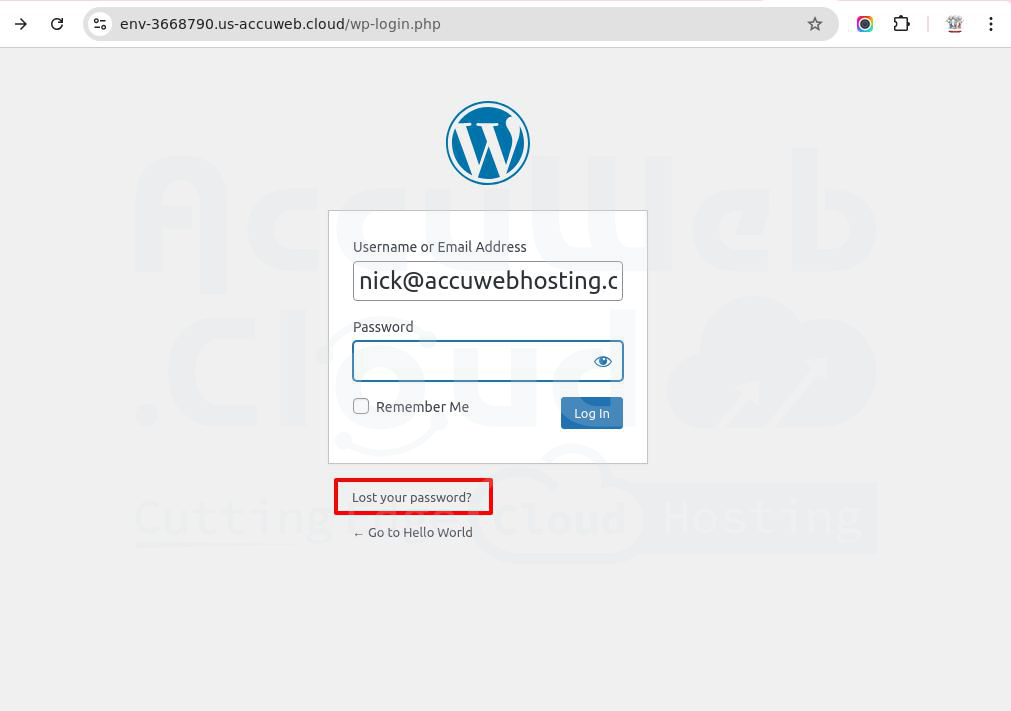
WordPress login page

Step 2: In the Username or Email Address field, enter your registered email address.
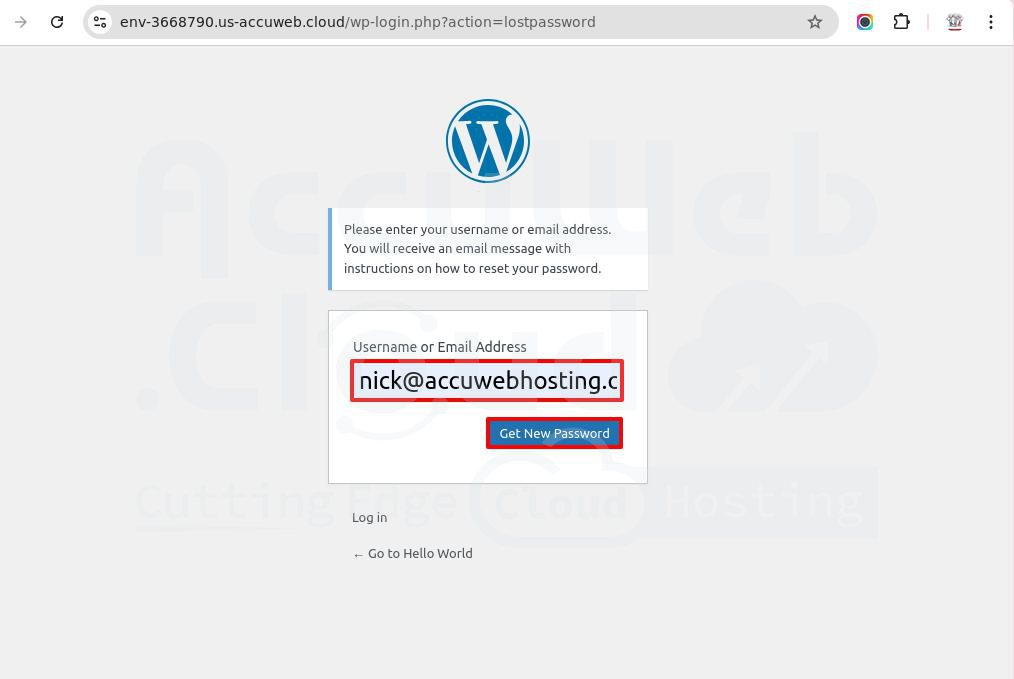
Enter Email Address

Note: Your registered email is set as the WordPress admin email by AccuWeb.Cloud. So, you will receive the Password reset link on your registered email address.

Step 3: Click on the Get New Password button. A password reset link will be sent to your email. You’ll also see a message: “Check your email for the confirmation link, then visit the login page.”
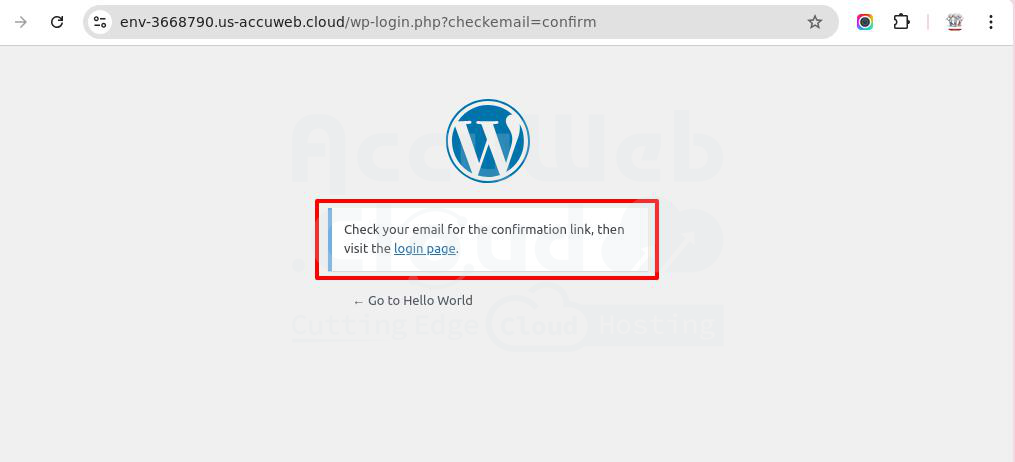
WordPress login page

Step 4: Open the email, click the reset link, and set a new password.
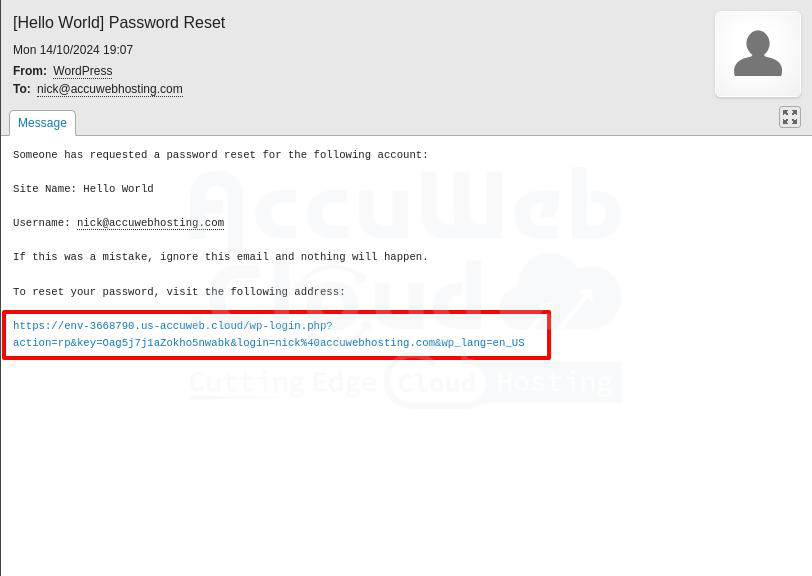
Enter new password

Step 5: Enter your new password and click Save Password. To create a strong password, you can also use the Generate Password button.
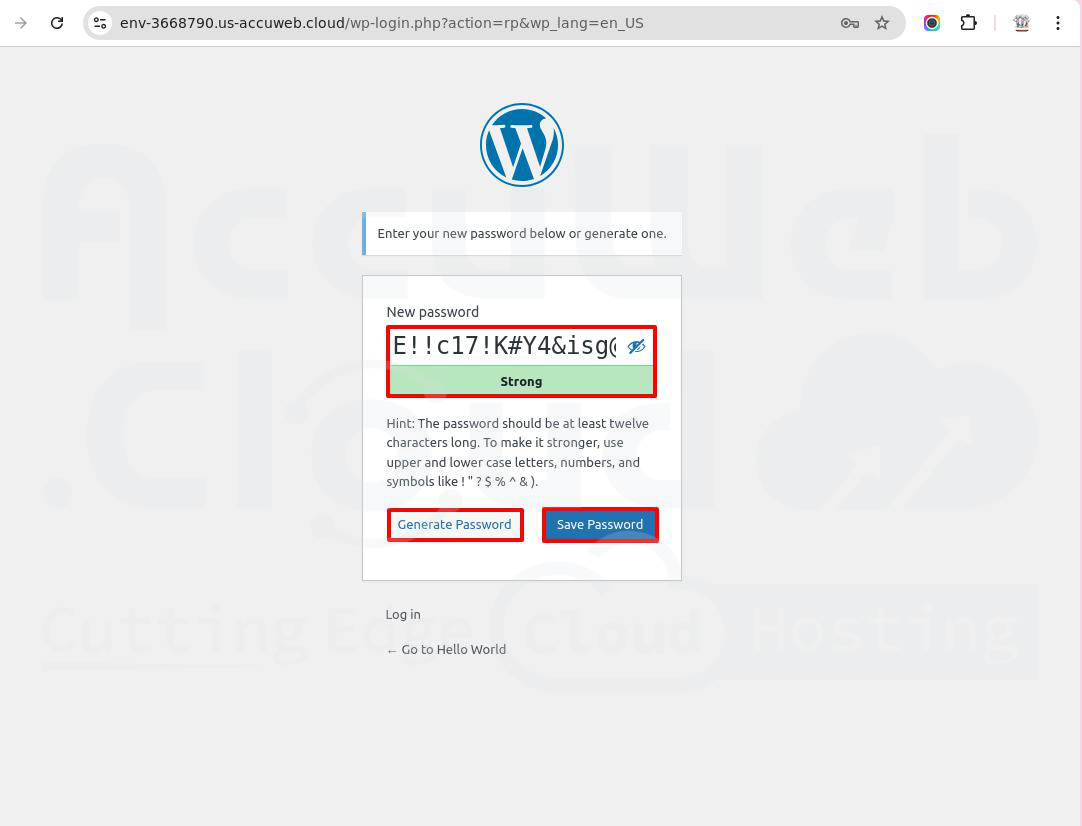
Enter new password

Congratulations! You have successfully reset your WordPress admin password in AccuWeb.Cloud.

Case 2: Resetting MySQL Database Password in AccuWeb.Cloud

If you installed the MySQL database through a new environment and forgot the user password or didn’t receive the login email, follow these steps to reset it.

AccuWeb.Cloud lets you access the MySQL database from the dashboard without needing the user password. However, if you want to connect from outside the dashboard, you’ll need the database credentials.

Here’s how you can reset the MySQL user password:

Step 1: Log in to your AccuWeb.Cloud dashboard.

Step 2: Select the environment, click the Gear icon (Settings) next to the SQL Database, and choose Reset Password.
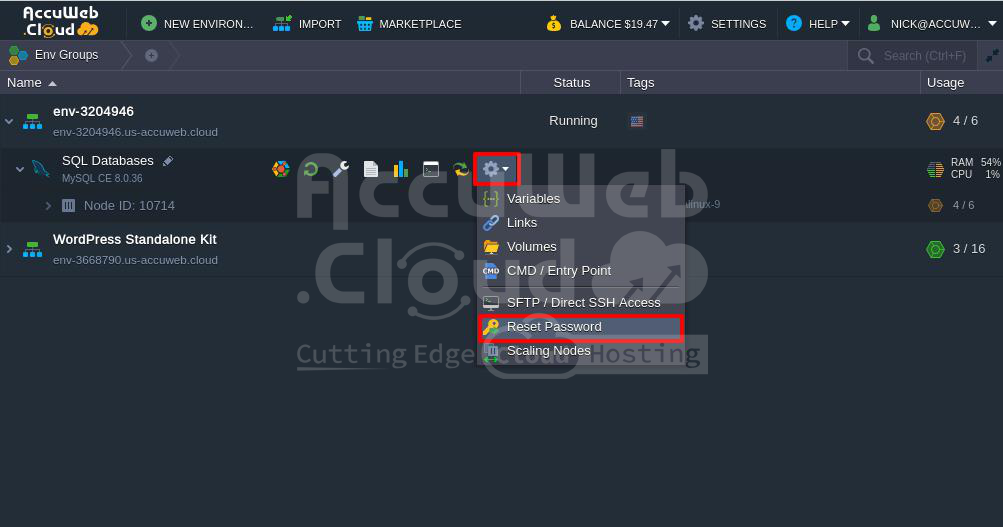
Reset password in MySQL

Step 3: In the confirmation box, click Yes to reset the password.
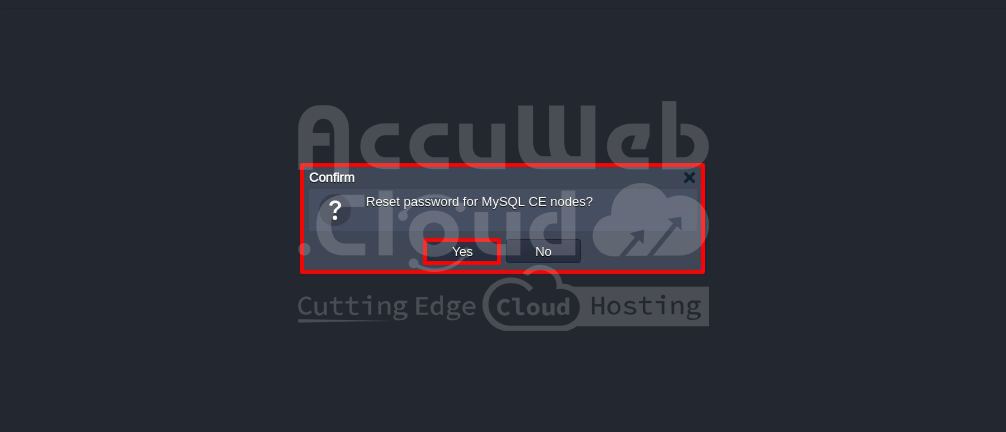
Reset password

Step 4: The system will reset the password and send the new details to your registered email.

You’ll also see a message confirming the reset and that the new password has been emailed to you.
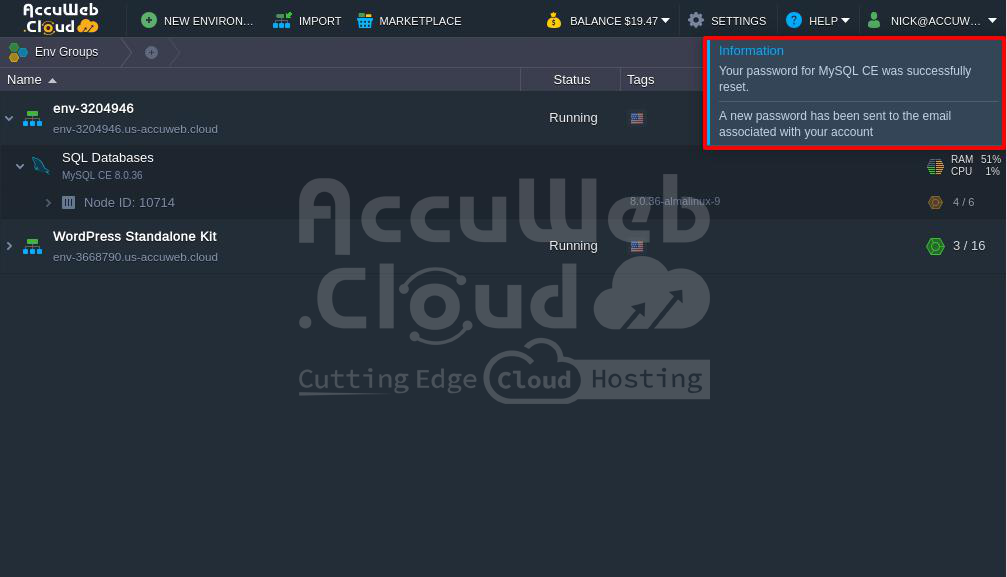
Confirming Message

Case 3: Resetting Elastic VPS Root Password in AccuWeb.Cloud

If you created an Elastic VPS from the AccuWeb.Cloud dashboard but didn’t save the login details sent to your email, follow these steps to reset the root password.

You can access the VPS from the AccuWeb.Cloud dashboard without a root password. However, to access the VPS from outside the dashboard, you need the root password. Here’s how you can reset it:

Step 1: Log in to your AccuWeb.Cloud dashboard.

Step 2: Select your environment and click Web SSH next to the Elastic VPS.
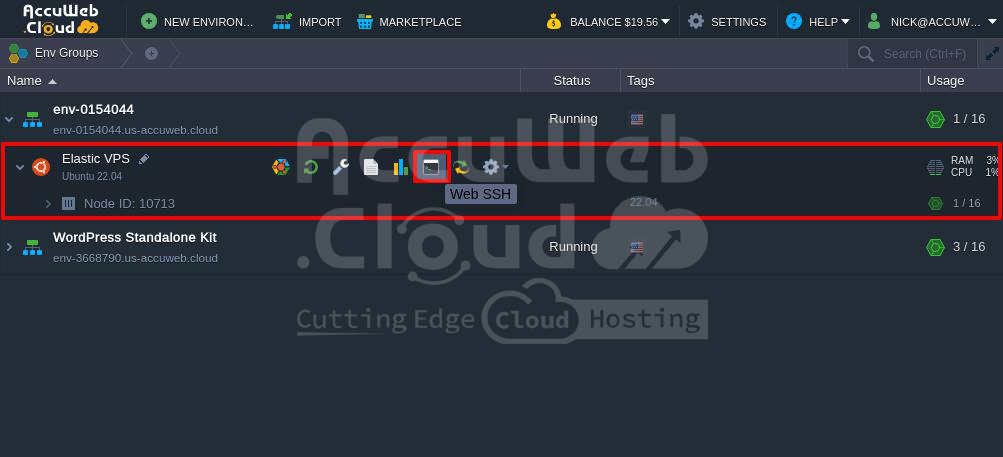
Web SSH

Step 3: In the Web SSH window, type the following command and press Enter:

# passwd root
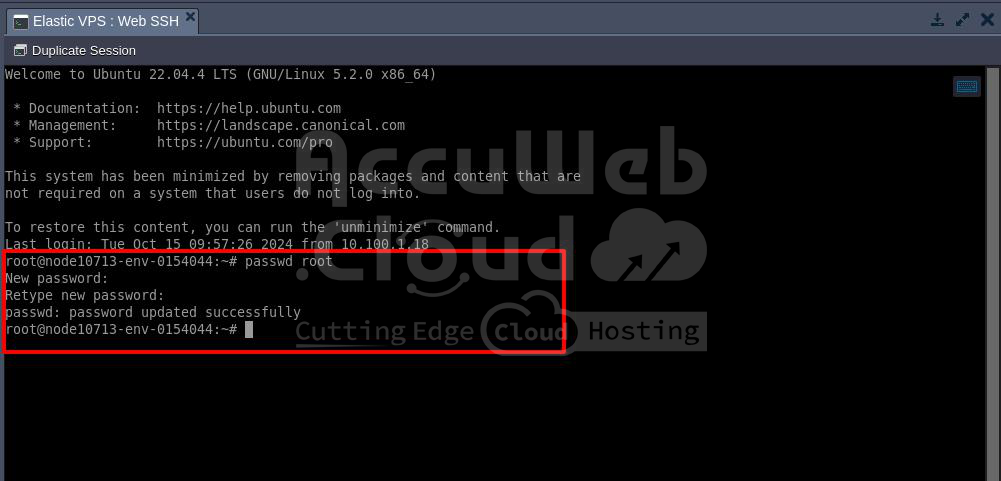
Web SSH

Step 4: When prompted, enter the new password you want to set. (Note: The password won’t be visible for security reasons.)

Step 5: Retype the same password and press Enter.

If you see the message: “passwd: password updated successfully“, the root password has been changed.

Congratulations! You have successfully reset the root password for your Elastic VPS from the AccuWeb.Cloud dashboard.

Case 4: Resetting MongoDB Admin Password in AccuWeb.Cloud

If you installed MongoDB from the Marketplace but forgot the admin password or didn’t receive the login email, follow these steps to reset it.

You can access the MongoDB database from the AccuWeb.Cloud dashboard without a password. However, to connect from outside the dashboard, you need the admin user credentials. Here’s how to reset the admin password:

Step 1: Log in to your AccuWeb.cloud dashboard.

Step 2: Select your environment, click the Gear icon (Settings) next to the NoSQL Database, and choose Reset Password.
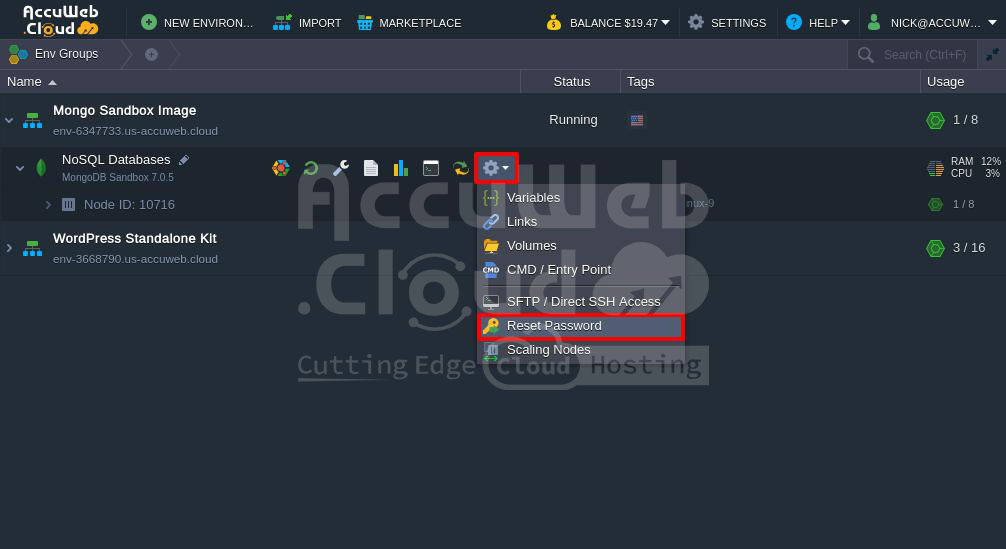
Reset password in NoSQL Database

Step 3: In the confirmation box, click Yes to reset the password.
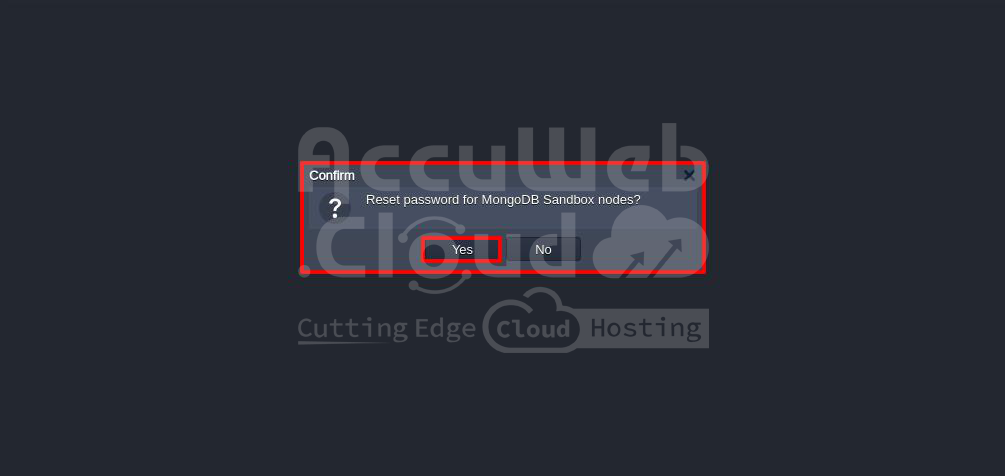
Reset password

Step 4: The system will reset the password and email the new credentials to your registered address.

You’ll also see a message confirming the reset and that the new password has been sent to your email.
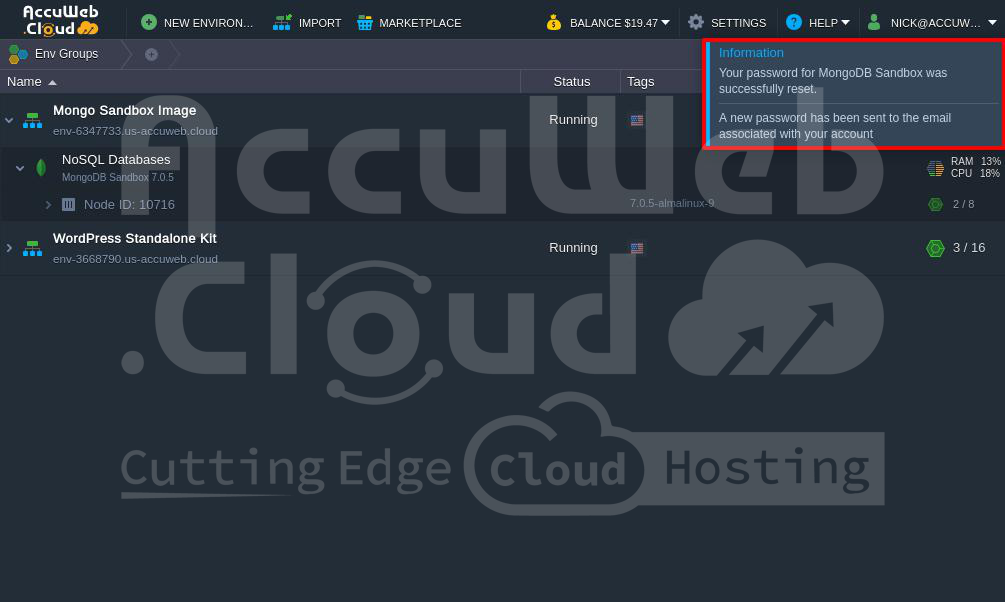
Confirming Message

That’s it! You’ve successfully reset the MongoDB admin password from the AccuWeb.Cloud dashboard.

Conclusion:

If you lose the login details for your VPS or other services on AccuWeb.Cloud, you can reset the password from the dashboard. Just go to the service settings, follow the reset steps, and the new login details will be sent to your registered email. This will ensure secure access from both the AccuWeb.Cloud dashboard and outside it.

Save $100 in the next
2:39 minutes?

Register Here
    • Product Documentation656
      • Quickstart5
      • Order Process2
      • Platform Overview17
      • Clusters5
      • Containers26
      • Environment Management41
      • Deployment10
      • Application Settings58
      • Backup and Restore10
      • Migrate11
      • Development Tools33
      • Java29
      • PHP25
      • Apache1
      • Node.js7
      • RUBY9
      • Python6
      • Go Lang2
      • .Net Core4
      • Databases54
      • Load Balancer12
      • Kubernetes Hosting24
      • Elastic VPS19
      • Data Storage Container12
      • Memcached4
      • Account & Pricing16
      • App. Platform (PaaS)34
      • Database Cloud Hosting2
      • Billing6
      • Storage14
      • Troubleshooting3
      • Tutorials146
      • Affiliates2
      • CMS6
      • OpenVPN2
      • Ubuntu10
      • Email1
      • Control Panel1
  • * View Product limitations and legal policies

    All third-party logos and trademarks displayed on AccuWeb Cloud are the property of their respective owners and are used only for identification purposes. Their use does not imply any endorsement or affiliation.

    Product limitations and legal policies

    * Pricing Policy
    To know about how the pricing is calculated please refer to our Terms and Conditions.
    AccuWeb.Cloud

    Enterprise-grade cloud hosting solutions trusted by businesses worldwide.

    Powered by AccuWebHosting

    Compute (IaaS)

    • Cloud VPS Hosting

    Database Cloud

    • MongoDB
    • PostgreSQL
    • MySQL
    • MariaDB
    • Redis

    Storage

    • Object Storage
    • Backup Storage
    • File Storage

    Managed Applications on Cloud (PaaS)

    • WordPress
    • Laravel
    • Magento
    • PHP
    • Node.JS
    • JAVA
    • Ruby
    • GitLab
    • Python
    • Go
    • Kubernetes
    • Docker
    • Joomla
    • Drupal
    • View more

    Pricing

    • Cloud Pricing
    • Price Comparison
    • Cost Estimator

    Resource

    • Blog
    • Knowledgebase
    • FAQ

    About AccuWeb

    • About us
    • Data Centers
    • Contact us
    • Careers
    • Scholarship Programs
    • Become a Provider
    • Affiliate Program
    • Terms of Service
    • Privacy Policy
    • Media Kit
    • Scholarship Programs
    • Sitemap
    • Testimonials

    Stay Updated

    Get the latest updates on new features, tutorials, and cloud hosting tips.

    Free Website Migration Support
    24/7 Support
    1-Click Cloud Hosting
    Privacy Policy Terms of Service

    © 2026 AccuWeb.Cloud. All rights reserved. | Powering 100,000+ cloud applications across 170+ countries.

    Infrastructure That Adapts as Fast as Your Business

    No setup headaches. No surprise bills. Just scalable cloud.

    Chat With Us Explore Our Cloud Services
    AccuWeb.Cloud

    Modern cloud infrastructure built for automatic scaling, predictable costs, and zero operational friction.

    Auto scaling without downtime Fully managed cloud support Pay only for what you use Trusted by businesses in 100+ countries.

    Powered by AccuWebHosting

    ISO compliant | Enterprise ready | Developer friendly

    Compute (IaaS)

    • Cloud VPS Hosting

    Startt & Scale

    • 1 Click App Hosting
    • Auto Horizontal Scaling
    • Live Vertical Scaling
    • Pay As You Go

    Storage

    • Object Storage
    • Backup Storage
    • File Storage

    Managed Applications

    • Odoo Hosting
    • ERPNext Hosting
    • Nextcloud Hosting
    • Python Hosting
    • Wordpress Hosting
    • Plausible Analytics
    • Kubernetes Hosting
    • Docker Hosting
    • Laravel Hosting
    • Java Hosting
    • Jitsi Hosting
    • View All Applications

    Support & Pricing

    • Cloud Pricing
    • Cost Estimator
    • Cloud Support 24x7
    • Fully Managed Support
    • Free Website Migration
    • Migration - AWS to CloudStack
    • Migration -.ct-link-items li a GCP to CloudStack

    VPS Panels

    • cPanel
    • aaPanel
    • FastPanel

    Data Layer

    • MongoDB Hosting
    • PostgreSQL Hosting
    • MySQL Hosting
    • MariaDB Hosting
    • Redis Hosting

    Ecosystem

    • AccuWeb.Cloud Partners
    • Case Studies
    • Become a Partner
    • Become a Reseller
    • Affiliate Program

    Company

    • About us
    • Media & Press Kit
    • Data Centers
    • Careers
    • Contact us

    Programs

    • Scholarship Programs

    Resource

    • Knowledgebase
    • Blog
    • FAQ
    • Sitemap

    Stay Updated

    Get the latest updates on new features, tutorials, and cloud hosting tips.

    Free Website Migration Support
    24/7 Support
    1-Click Cloud Hosting
    Privacy Policy Terms of Service

    © 2026 AccuWeb.Cloud. All rights reserved. | Powering 100,000+ cloud applications across 100+ countries.

    2026

    Most Viewed Articles

    • Container Management with Docker and Kubernetes
    • Deploy Wagtail CMS
    • Hosting Spring Boot Standalone and Clustered Java Applications with Jelastic Cloud
    • Deploy Go Git Service on AccuWeb.Cloud
    • Automatic Vertical Scaling
    • GlassFish & Payara Auto-Clustering
    • API Overview
    • Select A Product in Accuweb.Cloud
    • Zero Code Change Deploy
    • How to Use MongoDB for Database Creation, CRUD Operations, Indexing, and Data Import and Export?

    Most Viewed Articles

    • How to Remove Spaces From a String in Python?
    • How to Read Binary File in Python?
    • How To Concatenate String and Int in Python?
    • Install Anaconda in Ubuntu 22.04 - Tutorial for Beginners
    • How to clone a Private Repo using a Personal Access Token (PAT)?
    • Python Break, Continue, Pass Statements with Examples
    • Explain Python ValueError Exception Handling with Examples
    • One Click Installation of Odoo Community Edition from Marketplace
    • Understanding the Arrow Operator in C
    • How to Convert String to Array in Vue JS?

    Website Security Check

    Powered by AccuWeb.Cloud