
How To Make Sticky Posts in WordPress?
In Default wordpress, when we publish a new post, it always displays in the first place as the latest post; all posts show after that as per the last publishing dates and time. This may move your essential post to the bottom of pages or sometimes move that post to achieve. If you have any critical position that you want your website visitor to read first, then there is a feature by wordpress to keep that post as Sticky Posts; by using this feature, we can make our Important posts appear on the top of the blog page.
Let’s see how we can make any post on the WordPress website the sticky post step by step:
Step 1. First, log in to your WordPress website dashboard.

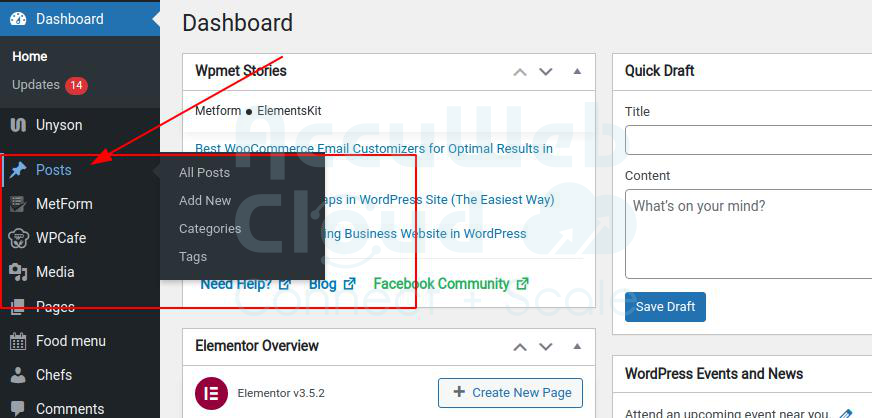
Step 2. Hover over the “Posts” section and click “All Posts”.
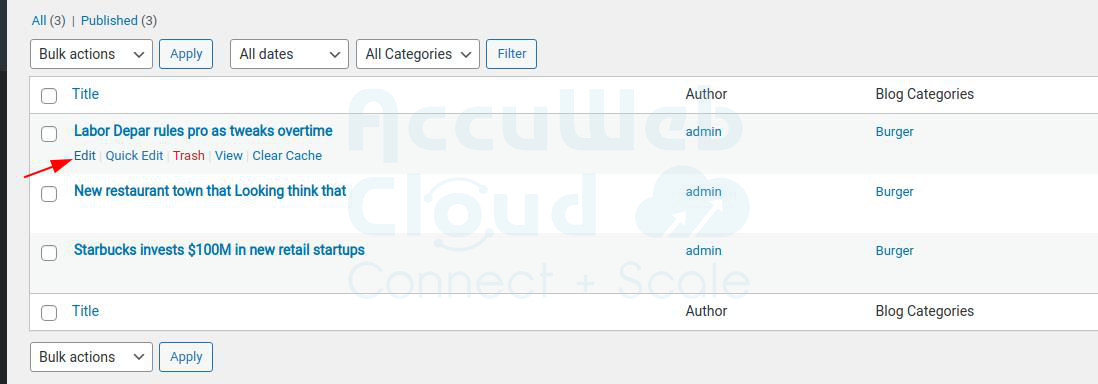
Step 3. Select the post you want to make sticky on the blog post and click “Edit” next.
Step 4. Next, in the “blog post” option on the right side of the page, expand the menu “Status and Visibility.”

Step 5. Click On and Check the “Check box” of the “Stick to the top of the blog.”

Step 6. Now, click on the “Update” button to make all the changes saved to your blog page.

Now, the post (Labor Depar rules pro as tweaks over) appears on the top of the blog page; following this method, you can make any blog post sticky on your WordPress site.

That’s it, all this step, and you are done. You don’t need any script or plugin to activate the sticky post on WordPress. If you want to remove or turn off sticky posts, follow the steps above, uncheck the box, and correct settings. It will remove the sticky post from your WordPress blog home page. We hope this post helps.