
How to Install and Use ionCube Add-On?
In the tech world, keeping your code safe is a big deal. That’s why ionCube Loader comes in handy, especially for PHP applications. It helps protect your code from unauthorized use. In this guide, we’ll show you how to smoothly use ionCube Loader on AccuWeb.Cloud to run your encoded PHP scripts securely.

Understanding ionCube Loader
What is ionCube Loader?
IonCube Loader is a PHP extension used to execute encoded PHP scripts. It has two essential components – the Encoder and the Loader. The Encoder compiles PHP files into bytecode while the Loader manages the execution of these encoded files.
Encoder:
The Encoder is responsible for converting PHP source code into bytecode. This process involves transforming human-readable PHP code into a format that is not easily decipherable, providing a level of protection against unauthorized access and tampering.
Loader:
The Loader comes into play during the execution phase. It is responsible for managing and running the encoded PHP scripts. Essentially, it decodes and executes the bytecode generated by the Encoder, ensuring that the original PHP functionality is restored during runtime.
Supported PHP Versions by ionCube Loader: PHP 8. 1. x, 7. 4. x, 7. 3. x, 7. 2. x, 7. 1. x, 7. 0. x, 5. 6. x, 5. 5. x, 5. 4. x, and 5. 3. x.

Steps for Installing ionCube Loader Add-On on AccuWeb.Cloud
Step 1. Start by logging into your AccuWeb.Cloud dashboard using your credentials. Ensure that you have a properly configured PHP environment to handle your protected code with ionCube Loader.
Step 2. Once logged in, navigate to the Marketplace section on the dashboard.

Step 3. Look for the Add-ons category and click on it. Inside the Add-ons section, locate the ionCube package and click on Install. This is the tool you’ll need to integrate ionCube Loader with your AccuWeb.Cloud environment.

Step 4. Once you click on the install button the ionCube Loader package to initiate the installation process. This action will open a new window for configuring the installation.
Step 5. In the opened installation window, you’ll need to specify the following details:
- Environment Name: Choose the environment to which the ionCube tool should be integrated.
- Nodes: Select the target PHP application server for the ionCube Loader add-on. This information is typically fetched automatically upon choosing the environment.
Step 6. Once you’ve entered the required details, proceed by clicking on the “Install” button. Wait for the installation process to complete this. You will also receive an email notification confirming the completion of the installation.

By following these detailed steps, you should seamlessly install ionCube Loader as an add-on to your AccuWeb.Cloud environment, enabling you to run and protect your encoded PHP scripts efficiently.
Verification of ionCube Loader Installation:
Once you have installed ionCube Loader on your server, it’s crucial to verify that the installation was successful. Here’s a step-by-step guide:
Step 1. Create a PHP info page to inspect the configuration. Create a new PHP file, for example, `info.php`, and add the following code:
<?php
phpinfo();
?>
Save the file and upload it to your server.
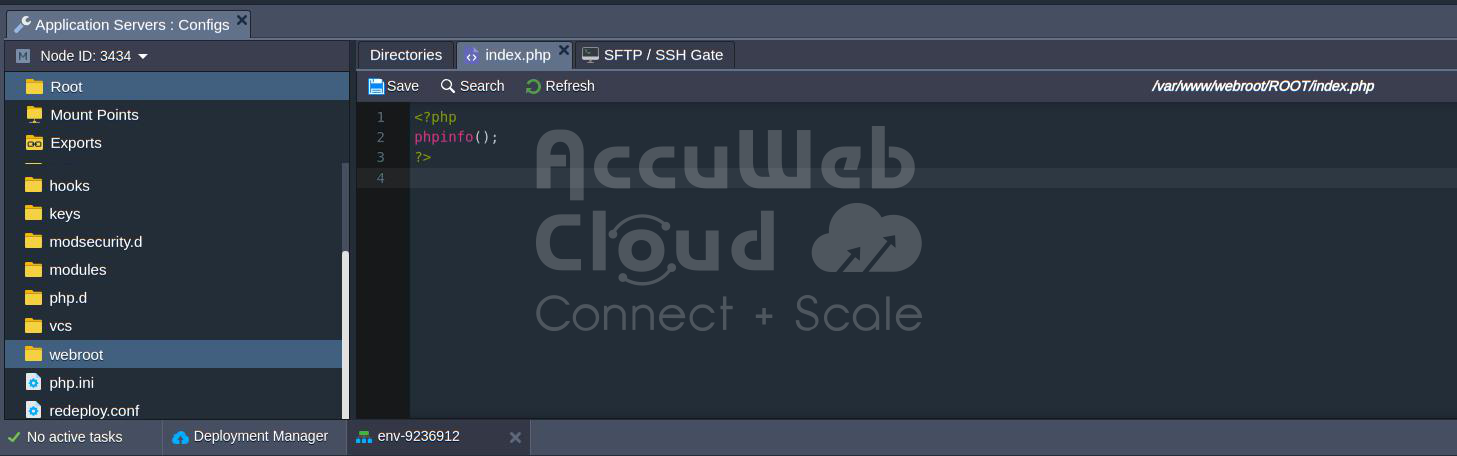
Step 2. Open your web browser and navigate to the PHP info page you just uploaded (e. g., http://yourdomain.com/info.php).
Step 3. On the PHP info page, search for the ionCube Loader section. This section will display information about the ionCube Loader version, whether it’s enabled and additional details.

Step 4. Check the ionCube Loader section to confirm the following:
- ionCube Loader Version: Ensure that the installed version matches the expected version.
- Loader Version: Verify that the Loader version is mentioned and corresponds to the installation.
By following these steps, you can effectively verify the installation of ionCube Loader on your server and ensure that it is functioning correctly.
Executing Encoded Applications with ionCube
To illustrate the deployment of an encoded application, let’s use the AccuWeb.Cloud Hello World project as an example. Here’s a glimpse into the code snippet from its index. php file before and after encoding:
Before Encoding:
<?php
// Prints the day
echo date(“l”) . “<br>”;
// Prints the day, date, month, year, time, AM or PM
echo date(“l jS \of F Y h:i:s A”);
?>
After Encoding:
PD9waHAKLy8gUHJpbnRzIHRoZSBkYXkKZWNobyBkYXRlKCJsIikgLiAiPGJyPiI7CgovLyBQcmludHMgdGhlIGRheSwgZGF0ZSwgbW9udGgsIHllYXIsIHRpbWUsIEFNIG9yIFBNCmVjaG8gZGF0ZSgibCBqUyBcb2YgRiBZIGg6aTpzIEEiKTsKPz4KPD9waHAKLy8gUHJpbnRzIHRoZSBkYXkKZWNobyBkYXRlKCJsIikgLiAiPGJyPiI7CgovLyBQcmludHMgdGhlIGRheSwgZGF0ZSwgbW9udGgsIHllYXIsIHRpbWUsIEFNIG9yIFBNCmVjaG8gZGF0ZSgibCBqUyBcb2YgRiBZIGg6aTpzIEEiKTsKPz4KPD9waHAKLy8gUHJpbnRzIHRoZSBkYXkKZWNobyBkYXRlKCJsIikgLiAiPGJyPiI7CgovLyBQcmludHMgdGhlIGRheSwgZGF0ZSwgbW9udGgsIHllYXIsIHRpbWUsIEFNIG9yIFBNCmVjaG8gZGF0ZSgibCBqUyBcb2YgRiBZIGg6aTpzIEEiKTsKPz4KPD9waHAKLy8gUHJpbnRzIHRoZSBkYXkKZWNobyBkYXRlKCJsIikgLiAiPGJyPiI7CgovLyBQcmludHMgdGhlIGRheSwgZGF0ZSwgbW9udGgsIHllYXIsIHRpbWUsIEFNIG9yIFBNCmVjaG8gZGF0ZSgibCBqUyBcb2YgRiBZIGg6aTpzIEEiKTsKPz4K
This encoded code is processed exclusively by ionCube Loader. Once the extension is installed, deploying your PHP project to the target environment is all that’s needed. Open it in the browser, and ionCube Loader will automatically handle the decoding process.

Upon deployment, access your application in the browser. If it’s up and running, it indicates that ionCube Loader has successfully processed all protected files.
Conclusion
In summary, ionCube Loader works hand-in-hand to secure and run PHP applications. The Encoder safeguards the source code by transforming it into bytecode, and the Loader takes care of the execution of these encoded scripts, ensuring the protection and integrity of PHP applications. By following these steps, you can harness the full potential of ionCube Loader, ensuring the protection and seamless execution of your PHP code. Take advantage of AccuWeb.Cloud to enhance your web development.