Can an Agency Host n8n for Clients? The Complete Agency Hosting Guide
Yes, an agency can host n8n for clients, as long as clients receive the results of the workflows and never get access to n8n itself. Under n8n’s Sustainable Use License, you can run n8n on your own server and build, run and maintain automations for any number of clients. You can also install and manage n8n on a client’s own server.
What you can’t do under the free license is host n8n as a service that clients log into, or white-label it and sell it as your product. Those models need a commercial agreement with n8n.
This guide covers the license rules, the hosting setups that work, security, scaling and costs. It also explains when managed n8n hosting saves your agency time.
TL;DR
- Allowed: running client workflows on your own n8n instance, with clients receiving outputs only.
- Allowed: installing and managing n8n on a server the client owns.
- Not allowed without a commercial license: giving clients the n8n editor, letting them build workflows, or white-labeling n8n.
- Infrastructure: start with one well-secured instance, use PostgreSQL in production, and add queue mode and workers as volume grows.
- Isolation: use separate instances for clients with sensitive data or heavy workloads.
Can an Agency Host n8n for Clients?
Yes, with one condition: your clients must not be able to build or edit workflows. n8n’s official license FAQ states that the key test is who controls the workflow logic, not whose credentials are used or how many clients you serve.
The free self-hosted edition of n8n uses the Sustainable Use License (SUL). It allows use for your own internal business purposes, which n8n defines to include work where people outside your business receive what your workflows produce.
| Hosting model | How it works | Allowed under the free license? |
|---|---|---|
| Agency-run instance, outputs only | You host n8n and run client workflows. Clients see results such as synced data or automated messages. | Yes |
| Client-owned server, agency manages | The client owns the server. You install, configure and maintain n8n for them. | Yes, if you don’t also host it for them |
| Client on n8n Cloud | The client subscribes to n8n Cloud and you build workflows in their workspace. | Covered by n8n Cloud’s own terms |
| Hosted n8n with client access | Clients log in to an n8n instance you host, or build workflows through your product. | No. Contact n8n about a commercial license |
| White-labeled n8n | You rebrand n8n and sell it as your own automation tool. | No |
What the license allows
- Use n8n to run your own business.
- Build automations for clients on your instance, as long as they can’t create or edit them.
- Charge clients for workflow creation, setup, maintenance, training and consulting.
- You can build and run workflows for multiple clients, provided clients cannot access or modify the workflow logic. n8n says the deciding factor is client access, not client count or revenue.
- Run several instances of the community edition.
What the license does not allow
- Hosting n8n as a service where clients build their own workflows.
- Letting external users configure workflows through a custom UI, the n8n API, MCP or an AI agent acting for them.
- White-labeling n8n by removing its branding and selling it as is.
- Using Enterprise features that need a license key without an Enterprise license.
Licensing details can change, and some setups sit in a gray area. If yours isn’t clearly covered, n8n asks you to contact [email protected]. n8n currently describes its Expert Partnerships program as a closed pilot. Agencies interested in partnership opportunities should refer to n8n’s current partnership guidance for eligibility and availability.
How Agency-Hosted n8n Works
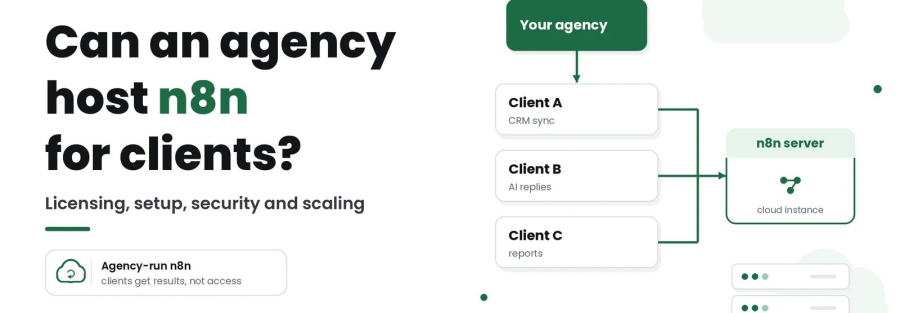
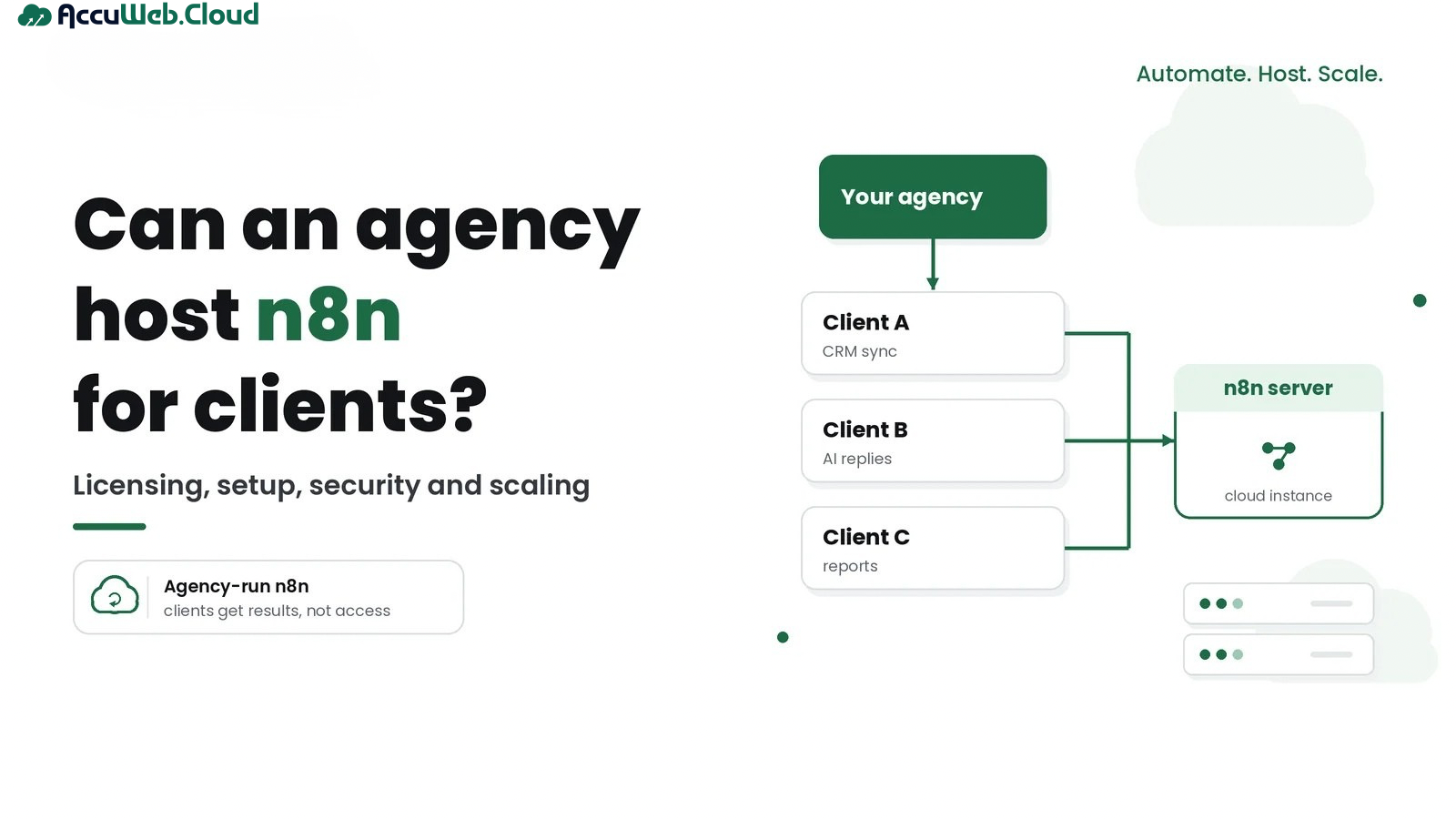
In an agency-hosted setup, your team owns the n8n environment and the workflow logic. Clients connect their apps, and the automations deliver results to them.
The flow is simple: Client → Agency → n8n instance → APIs, apps and databases → results back to the client. A client might receive new leads in their CRM, AI-drafted replies in their inbox, or a weekly report in Google Sheets.
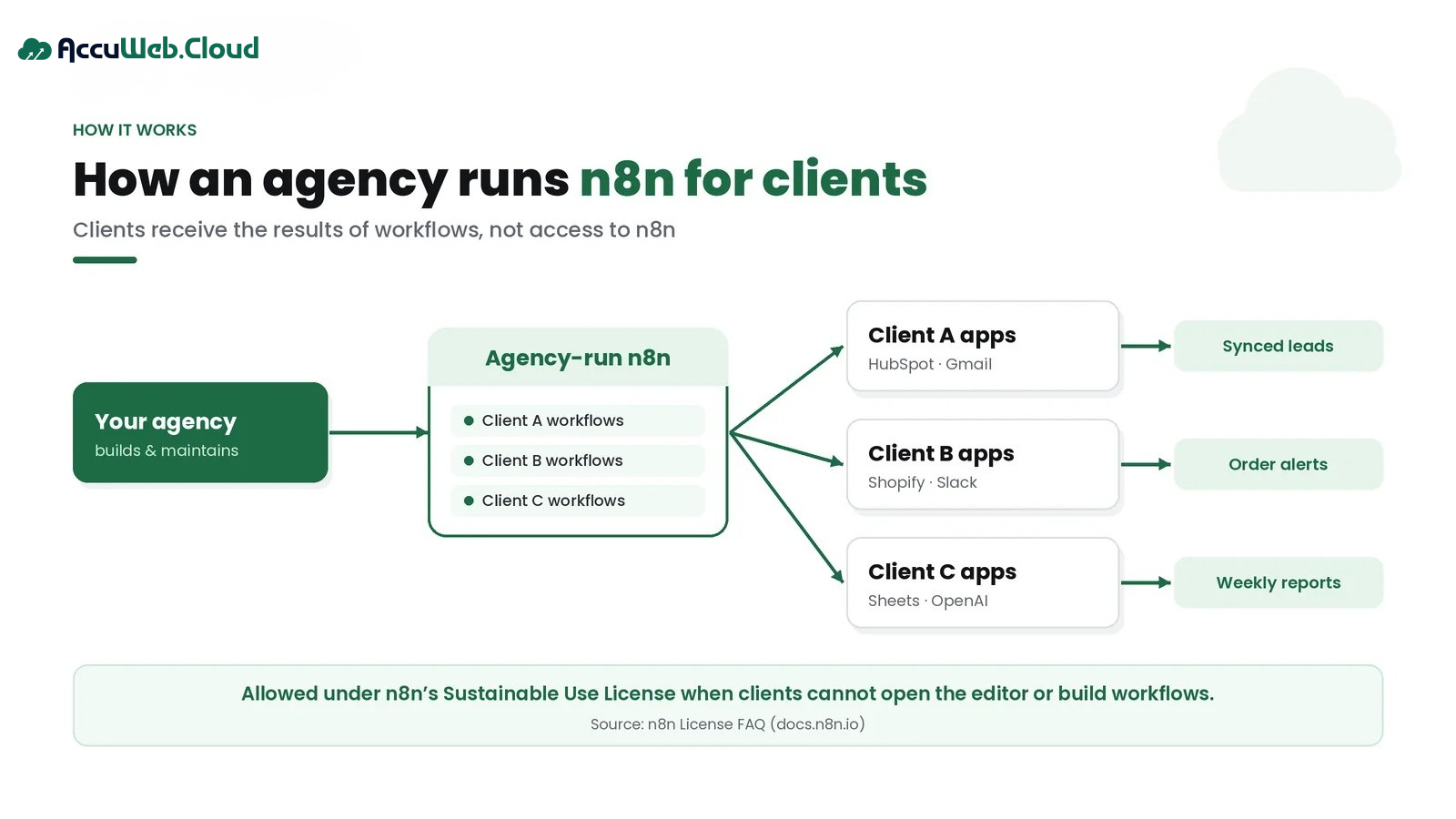
Clients can still connect their own accounts. n8n’s FAQ confirms that clients may authenticate their own OAuth credentials for automations you built, as long as they can’t access the workflow builder.
Why Agencies Host n8n for Clients
- Control: you choose the n8n version, the server, the integrations and the update schedule.
- Recurring revenue: keeping workflows running becomes a monthly service, not a one-off project.
- Central management: one team, one set of tools and one process for every client’s automations.
- Custom integrations: self-hosted n8n lets you add community nodes, custom code and private APIs.
- Infrastructure flexibility: you size servers to real workloads instead of buying a fixed plan.
- Data control: you decide where workflows, credentials and execution data are stored.
- Client experience: clients deal with your agency and see results, not another tool to learn.
One n8n Instance vs Separate Instances for Each Client
Both setups can stay within the license, as long as clients never access n8n. The choice is about isolation, risk and upkeep.
| Factor | One shared instance | Separate instance per client |
|---|---|---|
| Isolation | Logical only: workflows and credentials share one database | Strong: each client has its own server, database and encryption key |
| Security | A breach or leaked key could expose every client | An incident stays with one client |
| Maintenance | One instance to update and monitor | Every instance needs updates and monitoring |
| Cost | Lowest infrastructure cost | Higher, since each instance needs its own resources |
| Scalability | Heavy clients can slow everyone else | Scale each client independently |
| Client management | Needs strict naming and credential discipline | Clean separation by default |
| Failure impact | A crash or bad update affects all clients | Problems stay contained |
| Best use case | Small, low-risk workflows for several clients | Sensitive data, heavy workloads or strict client requirements |

Choose separate instances when a client handles personal, financial or health data, needs its own data location, runs heavy or long-running workflows, or asks for isolation in the contract. Many agencies use a mix: one shared instance for light clients and dedicated instances for the rest.
Infrastructure Requirements for Hosting n8n
n8n doesn’t have one fixed hardware requirement, because load depends on what your workflows do. A few scheduled syncs need very little. AI workflows, large files and heavy Code nodes need much more.
- CPU: sized to how many executions run at once and how much processing each one does.
- RAM: large payloads, binary files and AI workflows use the most memory. Monitor usage and keep headroom.
- NVMe storage: fast disks help with saved runs and database work. Prune old execution data so storage doesn’t grow forever.
- Database: n8n uses SQLite by default. For production and queue mode, use PostgreSQL.
- Networking: a public IP, open ports 80 and 443, and webhook URLs clients’ apps can reach.
- SSL, domain and subdomain: serve n8n over HTTPS on your own domain, for example automation.youragency.com.
- Backups: regular database backups plus server snapshots, stored somewhere other than the server itself.
- Monitoring: CPU, memory, disk and failed executions, with alerts before clients notice problems.
- Scalability: the ability to add CPU and RAM, and later queue-mode workers, without rebuilding.
The practical approach is to start with a modest server, watch real usage for a few weeks, then resize. That beats guessing large and paying for idle capacity.
Agency n8n Hosting Checklist
| Area | What to check | Why it matters for agencies |
|---|---|---|
| License model | Clients receive outputs only, with no editor access | Keeps you within n8n’s Sustainable Use License |
| Database | PostgreSQL for production | Needed for queue mode and growing execution history |
| Encryption key | Custom N8N_ENCRYPTION_KEY, stored securely | Without it, stored credentials can’t be decrypted after a rebuild |
| HTTPS | Valid SSL on your own domain | Protects logins, webhooks and client data in transit |
| Firewall | Only required ports open; SSH restricted | Reduces the attack surface |
| Backups | Scheduled, off-server, restore tested | Lets you recover a client’s automations quickly |
| Updates | Planned n8n and OS update schedule | Patches security issues without surprise breakage |
| Monitoring | Resource and failed-execution alerts | You spot problems before clients do |
| Client separation | Per-client credentials and naming, or separate instances | Prevents data mix-ups between clients |
| Documentation | Workflow notes and client handover docs | Makes support and staff changes manageable |
Security Considerations When Hosting Client Automations
When you host automations for clients, you hold the keys to their systems. Treat the n8n server with the same care as a client’s production database.
- Client credentials: n8n encrypts stored credentials with an encryption key. By default it creates a random key on first launch. Set your own key, store it in a password manager, and use the same key on every worker in queue mode.
- Secrets: keep secrets in environment variables or a secrets store. Never paste them into workflow nodes or shared docs.
- Database security: keep PostgreSQL and Redis on a private network, never exposed to the internet, with strong passwords.
- HTTPS: serve the editor and webhooks only over SSL.
- Firewall: open ports 80 and 443 for web traffic and restrict SSH to known IP addresses or keys.
- Access control: give team members their own accounts, remove access when people leave, and never share one admin login.
- Backups: back up the database and the encryption key together. A database backup is useless without its key.
- Client isolation: use separate credentials per client, and separate instances where the data is sensitive.
- SSH access: use key-based login, disable password login, and limit who can connect.
- Updates: test each n8n update on a copy first, then update the live servers.
How to Scale n8n Across Multiple Clients
What you need depends on how often workflows run, how much data they move and how complex they are. The number of clients matters less. Ten clients with daily reports may need less than one client running AI workflows every minute.
| Agency stage | Typical setup | When to move on |
|---|---|---|
| About 5 clients | One instance with PostgreSQL, daily backups and monitoring | Executions start queuing or the editor slows down |
| About 10 clients | Larger server, plus separate instances for sensitive or heavy clients | Peak loads affect several clients at once |
| About 25 clients | Queue mode with Redis and workers on the busiest instance | Workers stay busy or updates become risky |
| 50+ clients | Several instances grouped by client type or region, with standard deployment scripts | Management overhead needs automation |
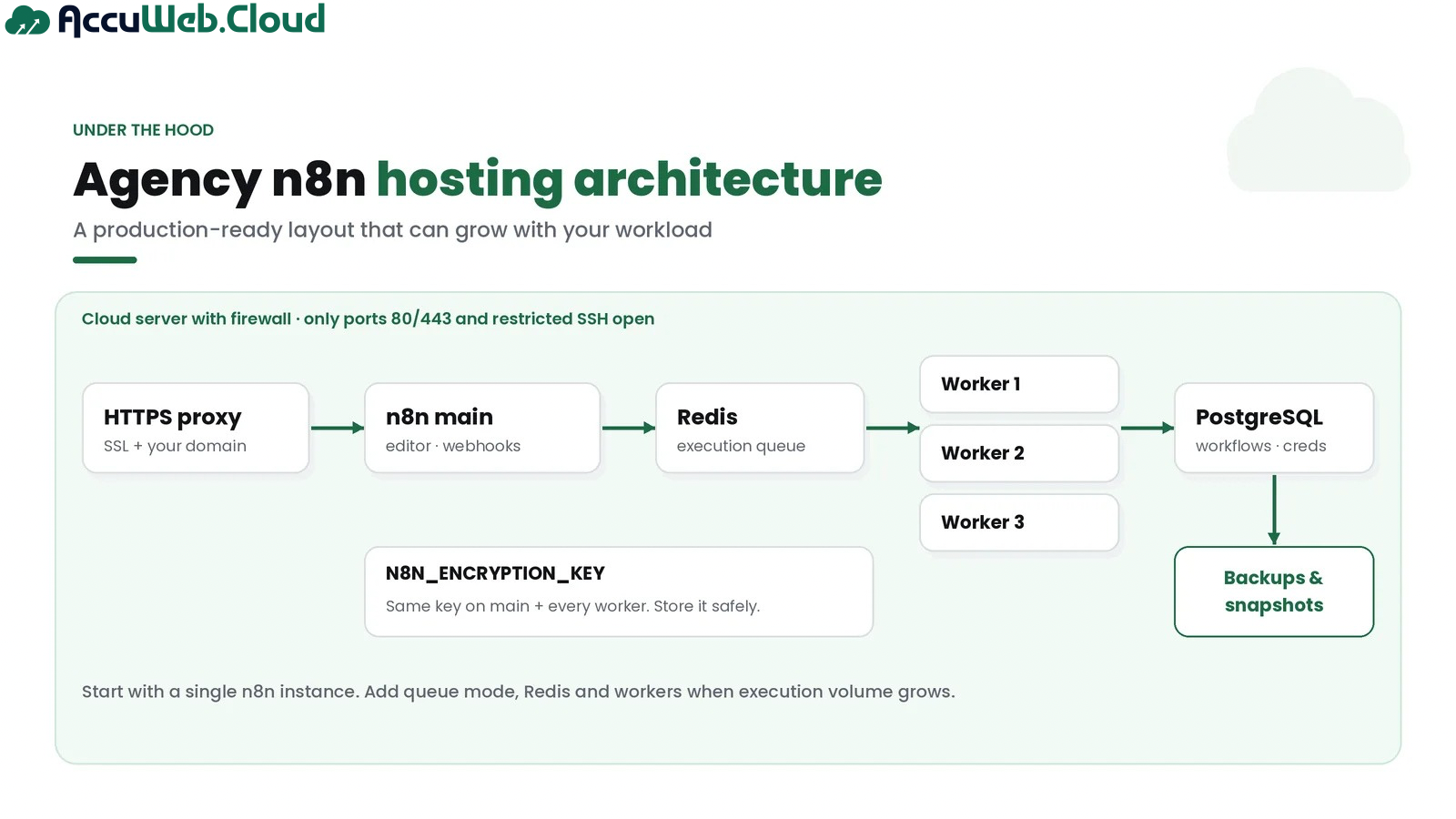
n8n’s queue mode separates the main instance from workers. The main process receives triggers and webhooks, Redis holds the queue, and workers run the executions. You scale by adding workers. Some related features, such as viewing running workers and multi-main setups, are listed by n8n as Enterprise features.
Self-Hosted n8n vs n8n Cloud for Agencies
Both are good options. n8n Cloud removes server work entirely. Self-hosting gives you more control and different cost economics, but you take on more responsibility.
| Factor | Self-hosted n8n | n8n Cloud |
|---|---|---|
| Infrastructure control | Full: you choose the server, location and configuration | Managed by n8n |
| Management | You, or a managed hosting provider, handle servers, updates and backups | n8n handles the platform |
| Scaling | You resize servers and add queue-mode workers | Handled within your plan’s limits |
| Customization | Community nodes, custom code, private networking | Some limits apply to custom setups |
| Cost model | Pay for server resources | Subscription based on plan and usage |
| Client isolation | Separate instances on your own infrastructure | Separate workspaces or accounts |
| Technical responsibility | Higher: security, uptime and recovery are yours | Lower: n8n runs the service |
| Licensing | Sustainable Use License for the community edition | n8n Cloud’s own subscription terms |
| Best suited for | Technical agencies wanting control and predictable infrastructure cost | Agencies that want zero server management |
If self-hosting fits your agency but you don’t want to manage cloud infrastructure alone, managed hosting is the middle ground.
Example: An Automation Agency With 10 Clients
Here is a hypothetical example to show how the pieces fit together. The numbers are illustrative, not quotes.
An agency builds automations for 10 small businesses. Eight run light workflows: lead routing, CRM syncs and weekly reports. Two are a clinic and an accounting firm, which handle sensitive data.
- Setup: the eight light clients share one agency-run instance. The clinic and accounting firm each get their own instance.
- Isolation: each client has separate credentials, clear naming, and access limited to the agency team. No client can open n8n.
- Who does what: the agency looks after workflows, credentials, updates and checks. The hosting provider looks after the cloud servers.
- Scaling: if the shared instance gets busy, the agency resizes it or moves a heavy client to its own instance.
Example calculation: suppose the shared instance costs $58 a month and each dedicated instance costs $29 a month. That’s $116 a month in total, or about $11.60 per client.
The agency includes this cost in its monthly automation fee, which also covers building, monitoring and fixing workflows. Clients pay for results, not for access to n8n.
Why Managed n8n Hosting Can Be Better for Agencies
Managed n8n hosting means a provider looks after the cloud infrastructure while you keep control of n8n and your workflows. For most agencies, that is the right split of work.
Your team’s value is in designing automations, not patching servers at midnight. Managed hosting cuts the time you spend setting up servers, handling backups and fixing server problems. It also gives you a support team to call when a server problem would otherwise land on your best developer.
The trade-off is cost and some loss of low-level control compared with running everything yourself. For agencies with fewer than a dedicated DevOps person, the saved time usually matters more.
Why Agencies Can Use AccuWeb.Cloud for n8n Hosting
AccuWeb.Cloud offers n8n hosting as a one-click app on dedicated cloud servers. Here is what that means for an agency:
| AccuWeb.Cloud feature | Benefit for your agency |
|---|---|
| One-click n8n deployment | Launch a new client or internal instance in minutes instead of building each server by hand |
| Dedicated vCPU and RAM, no resource sharing | Client workflows aren’t slowed by other customers on the same hardware |
| NVMe storage | Helps database-heavy workflows and growing execution history stay responsive |
| Full server control and root access | Install community nodes, configure environment variables and set up queue mode yourself |
| Firewall rules and SSH access management | Lock the server down to the ports and people that need access |
| Backups and snapshots | Recover a client’s automations after a bad update or mistake |
| CPU, memory and disk monitoring | Spot a busy client before it affects others |
| Scalable compute and storage | Resize as a client’s workload grows instead of rebuilding |
| Hourly or monthly pay-as-you-go billing | Spin up test instances for client pilots and pay only for hours used |
| 4 data centers: New York, Los Angeles, Frankfurt, Mumbai | Host clients closer to their users and data requirements |
| Fully managed infrastructure support, 24/7 | Infrastructure issues go to AccuWeb.Cloud’s team, so yours stays on client work |
The split of work is clear. AccuWeb.Cloud helps run the cloud side: servers, network setup, backups, snapshots, scaling and fixing server problems. Your agency keeps control of n8n itself: workflows, credentials, integrations and settings.
AccuWeb.Cloud reports a 10.6-minute median ticket response time for its 24/7 support.
This fits both license-friendly models. Your agency can run its own n8n instances on AccuWeb.Cloud. Or a client can open their own account and have your agency manage it.
Moving an existing setup? AccuWeb.Cloud also offers free migration.
AccuWeb.Cloud n8n Hosting Pricing
AccuWeb.Cloud n8n hosting starts from $4.95 per month, with hourly or monthly billing. For custom sizing, dedicated resources are priced per component, so you pay only for what each client needs.
| Resource or plan | Price |
|---|---|
| n8n hosting entry plan | From $4.95/month |
| Dedicated vCPU | $6 per vCPU / month |
| RAM | $3.50 per GB / month |
| NVMe storage | $0.06 per GB / month |
| Example: 2 vCPU, 4 GB RAM, 50 GB NVMe | $29.00 / month |
| Example: 4 vCPU, 8 GB RAM, 100 GB NVMe | $58.00 / month |
| Example: 8 vCPU, 16 GB RAM, 200 GB NVMe | $116.00 / month |
Plans are backed by a 30-day money-back guarantee, subject to AccuWeb.Cloud’s terms. See the full cloud pricing page for current plans and the configuration calculator.
Frequently Asked Questions
Can an agency host n8n for clients?
Yes. Under n8n’s Sustainable Use License, an agency can run client workflows on its own n8n instance if clients receive only the results and cannot build or edit workflows. Giving clients access to n8n needs a commercial license.
Can I host multiple clients on one n8n server?
Yes. n8n’s license FAQ says there is no limit on the number of clients you serve from one instance, as long as clients don’t access it. For sensitive data or heavy workloads, separate instances give better isolation.
Should every client have a separate n8n instance?
Not always. Separate instances suit clients with sensitive data, heavy workloads or strict contract requirements. Light, low-risk clients can share one well-managed instance.
Is self-hosted n8n suitable for agencies?
Yes, for agencies with some technical capacity. It gives you control and custom integrations, and you pay for server resources. But security, updates and backups become your job, unless you use managed hosting.
How much RAM does n8n need?
It depends on your workflows. Simple scheduled automations need little memory, while AI workflows, large files and heavy Code nodes need much more. Start modestly, monitor usage and resize when needed.
Can agencies charge clients for n8n hosting?
Agencies can charge for workflow creation, setup, maintenance, training and consulting, and can include infrastructure costs in that service. Selling clients access to hosted n8n itself requires a commercial license from n8n.
Is managed n8n hosting better for agencies?
Often, yes. Managed hosting handles cloud infrastructure, backups and server troubleshooting, so your team can focus on building and maintaining client workflows.
How do agencies secure client credentials in n8n?
Set a custom encryption key and store it safely, keep secrets in environment variables, use HTTPS, restrict server access, keep the database private, and back up the database together with the key.
Final Thoughts
An agency can host n8n for clients, and it can be a strong, recurring part of your service. The rule to remember is simple: clients get the results, not access to n8n. Within that boundary, you can serve one client or fifty from infrastructure you control.
Start with one secure instance, separate clients with sensitive data, plan for backups and updates, and scale with queue mode when volume grows. If you’d rather spend your time on automations than servers, managed hosting keeps the infrastructure off your plate.
This article explains n8n’s published license guidance as of October 2026 and is not legal advice. For your specific setup, contact n8n at [email protected].

Jilesh Patadiya, the visionary Founder and Chief Technology Officer (CTO) behind AccuWeb.Cloud. Founder & CTO at AccuWebHosting.com. He shares his web hosting insights on the AccuWeb.Cloud blog. He mostly writes on the latest web hosting trends, WordPress, storage technologies, and Windows and Linux hosting platforms.