Nextcloud Hosting with Unlimited Users and Storage: Your Private Cloud, Fully Managed

Most teams reach the same point sooner or later. Files end up in three different places, every new hire adds another line to the monthly bill, and somebody asks a fair question: who actually holds our data?
That question is a big reason Nextcloud keeps growing. Nextcloud reported more than two million new professional users in 2025, and inquiries about its software tripled compared with the year before. Nextcloud hosting with unlimited users and storage gives you the same familiar file sharing, sync and collaboration, running on a private server that you control.
With AccuWeb.Cloud, you can deploy Nextcloud on dedicated cloud infrastructure with private file storage, scalable resources, full control and managed support. There’s no per-user fee, so you can add every colleague, contractor and client who needs access. Storage grows when you do, because you decide how much to attach.
In this guide, you’ll see how a Nextcloud private cloud works, how the cost compares with per-seat plans and with other cloud VPS providers, how to size your server, and how a move from Google Drive or Dropbox is handled for you. Let’s break this down.
Key Takeaways
- Managed Nextcloud hosting on AccuWeb.Cloud has no per-user charge, so adding people doesn’t change your server bill.
- Your files live on dedicated infrastructure that only your team uses, which keeps data ownership in your hands.
- In published list pricing for comparable storage tiers, a 25-person team pays $104 a month with Nextcloud on AccuWeb.Cloud, against $360 for Google Workspace and $450 for Dropbox Business.
- A 2 vCPU / 4 GB instance supports roughly 18 to 20 simultaneous users on everyday file work, and you can scale up from there.
- Free migration from Google Drive or Dropbox and fully managed support mean you can start without a long setup project.
- Dedicated plans start at $4.95 a month, in New York, Frankfurt, Mumbai and Los Angeles, with a 30-day money-back guarantee.
What Is Nextcloud Hosting with Unlimited Users and Storage?
Nextcloud is an open-source platform for storing, syncing and sharing files, with calendars, contacts and document editing available alongside. Nextcloud estimates that roughly 400,000 to 500,000 servers are online worldwide, which makes it one of the most widely deployed self-hosted file sharing platforms.
Nextcloud hosting simply means someone else runs that server for you. With AccuWeb.Cloud, you get managed Nextcloud hosting on a dedicated instance, so the CPU, RAM and NVMe storage belong to your deployment alone.
What “Unlimited Users” Means
Accounts aren’t metered. You can create accounts for your whole team, your partners and your clients, and the plan price stays the same. What shapes your plan is how many people are active at once and how heavy their work is, not how many names are on the user list.
What “Unlimited Storage” Means in Practice
Storage isn’t capped by a seat license. Every plan includes NVMe storage, and the size of your library is whatever you attach, so you add space as your files grow instead of being pushed into a higher tier. Project archives, shared folders and business backups can all sit in one place.
Who Gets the Most from a Nextcloud Private Cloud
- Agencies and consultancies that share large files with clients every week.
- Schools and training teams with many learner accounts but modest day-to-day activity.
- Finance, legal and healthcare-adjacent teams that handle contracts and records and want a clear answer about where files are stored.
- Remote and hybrid companies replacing a patchwork of file-sharing tools with one workspace.
Why More Teams Are Moving to a Private Cloud
Cloud file storage is now standard. Bitkom’s Cloud Report 2026 found that 86% of German companies already use cloud computing, and the remaining 14% are planning to. The conversation has moved from whether to use the cloud to where files should live and who controls them. A BARC survey of 295 companies in 2025 found that 84% view data sovereignty as a central point of their strategy.
Security is part of that picture. IBM’s 2026 Cost of a Data Breach Report puts the global average cost of a breach at $4.99 million, up 12% on the previous year, and the US average at $11.5 million. Keeping files on a dedicated, access-controlled server, with monitoring and patching handled by engineers, is a practical way to protect what matters most to your business.
Full Data Ownership
Your files sit on your own instance. You choose the data center, set the admin password and decide who gets access. Because Nextcloud is open source, your data stays portable and you can export it whenever you like. AccuWeb.Cloud runs Nextcloud from four global data centers: New York, Frankfurt, Mumbai and Los Angeles, all on Equinix infrastructure.
Security That’s Handled for You
Guest OS patching, daemon health, firewall rules, Fail2Ban and monitoring are managed by AccuWeb.Cloud engineers, and your TLS certificate is configured before you first log in. If you’d like to see how the platform approaches protection more broadly, take a look at cloud security and compliance.
Per-User vs. Per-Server Pricing: A Cost Breakdown
Per-seat plans from Google Workspace and Dropbox Business suit many organizations, and they’re easy to understand: every person you add adds to the bill. A dedicated Nextcloud instance changes that model. You pay for the server, and everyone on your team shares it.
Here’s how monthly costs compare for different team sizes, using published list pricing for comparable storage tiers:
- 10 users: $144 for Google Workspace, $180 for Dropbox Business, $61 for Nextcloud on AccuWeb.Cloud.
- 25 users: $360, $450 and $104.
- 50 users: $720, $900 and $104.
- 100 users: $1,440, $1,800 and $219.
The per-person math is easy to follow. At 25 users, Google Workspace works out to $14.40 per person and Dropbox Business to $18.00, while the Nextcloud setup comes to $4.16 per person ($104 ÷ 25). At 100 users, Nextcloud drops to $2.19 per person.
Over a year, the gap adds up. At 50 users, the difference between Google Workspace and Nextcloud is $616 a month, or $7,392 a year. At 100 users, the difference against Dropbox Business is $1,581 a month, or $18,972 a year.
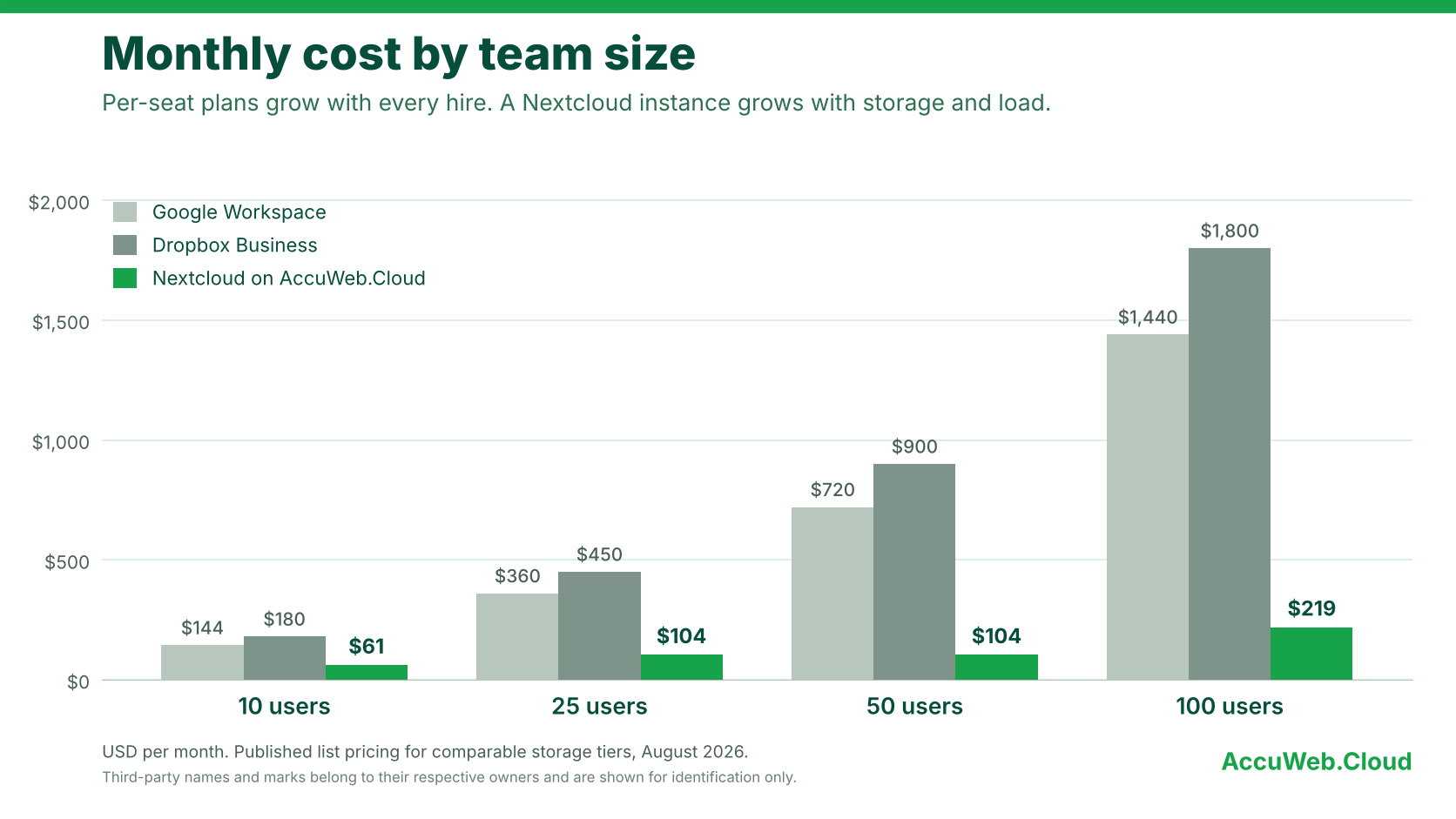
Notice that the Nextcloud figure stays at $104 whether you have 25 users or 50. Cost follows storage and load rather than headcount, so a growing team doesn’t trigger a new price tier every time someone joins.
How Many Users Can One Nextcloud Instance Handle?
If you’re comparing Nextcloud server requirements, start with how many people are active at the same time and what they’re doing. Registered accounts matter less than simultaneous activity such as syncing, uploading and opening shared files.
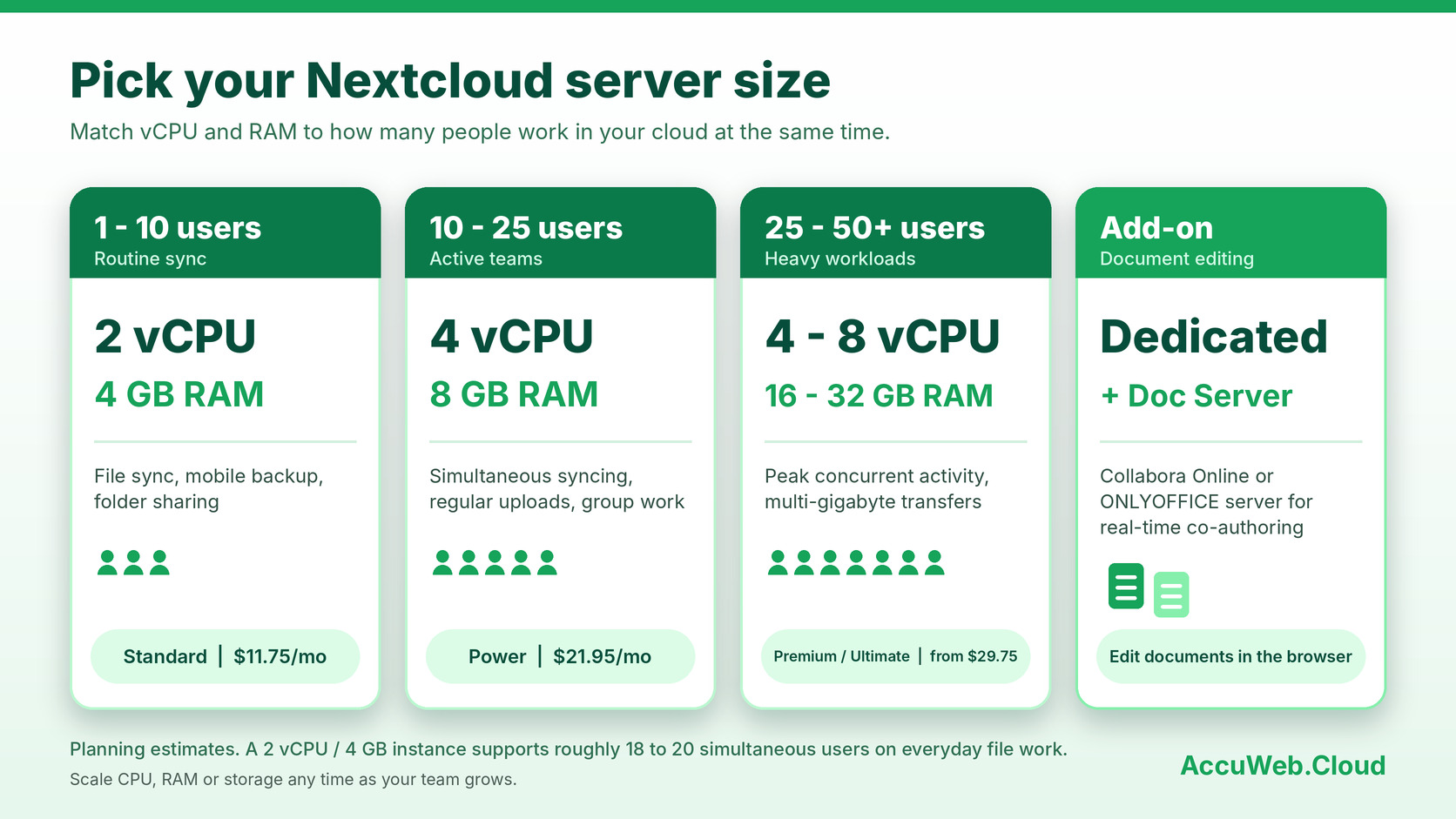
As a planning estimate, a 2 vCPU / 4 GB RAM instance supports approximately 18 to 20 simultaneous users on everyday work like browsing folders, opening files and routine sync. Actual numbers depend on file sizes, installed apps and how your team works, so it helps to size for your busiest hours.
Matching a Plan to Your Team
- 1 to 10 users: 2 vCPU / 4 GB RAM covers standard file sync, mobile backup and folder sharing. The Standard plan at $11.75 a month fits here.
- 10 to 25 users: 4 vCPU / 8 GB RAM suits simultaneous syncing, regular uploads and group work. The Power plan at $21.95 a month is built for this range.
- 25 to 50+ users: 4 to 8 vCPU with 16 to 32 GB RAM handles peak concurrent activity and multi-gigabyte transfers. Premium at $29.75 and Ultimate at $52.95 a month cover it.
- Document editing: add a dedicated Collabora or ONLYOFFICE server so editing has its own resources.
When your team grows, you can add CPU, RAM or storage to the same instance using vertical scaling options. That means you can start with the plan that fits today and move up when the work calls for it.
Collaboration, Backups and File Sharing in One Private Cloud
A good Nextcloud private cloud does more than hold files. It becomes the place where your team shares, edits and protects its work.
File Sharing and Sync
Share folders with colleagues, send links to clients and keep devices in step with the Nextcloud desktop and mobile apps. Permissions are set per user and per group, so the right people see the right files.
Online Document Editing
With Collabora Online or ONLYOFFICE, your team can open and edit documents, spreadsheets and presentations in the browser and work on the same file together. Connecting a dedicated ONLYOFFICE document server keeps editing workloads separate from file storage and leaves room to scale.
Backups and Recovery
Every plan includes a complimentary 7-day disaster recovery backup, and you can add hourly, daily or weekly backup policies on top. Instance and volume snapshots capture your data directory as well as the database, so a restore brings back files and file metadata together. If you also need space for archives, see the backup storage options available alongside your instance.
Cloud VPS Price Comparison: AccuWeb.Cloud vs. Major Providers
Nextcloud runs on cloud VPS infrastructure, so the server price is the largest line in your hosting cost. That makes provider pricing worth a close look. The table below compares 32 GB RAM configurations at published monthly rates, with each provider’s vCPU count and storage shown so you can see exactly what each price includes.
| Provider | vCPU | RAM | Storage | Monthly Price | Monthly Saving with AccuWeb.Cloud |
|---|---|---|---|---|---|
| AccuWeb.Cloud | 16 | 32 GB | 50 GB SSD | $211.00 | – |
| Microsoft Azure | 8 | 32 GB | 64 GB SSD | $285.12 | $74.12 (26%) |
| DigitalOcean | 8 | 32 GB | 120 GB SSD | $302.00 | $91.00 (30%) |
| Google Cloud | 12 | 32 GB | 50 GB SSD | $312.22 | $101.22 (32%) |
| AWS | 16 | 32 GB | 50 GB SSD | $450.76 | $239.76 (53%) |
Monthly prices in USD for comparable configurations, August 2026. Third-party names and marks belong to their respective owners and are used for identification only.
At $211 a month, the AccuWeb.Cloud configuration includes 16 vCPUs, which is twice the vCPU count of the Azure and DigitalOcean configurations and four more than Google Cloud’s, and it costs less than each of them. Against the AWS configuration with the same 16 vCPU / 32 GB RAM / 50 GB SSD, the monthly difference is $239.76, which comes to $2,877.12 over a year.
For a Nextcloud server, that headroom matters. More vCPU supports more simultaneous syncs and uploads, and the lower price leaves budget for extra storage and backups. Pricing is also pay-as-you-go, with hourly rates on every plan, so you only pay for the time your instance runs. You can read more about our cloud VPS hosting if you want to see what else runs on the same platform.
Nextcloud Hosting Plans and Pricing
Every Nextcloud hosting plan runs on a dedicated instance with no resource sharing. Each one includes NVMe storage, 1 TB of bandwidth and one dedicated public IP, and your purchase is backed by a 30-day money-back guarantee. Hourly billing runs from $0.006781 to $0.072507 depending on the plan.
- Start: 1 vCPU, 1 GB RAM, 12 GB NVMe, $4.95 a month.
- Essential: 1 vCPU, 2 GB RAM, 15 GB NVMe, $6.95 a month.
- Standard: 2 vCPU, 4 GB RAM, 35 GB NVMe, $11.75 a month.
- Plus: 2 vCPU, 8 GB RAM, 50 GB NVMe, $15.95 a month.
- Power: 4 vCPU, 8 GB RAM, 85 GB NVMe, $21.95 a month.
- Premium: 4 vCPU, 16 GB RAM, 105 GB NVMe, $29.75 a month.
- Ultimate: 8 vCPU, 32 GB RAM, 140 GB NVMe, $52.95 a month.
Pick the plan closest to the sizing guide above, then add storage whenever your library needs more room.
Move from Google Drive or Dropbox with Free Migration
Switching platforms can sound like a project. With AccuWeb.Cloud, it doesn’t have to be. Hand over access to your Google Drive or Dropbox and our engineers move your files across at no charge. You can also ask for a free migration plan to see how the move will work for your team. Learn more about the free migration service.
Getting started takes only a few minutes:
- Pick a plan size and a data center.
- Set your admin password and let one-click deployment finish. Nextcloud, PostgreSQL, PHP-FPM, Nginx and a TLS certificate are configured before you first log in.
- Request your free migration plan.
- Invite your team. There’s no per-user charge, so you can add everyone.
Why AccuWeb.Cloud for Nextcloud Hosting
- One-click deployment: your instance is ready in a few minutes, with the full Nextcloud stack already configured.
- Dedicated resources: every instance is dedicated, with 1 TB bandwidth and a dedicated public IP included.
- Fully managed: engineers handle OS patching, daemon health, firewall rules, Fail2Ban and monitoring, and two hours of hands-on engineer time are included every month. Explore our fully managed support to see how it works.
- Quick responses: median first response on a ticket is 10.6 minutes, from a named engineer.
- Your choice of location: New York, Frankfurt, Mumbai or Los Angeles, on Equinix data centers.
- Experience behind it: 23+ years in the hosting business and 10,000+ cloud deployments.
Frequently Asked Questions
Is there a per-user charge for Nextcloud hosting?
No. Plans are priced per instance, so you can add users without paying a seat fee. What changes your plan is the amount of activity and storage, not the number of accounts.
How long does a one-click deployment take?
A few minutes. Pick a size and a data center, and the instance starts with Nextcloud, the database and TLS already configured. You set the admin password and begin using it.
Can you migrate my files from Google Drive or Dropbox?
Yes, and it’s free. Share access with the AccuWeb.Cloud team, or request a free migration plan first to see the steps for your account.
How much storage can I have?
Each plan includes NVMe storage, and you can add more as your files grow. The size of your library is whatever you attach.
Does it include online document editing like Google Docs?
Nextcloud supports in-browser editing of documents, spreadsheets and presentations through Collabora Online or ONLYOFFICE. For larger teams, a dedicated document server keeps editing workloads separate from file storage.
What backups are included?
Every plan includes a complimentary 7-day disaster recovery backup. You can add hourly, daily or weekly backup policies, and snapshots cover both your data directory and the database.
Conclusion
Nextcloud hosting with unlimited users and storage gives your team a private place for files without a per-person bill. You keep full control of your data, choose where it’s stored, and let engineers take care of patching, monitoring and support.
The numbers are straightforward. A 25-person team’s Nextcloud cost is $104 a month in the published comparison, against $360 and $450 for per-seat plans, and the cloud VPS comparison shows AccuWeb.Cloud priced below Azure, DigitalOcean, Google Cloud and AWS for comparable configurations.
If your files are spread across tools and your costs rise with every hire, a managed Nextcloud private cloud on AccuWeb.Cloud is a straightforward next step. Pick a plan, deploy in a few minutes and let us move your Drive or Dropbox files across for free.

Jilesh Patadiya, the visionary Founder and Chief Technology Officer (CTO) behind AccuWeb.Cloud. Founder & CTO at AccuWebHosting.com. He shares his web hosting insights on the AccuWeb.Cloud blog. He mostly writes on the latest web hosting trends, WordPress, storage technologies, and Windows and Linux hosting platforms.