MySQL Database Hosting With Automated Backup Policies and Snapshots
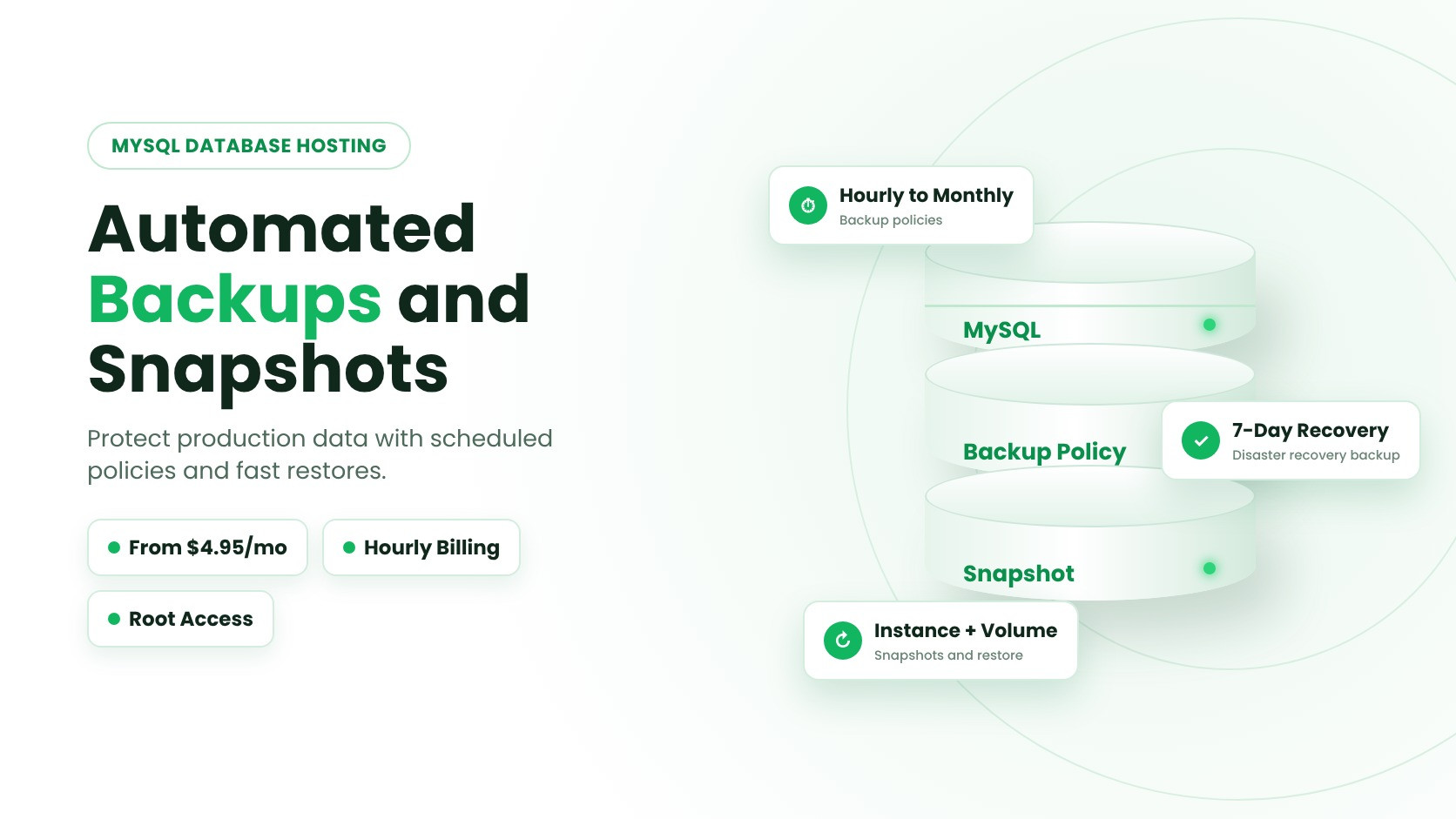
MySQL database hosting with automated backup policies and snapshots means your MySQL server runs on a cloud instance that creates scheduled recovery points for you, so you can protect production data without writing backup scripts or managing cron jobs.
AccuWeb.Cloud gives you a preinstalled MySQL instance with full root access, hourly, daily, weekly and monthly backup policies, a seven-day disaster recovery backup, and instance and volume snapshots. Plans start at $4.95 per month with hourly or monthly billing and a 30-day money-back guarantee.
This guide covers the plans and prices, how entry-level MySQL hosting compares across providers, how to match a backup schedule to the data you can afford to lose, how to budget backup storage, and how to restore and test a recovery point.
TL;DR
- Start with a preinstalled MySQL instance from $4.95 per month, with hourly or monthly billing.
- Use hourly, daily, weekly or monthly backup policies alongside a seven-day disaster recovery backup.
- Create instance and volume snapshots and restore from available backups.
- At the published storage rate, an assumed 10 GB backup costs $0.33 for one month of storage.
- The $4.95 Start plan costs $10.20 less per month than the compared DigitalOcean entry plan.
MySQL Hosting Plans and Pricing
Choose the CPU, RAM and storage for your MySQL instance and pay only for the cloud resources you provision. Every plan includes vCPU and RAM, NVMe storage, 1 TB bandwidth and one dedicated public IP, along with free SSL, backup and snapshot options, free migration, fully managed support and an app marketplace.
| Plan | Best For | vCPU | RAM | NVMe Storage | Hourly Price | Monthly Price |
|---|---|---|---|---|---|---|
| Start | Personal sites and dev testing | 1 | 1 GB | 12 GB | $0.006781/hr | $4.95/mo |
| Essential | Small blogs and starter projects | 1 | 2 GB | 15 GB | $0.009507/hr | $6.95/mo |
| Standard | Growing sites and e-commerce | 2 | 4 GB | 35 GB | $0.016096/hr | $11.75/mo |
| Plus | High-traffic sites and web apps | 2 | 8 GB | 50 GB | $0.021863/hr | $15.95/mo |
| Power | Agencies and busy databases | 4 | 8 GB | 85 GB | $0.030096/hr | $21.95/mo |
| Premium | Intensive multi-user workloads | 4 | 16 GB | 105 GB | $0.040795/hr | $29.75/mo |
| Ultimate | High-demand enterprise apps | 8 | 32 GB | 140 GB | $0.072507/hr | $52.95/mo |
Dedicated plans for workloads that need dedicated resources start from $9.50 per month, and custom vCPU, RAM and NVMe configurations are available for an exact fit. MySQL instances run in four data centers: New York, Los Angeles, Frankfurt and Mumbai, so you can place your database close to your application and its users. Use the cloud cost estimator tool to total your plan before you order.
MySQL Hosting Price Comparison
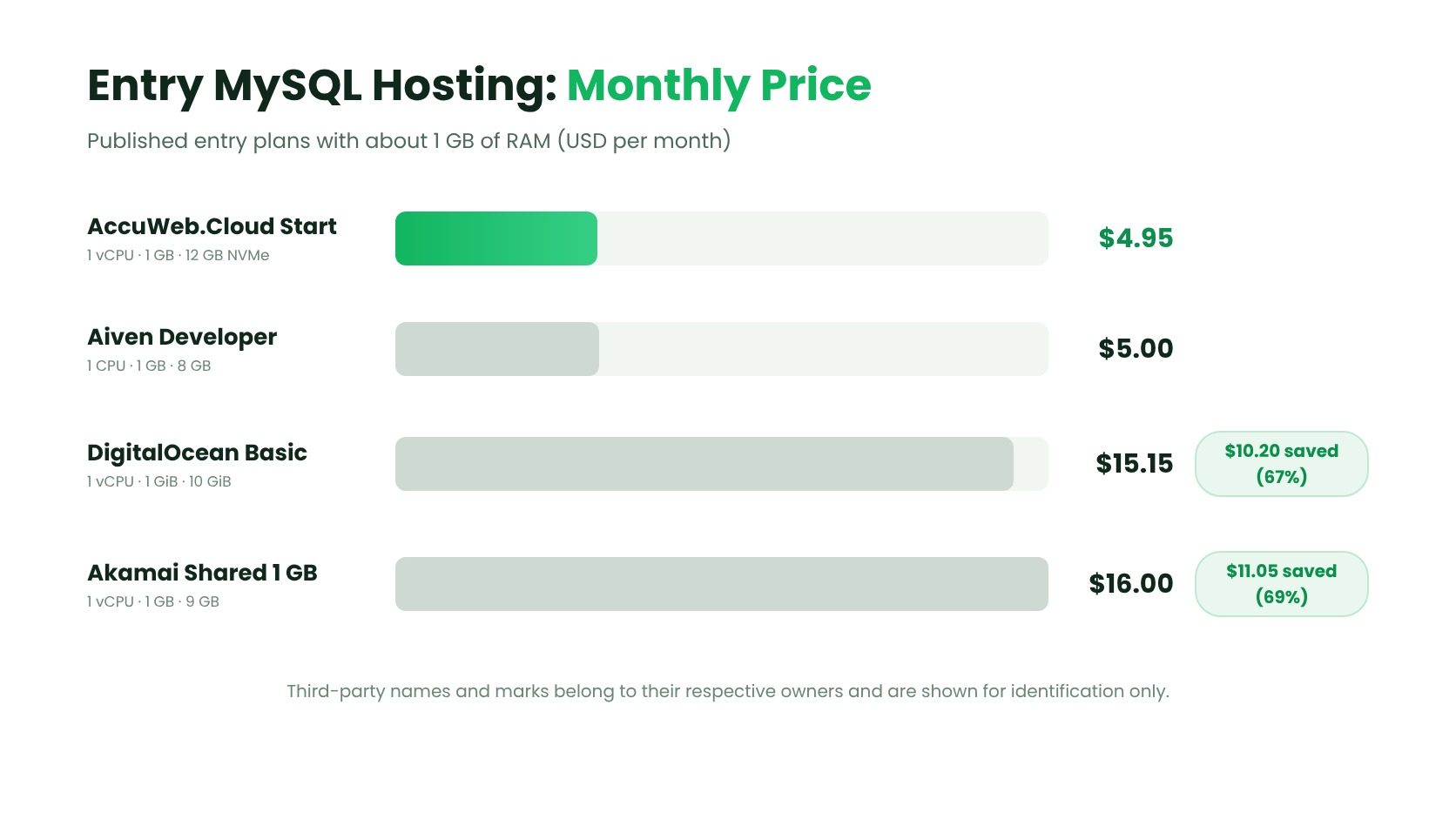
Entry-level MySQL prices are a useful starting point for comparing providers. The table below sets the AccuWeb.Cloud Start plan beside published entry MySQL plans with about 1 GB of RAM, so each row has a similar amount of memory to work with.
| Provider | Entry Plan | Compute | Storage | Monthly Price | Monthly Saving with AccuWeb.Cloud |
|---|---|---|---|---|---|
| AccuWeb.Cloud | Start | 1 vCPU and 1 GB RAM | 12 GB NVMe | $4.95 | – |
| Aiven | MySQL Developer | 1 CPU and 1 GB RAM | 8 GB | $5.00 | $0.05 (1%) |
| DigitalOcean | Managed MySQL Basic | 1 vCPU and 1 GiB RAM | 10 GiB minimum | $15.15 | $10.20 (67%) |
| Akamai | Managed MySQL Shared 1 GB | 1 shared vCPU and 1 GB RAM | 9 GB usable | $16.00 | $11.05 (69%) |
Published monthly prices in USD for single-node entry plans. Third-party names and marks belong to their respective owners and are used for identification only.
What the Comparison Shows
The AccuWeb.Cloud Start plan has the lowest monthly price in the comparison, at $4.95. It also includes the most storage of the four entries, with 12 GB of NVMe, along with 1 TB of bandwidth, root access and backup and snapshot options.
Over a year, the Start plan costs $59.40 ($4.95 × 12), compared with $181.80 for the DigitalOcean entry plan and $192.00 for the Akamai plan. That is a difference of $122.40 and $132.60 per year for each database instance you run, and the gap grows when you add a staging or test database.
Look at Recovery Along With Price
The entry price is one part of a recovery budget, because a database instance, its working storage and its retained backups are separate lines. AccuWeb.Cloud combines scheduled backup policies, instance and volume snapshots and root access in one MySQL offering, which suits applications that need both database recovery and control over their server environment.
Automated Backup Policies and Snapshots
AccuWeb.Cloud supports hourly, daily, weekly and monthly backup policies for MySQL hosting. It also offers a seven-day disaster recovery backup, instance snapshots and volume snapshots, so you can choose the recovery boundary that matches what you need to bring back.
Match the Schedule to Acceptable Data Loss
A recovery point objective, or RPO, is the maximum age of data you are willing to lose. Choose an hourly policy when a full day of lost transactions would exceed that target.
For a simple scheduling comparison, an hourly policy creates 24 recovery points per day (24 hours divided by 1 hour), a daily policy creates one, and a weekly policy creates one every seven days. A recovery point is useful once the backup completes and stays available for restoration, so check your backup history regularly.
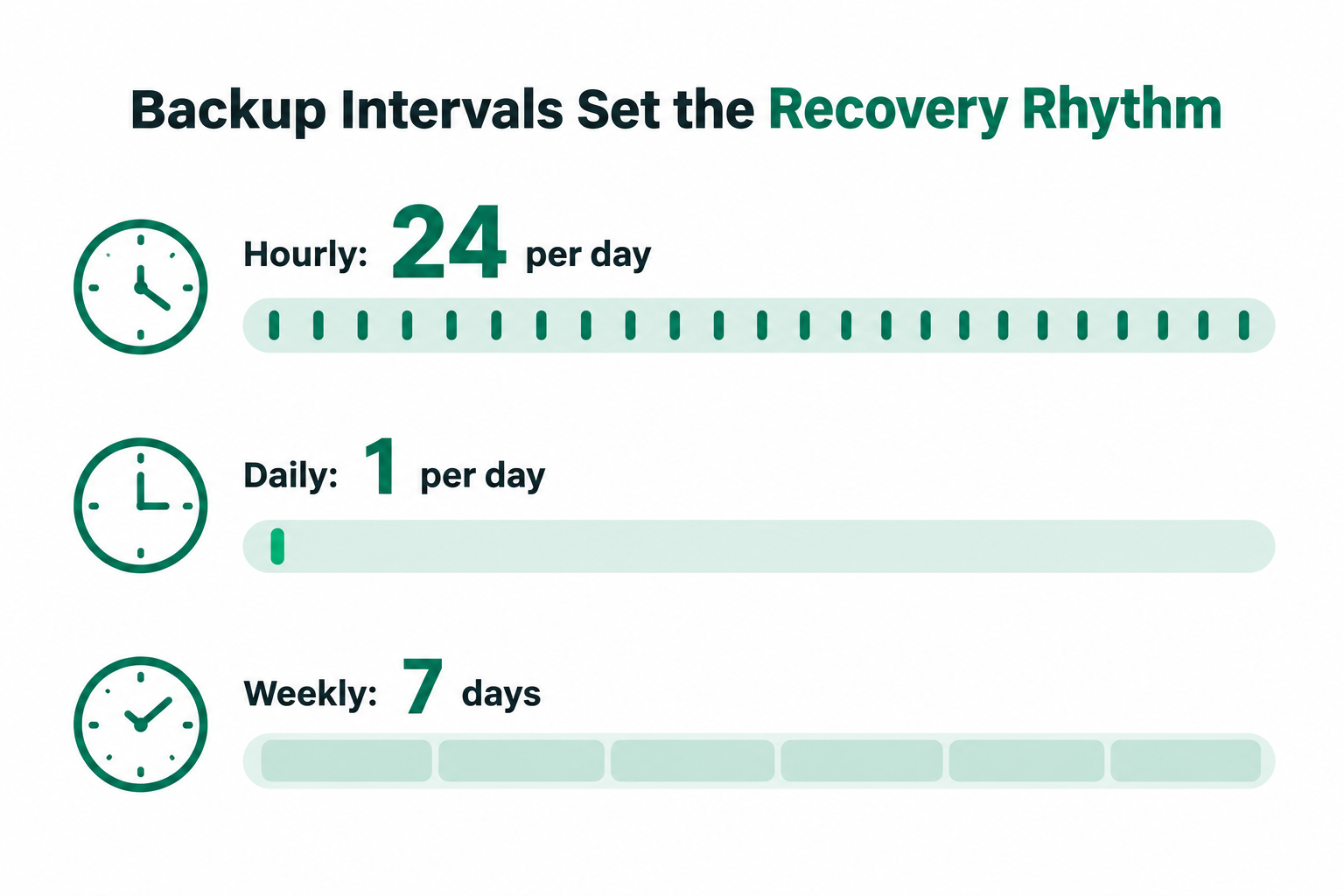
A monthly policy serves a different planning question: whether you want a periodic longer-term recovery point. Pair it with a more frequent policy when recent transactions matter.
Understand the Snapshot Boundary
An instance snapshot captures the instance at a point in time, and a volume snapshot captures a storage volume. Choose the one that matches what you want to restore.
Database consistency matters. A point-in-time copy taken while writes are active needs a recovery process that handles the database state correctly, so test the restored MySQL service to confirm application recovery. Also account for application files and configuration outside the selected volume, so the application has everything it needs once the database is back.
Budget for Backup Storage
AccuWeb.Cloud prices snapshot and backup storage at $0.033 per GB per month. The following planning example covers storage only, so you can see how little protecting a database can add to your bill.
| Assumed Stored Backup Data | Calculation | Storage Cost for One Month |
|---|---|---|
| 10 GB | 10 × $0.033 | $0.33 per month |
| 20 GB | 20 × $0.033 | $0.66 per month |
| 30 GB | 30 × $0.033 | $0.99 per month |
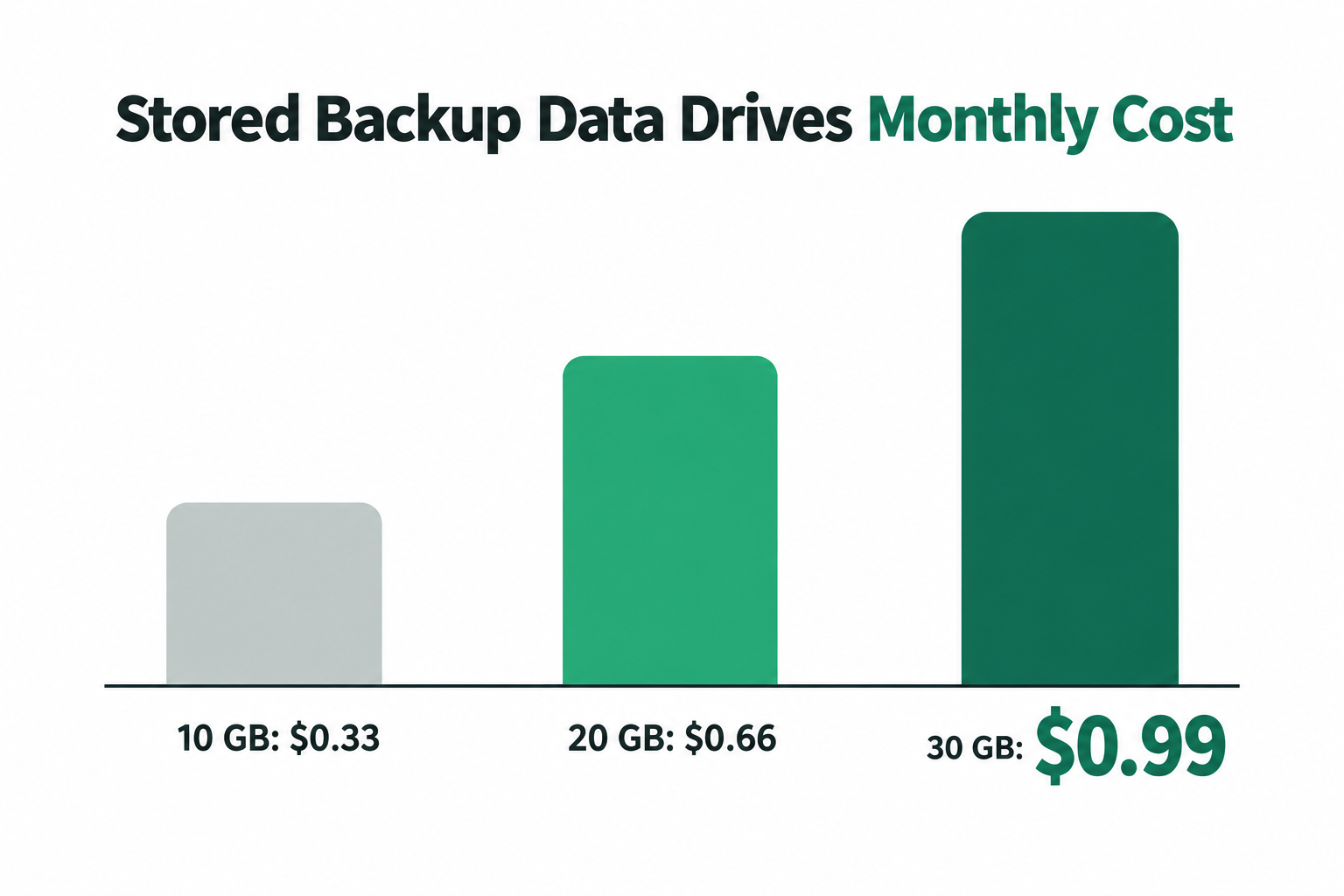
The cost follows the amount of backup data stored, so retained copies, changes between recovery points and the backup method shape your total. Additional NVMe working storage is priced at $0.06 per GB per month, listed on its own line.
For the published rates and compute examples, read the hourly billing guide, and explore the available backup storage options. Hourly billing is handy for a temporary restore-exercise environment, while monthly billing gives a familiar planning unit for an instance that runs continuously.
Restore the Right Recovery Point
AccuWeb.Cloud MySQL hosting supports restoration from available backups. The right recovery point is the newest usable copy from before the data problem.
Work Backward From the Incident
Consider an illustrative incident where a backup completes at 10:00 a.m., an unwanted change happens at 10:40 a.m., and the team detects it at 10:55 a.m.
The incident began 40 minutes after the completed backup (10:40 minus 10:00), and detection followed 15 minutes later (10:55 minus 10:40). Changes after the backup follow a separate recovery path if you need to keep them.
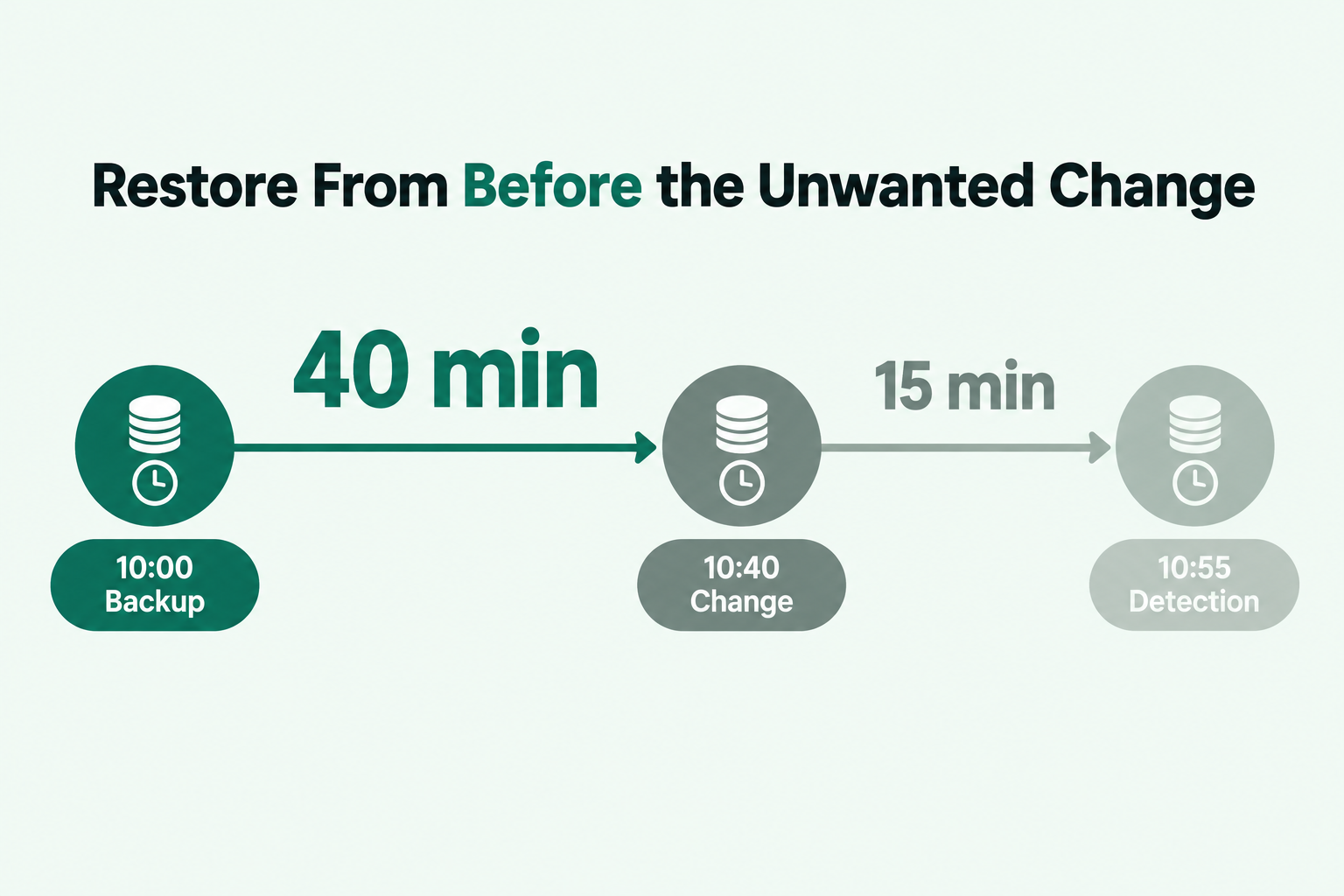
Record the incident time before restoring, and select a recovery point that predates the problem. When possible, restore into an isolated environment first, compare important records and application behavior, and then redirect production traffic.
Separate the Database From Its Dependencies
A restored MySQL database is one part of an application. Check connection settings, credentials, database permissions and any files that the application expects alongside its records.
The separate Database Backup/Restore add-on for the Application Platform supports MySQL and restores an SQL dump from a selected backup snapshot. An SQL dump is a file containing database statements and data for a restore. It is a distinct workflow from the MySQL hosting backup policies, and its backup storage tutorial covers schedule, storage location and retention settings.
Measure a Restore Exercise
A recovery time objective, or RTO, is the time your team can tolerate before service returns. Measure the entire restore exercise against that target, from the start of incident response to the moment the application can use the restored database.
For example, suppose three exercises take 20 minutes, 35 minutes and 50 minutes. The third takes 30 minutes longer than the first (50 minus 20), and the second takes 15 minutes longer (35 minus 20). Recording each stage shows where time changed from one exercise to the next.
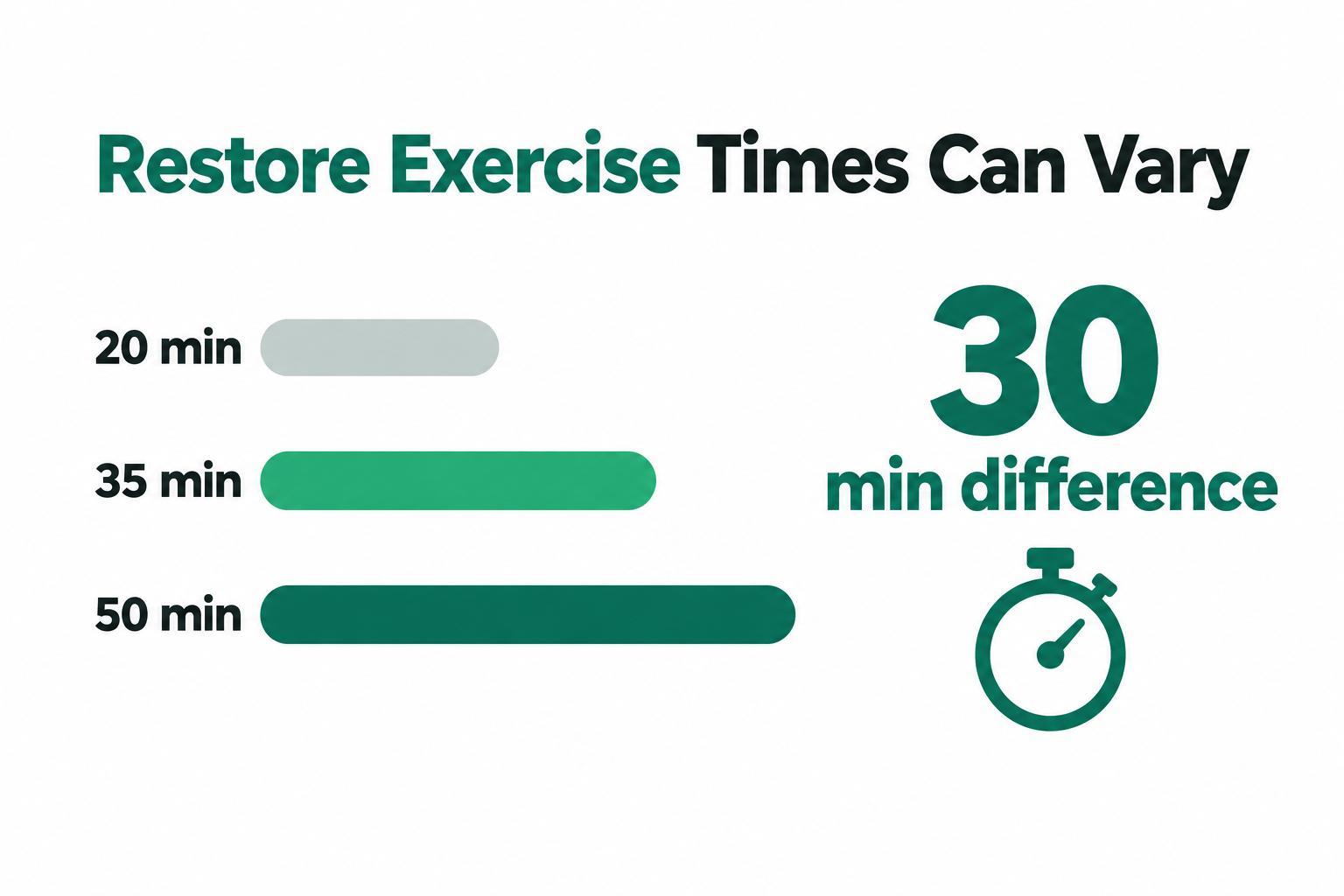
A useful exercise checks three outcomes: the database starts, the expected records are present, and the application can complete a representative transaction. Repeat it after a significant application or database change, and test the recovery point your team expects to use, whether that is an available backup or a snapshot.
MySQL Replication and Custom Architecture
When your application needs replication or high availability, AccuWeb.Cloud can configure MySQL replication, primary-replica, multi-node or supported high-availability architectures on request after technical review. The available design depends on your database workload, required topology, number of instances, networking and availability requirements.
Backups and replication work well together. Replication helps keep a copy of your data ready, while backup policies and snapshots give you a point in time to return to. For a different architecture, explore our MySQL cluster hosting offering.
You can also scale as your workload grows: increase CPU, RAM and storage through vertical scaling options, and keep fully managed infrastructure support behind your server. See how fully managed support works.
Conclusion
For MySQL database hosting with automated backup policies and snapshots, start with the recovery point your application needs. Then choose a schedule, budget for stored copies and test an end-to-end restore.
AccuWeb.Cloud brings scheduled policies, a seven-day disaster recovery backup and snapshot options to a MySQL instance from $4.95 per month, with the lowest entry price in the comparison. Use those tools to build a recovery routine your team can practice before an incident.
MySQL Backup Questions
Can I schedule hourly MySQL backups?
Yes. AccuWeb.Cloud MySQL hosting offers an hourly backup policy alongside daily, weekly and monthly policies.
Is MySQL hosting with daily backups enough for production?
It depends on your recovery point objective. If losing a day’s transactions would exceed your tolerance, choose an hourly policy and test recovery.
What is the difference between an instance and a volume snapshot?
An instance snapshot targets the instance, while a volume snapshot targets a storage volume. Choose based on which environment and data you need to restore.
Does a monthly backup policy replace an hourly policy?
A monthly schedule and an hourly schedule serve different recovery points. Use the interval that fits the age of data you can afford to lose, or combine them.
How do I choose a snapshot after a mistaken MySQL change?
Choose an available recovery point from before the change. Restore and inspect it before reconnecting the production application.
How much does 10 GB of backup storage cost?
At $0.033 per GB per month, an assumed 10 GB costs $0.33 for one month. That figure covers backup storage only.
How much does MySQL hosting cost?
Plans start at $4.95 per month, or $0.006781 per hour, for 1 vCPU, 1 GB RAM and 12 GB NVMe storage, and scale up to 8 vCPU, 32 GB RAM and 140 GB NVMe at $52.95 per month.
Is AccuWeb.Cloud less expensive than Aiven or DigitalOcean?
At the published entry prices, AccuWeb.Cloud Start is $4.95 per month, compared with $5.00 for Aiven’s MySQL Developer plan and $15.15 for DigitalOcean’s managed MySQL Basic plan.
What should I check before switching MySQL providers?
Check the restore workflow, available recovery points, networking, database access and the total cost of the instance and storage. Test your application against a restored copy, and use the free migration service for expert help with the move.
Can I restore an SQL dump through the Application Platform?
Yes. Its separate Database Backup/Restore add-on supports MySQL and restores an SQL dump from a selected backup snapshot.

Jilesh Patadiya, the visionary Founder and Chief Technology Officer (CTO) behind AccuWeb.Cloud. Founder & CTO at AccuWebHosting.com. He shares his web hosting insights on the AccuWeb.Cloud blog. He mostly writes on the latest web hosting trends, WordPress, storage technologies, and Windows and Linux hosting platforms.