ERPNext HR and Payroll Hosting for Small Businesses
ERPNext HR and payroll hosting for small businesses means running ERPNext and its HR application on a cloud server you control, so employee records, salary structures and payroll runs stay in one system that you own.
With AccuWeb.Cloud, you get one-click ERPNext deployment, managed infrastructure, root and admin access, and no per-user ERPNext license fees. Cloud VPS plans start at $4.95 per month, and every purchase is covered by a 30-day money-back guarantee.
This guide walks through the plans and prices, a memory-cost comparison, how ERPNext and Frappe HR fit together, a worked payroll example, and how to protect and recover your employee data.
TL;DR
- AccuWeb.Cloud VPS plans start at $4.95 per month.
- ERPNext has no per-user license fees on AccuWeb.Cloud.
- The Essential cloud VPS has 2 GB of RAM for $6.95 per month.
- ERPNext version 14 uses a separate HRMS app for HR and payroll.
ERPNext Hosting Plans and Pricing
A self-hosted setup gives your business control over its ERPNext server and payroll configuration. AccuWeb.Cloud combines managed infrastructure with root and admin access, so your team keeps control over users and business data.
One-click deployment creates the starting point for your ERPNext environment, and scheduled cloud backup and recovery options support your recovery planning. ERPNext adds no per-user license fee on AccuWeb.Cloud, which matters when you give access to HR staff, managers and employees.
Choose Server Resources for the Workload
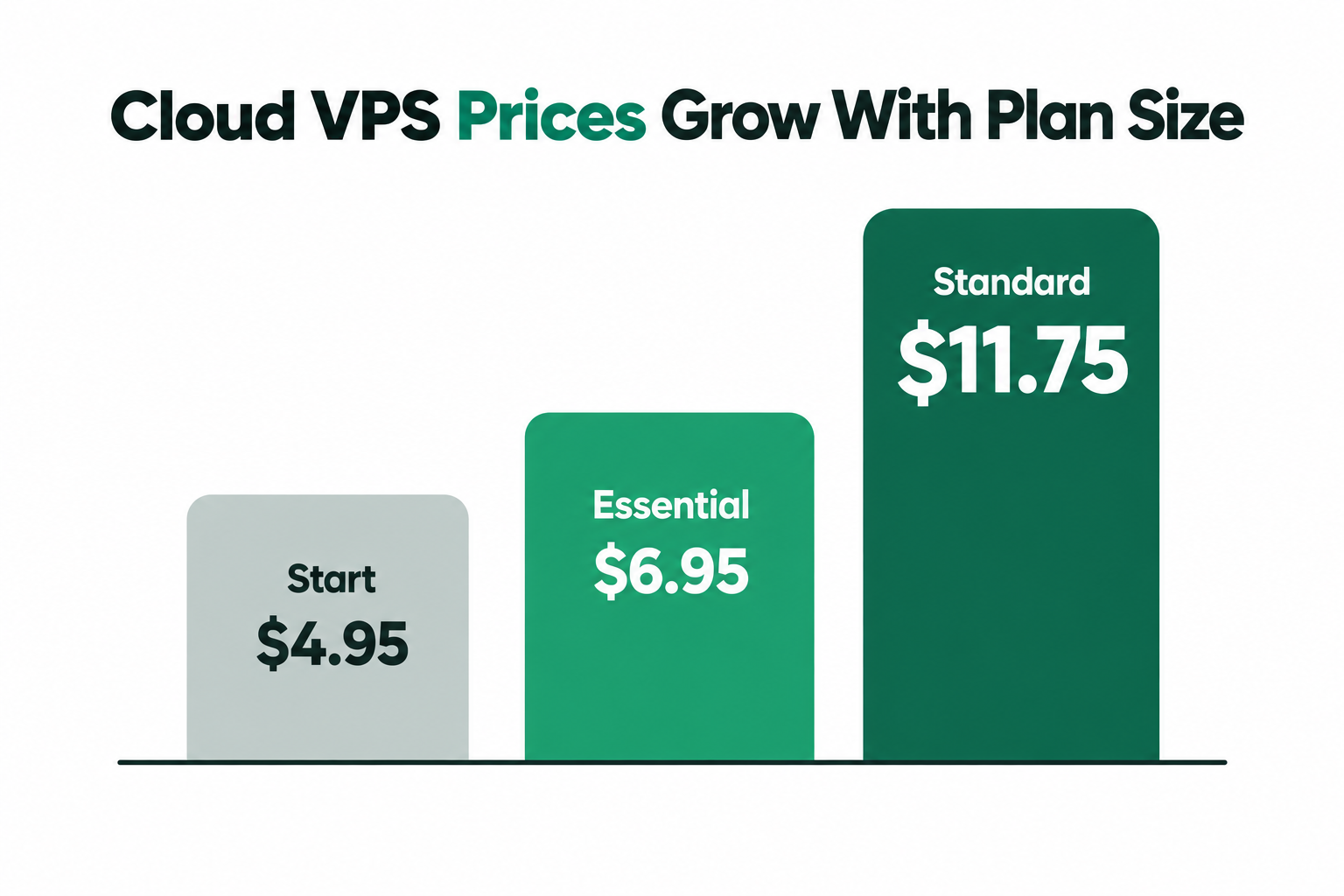
A cloud VPS is a virtual private server with allocated computing resources. RAM supports running services, while storage holds application files, databases and employee documents. The plans below show the full resource ladder, and the cloud cost estimator gives you another way to review server resources.
| Cloud VPS plan | Price per month | vCPU | RAM | NVMe storage | Bandwidth |
|---|---|---|---|---|---|
| Start | $4.95 | 1 vCPU | 1 GB | 12 GB | 1 TB |
| Essential | $6.95 | 1 vCPU | 2 GB | 15 GB | 1 TB |
| Standard | $11.75 | 2 vCPUs | 4 GB | 35 GB | 1 TB |
| Plus | $15.95 | 2 vCPUs | 8 GB | 50 GB | 1 TB |
| Power | $21.95 | 4 vCPUs | 8 GB | 85 GB | 1 TB |
| Premium | $29.75 | 4 vCPUs | 16 GB | 105 GB | 1 TB |
| Ultimate | $52.95 | 8 vCPUs | 32 GB | 140 GB | 1 TB |
These seven cloud VPS plans include a dedicated IP, free SSL, free migration, managed support and marketplace access. SSL encrypts the connection between a browser and the server. As payroll processing, concurrent users and stored documents grow, move up to a larger resource tier with vertical scaling options.
Compare the Cost of Server Memory
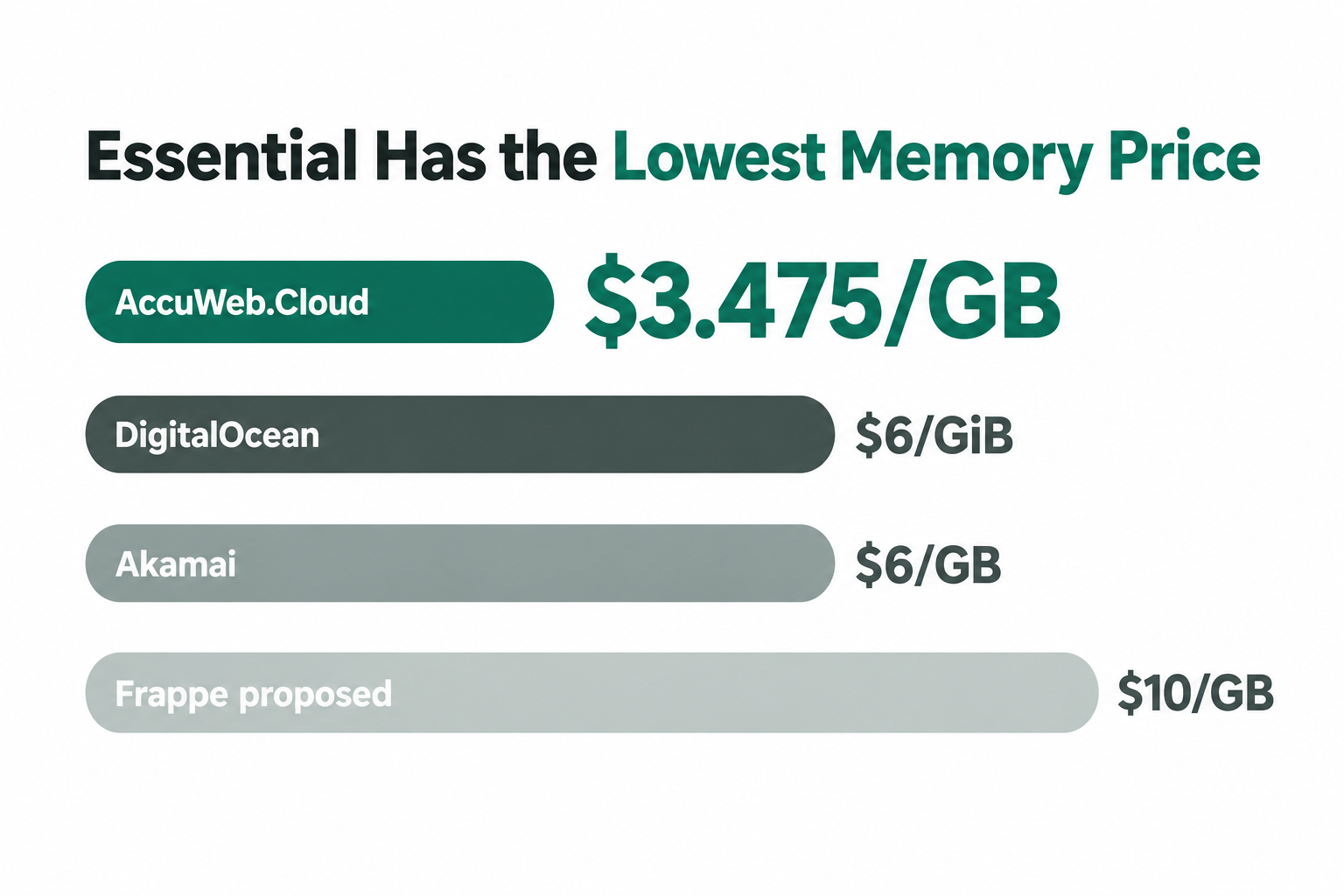
The Essential plan gives a small business 2 GB of RAM for $6.95 per month. It is the AccuWeb.Cloud comparison plan because the other entries each offer roughly 2 GB of memory. DigitalOcean lists memory in GiB, a binary unit, rather than decimal GB.
| Provider | Plan | Published price | Memory | Storage | Memory price per month |
|---|---|---|---|---|---|
| AccuWeb.Cloud | Essential | $6.95 per month | 2 GB | 15 GB NVMe | $3.475 per GB |
| DigitalOcean | Basic Droplet, regular CPU | $12 monthly cap | 2 GiB | 50 GiB SSD | $6 per GiB |
| Akamai | Linode 2 GB, shared CPU | $12 monthly cap | 2 GB | 50 GB | $6 per GB |
| Frappe | New Frappe Cloud Starter | $20 per month, proposed pricing | 2 GB | 25 GB | $10 per GB |
Monthly prices in USD. Third-party names and marks belong to their respective owners and are used for identification only.
The arithmetic is straightforward: $6.95 ÷ 2 GB = $3.475 per GB. DigitalOcean and Akamai each calculate to $12 ÷ 2 = $6 per listed memory unit, and Frappe’s proposed Starter price calculates to $20 ÷ 2 GB = $10 per GB. AccuWeb.Cloud has the lowest memory price in the comparison.
Read the Price Alongside the Work
Choose managed infrastructure when you want help with the server layer, while your team keeps control of payroll rules and employee access. See how fully managed support works for your server.
For a 12-month infrastructure budget, Essential at the published monthly price totals $83.40: $6.95 × 12. At their shown monthly rates, the comparable resource totals are $144 for DigitalOcean, $144 for Akamai and $240 under Frappe’s proposed pricing, calculated as $12 × 12, $12 × 12 and $20 × 12.
How ERPNext and Frappe HR Fit Together
ERPNext version 14 uses the separate HRMS app for its HR and payroll modules. Before configuring payroll, identify your ERPNext version and check that the matching HR application is installed.
ERPNext HRMS hosting and Frappe HR hosting both concern the HR application in the Frappe ecosystem. The important operational question is whether the application and its dependencies match your deployment.
Keep Application Versions Together
Application versions affect available integrations. For example, Frappe HR version 15 works with Frappe Lending for salary-slip loan integration with payroll.
A business that deducts employee loan repayments should account for that dependency before its payroll test. A business without that workflow can focus first on employee records, salary structures and approvals.
Record the installed application versions before an upgrade, and test changes against a restored copy of the environment before the next live payroll run. That keeps application compatibility and hosting resources easy to tell apart.
Separate Infrastructure From Payroll Ownership
Managed infrastructure leaves your salary rules in your hands. Your organization controls employee details, compensation settings, permissions and the review of payroll results.
Assign a small group to payroll administration, and give managers and employees only the access their work requires. HR records and salary slips contain sensitive information, so access decisions matter as much as the server choice.
Use the application marketplace to explore deployment options, and keep a record of which application versions and dependencies support your own payroll process.
A Payroll Example for a Small Team
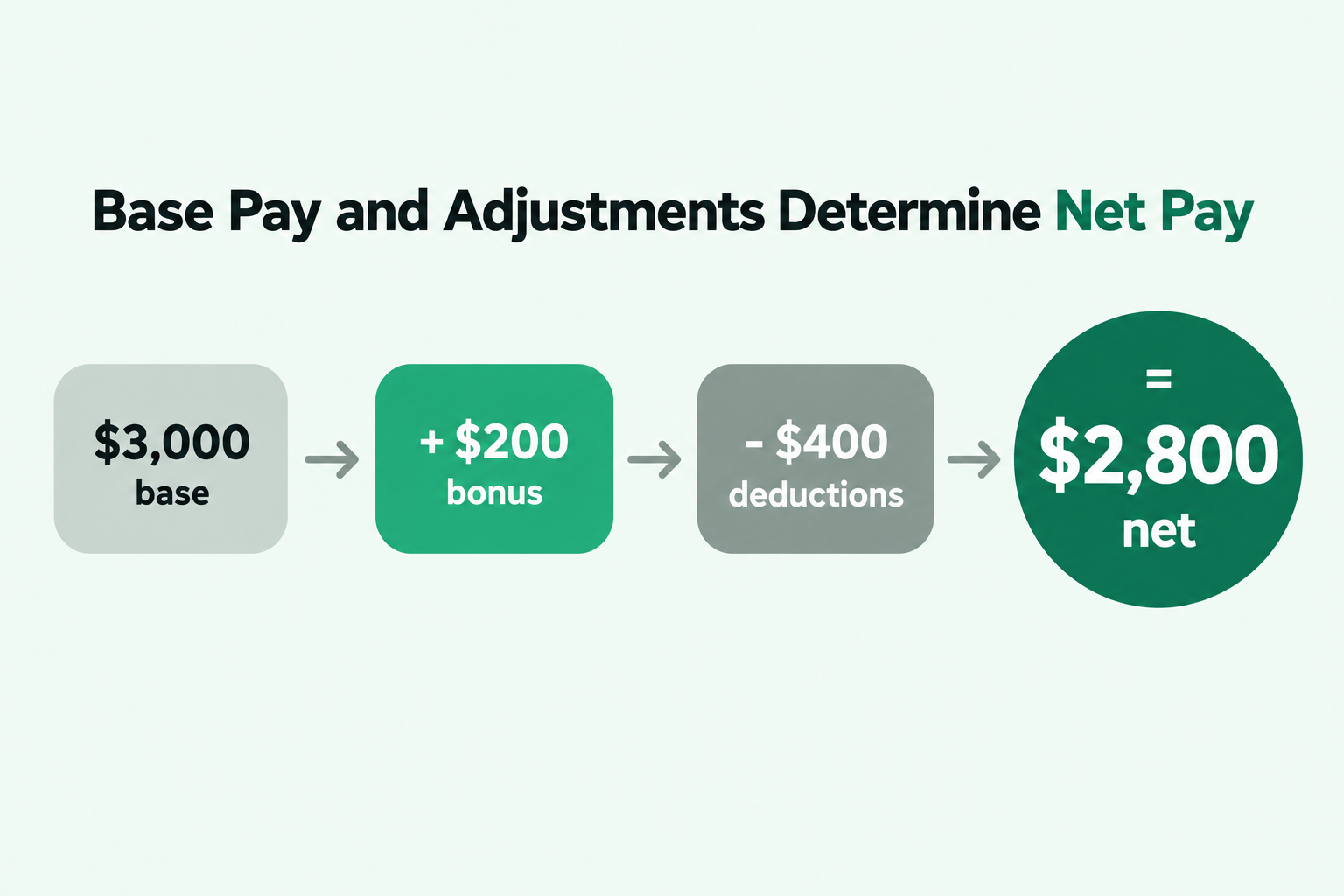
Consider an illustrative business with 12 employees. Each employee has $3,000 in base pay, a $200 bonus and $400 in deductions for one pay period.
The calculation is $3,000 + $200 – $400 = $2,800 per employee. For all 12 employees, $2,800 × 12 = $33,600 in net pay for the period. This example illustrates the arithmetic, and your actual payroll depends on your employees, deductions, local requirements and configured rules.
Check the Payroll Totals by Group
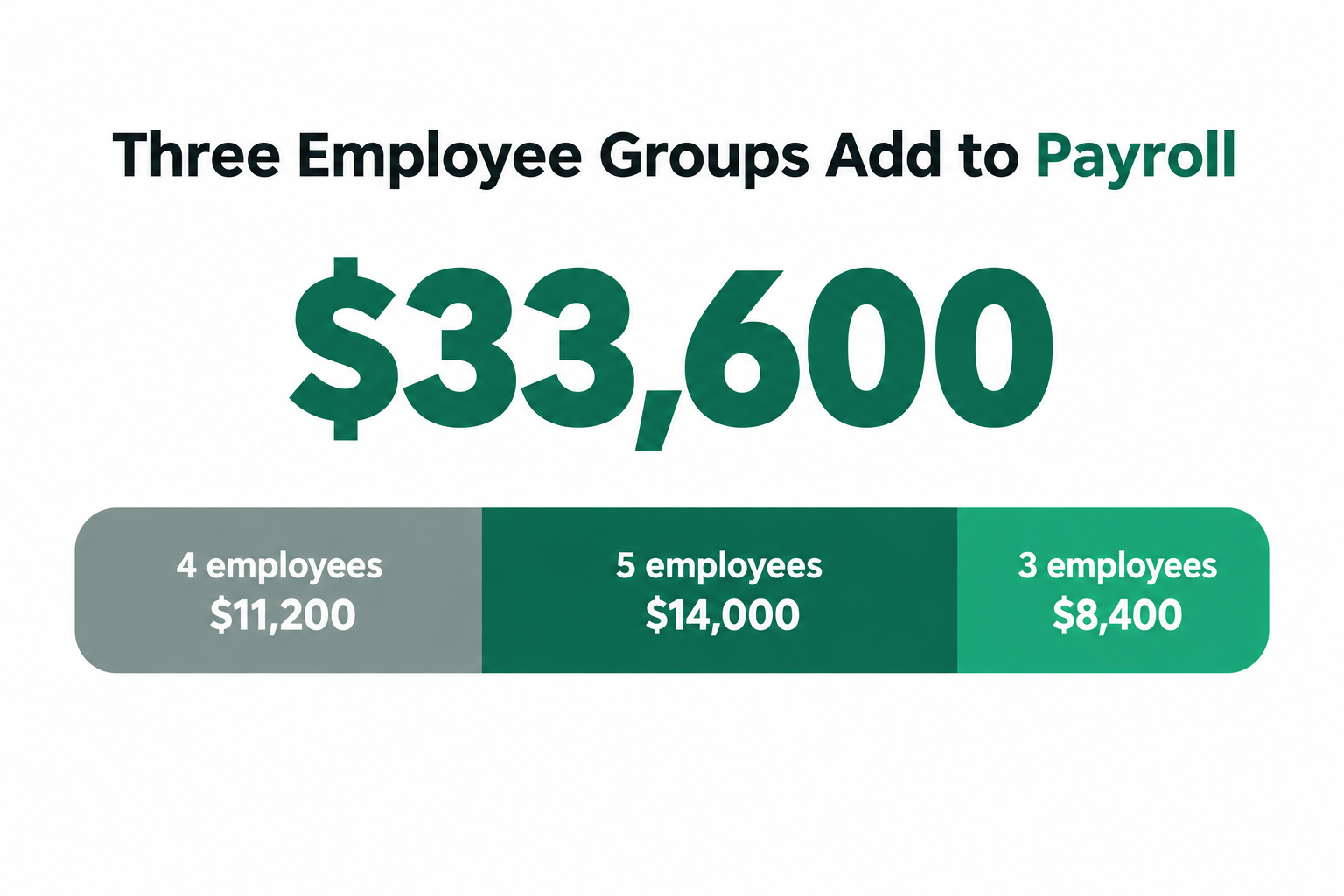
Split the same 12 employees into groups of four, five and three to check the total. The group calculations are 4 × $2,800 = $11,200, 5 × $2,800 = $14,000 and 3 × $2,800 = $8,400.
The group totals add up to $33,600: $11,200 + $14,000 + $8,400. A group check helps a reviewer find an incorrect employee count before approving the run.
Review the actual salary slips against your approved inputs, check that deductions and bonuses appear on the intended records, and review the total before issuing payments. Server size depends on concurrent activity, document storage, integrations and background processing, so size your plan around the full workload.
Protect Employee Data and Recovery
AccuWeb.Cloud ERPNext hosting includes scheduled cloud backup and recovery options. A useful recovery process also tests whether the application, database and employee documents restore together. Explore the available backup storage options to plan your retention.
Test a Restore Before Payroll Day
Use a separate test environment for a restoration exercise. Check that an authorized reviewer can find an employee record and open a representative salary slip, then confirm integrations and access permissions after the restore.
Choose a recovery target around your payroll calendar. For example, identify which records your team would need to recreate if the most recent recoverable copy preceded a payroll change.
Keep Administrative Access Limited
Root access controls the server, while application administration controls ERPNext users and settings. Keep both privileges limited to people who need them.
Use individual accounts rather than a shared payroll login. Remove access when responsibilities change, and review permissions before giving managers access to employee data.
AccuWeb.Cloud has four ERPNext hosting locations: New York, Los Angeles, Frankfurt and Mumbai. Consider where your team works and where you want the server located. The data center overview provides a starting point for reviewing locations, and your own retention rules and payroll obligations should guide your data-handling decisions.
Monthly and Hourly Server Budgeting
AccuWeb.Cloud publishes both monthly and hourly cloud VPS pricing. The hourly billing guide lists Essential at $0.009507 per hour.
For an illustrative 100-hour Essential server, $0.009507 × 100 = $0.9507. For a server that runs throughout the year, the published Essential monthly price gives a simple planning figure of $83.40 over 12 months, and for a temporary test environment you can calculate the expected running hours instead.
Review your cloud pricing options alongside the resources your workload needs. A payroll test and a production payroll environment serve different purposes, so budget them separately.
Conclusion
ERPNext HR and payroll hosting for small businesses works best when server resources and payroll responsibilities are considered together. Start with the application dependencies, then test access, calculations and recovery against your own workflow.
Use the published cloud VPS prices to build an infrastructure budget from $4.95 per month, and run your first restore and test payroll before you go live.
Frequently Asked Questions
Is ERPNext payroll free per user on AccuWeb.Cloud?
ERPNext has no per-user license fees on AccuWeb.Cloud. The server is a separate infrastructure expense.
Does ERPNext version 14 include payroll?
ERPNext version 14 uses the separate HRMS app for HR and payroll modules, which you install alongside ERPNext.
What is the difference between ERPNext payroll and Frappe HR hosting?
Both terms can refer to a deployment involving the Frappe HR application and ERPNext. Check the installed versions and required dependencies for your workflow.
Does Frappe HR need another app for employee loans?
Frappe HR version 15 works with Frappe Lending for salary-slip loan integration with payroll.
Is Essential less expensive than the compared Akamai server?
Yes. Essential is $6.95 per month for 2 GB of RAM, while the compared Akamai entry has a $12 monthly cap for 2 GB.
How does Essential compare with DigitalOcean for memory cost?
Essential costs $3.475 per GB per month. The compared DigitalOcean entry costs $6 per GiB at its monthly cap.
What should a business check before moving payroll to ERPNext?
Check application versions, employee records, salary rules, permissions and a restored copy of your data. Run a test payroll before using the new environment for payments.
Can a business control payroll data on its own server?
Yes. AccuWeb.Cloud ERPNext hosting includes root and admin access, and the business controls its users, payroll rules and data.
How should a small business size an ERPNext payroll server?
Consider concurrent users, stored documents, integrations and background processing together, then choose the plan that fits and scale up as your team grows.

Jilesh Patadiya, the visionary Founder and Chief Technology Officer (CTO) behind AccuWeb.Cloud. Founder & CTO at AccuWebHosting.com. He shares his web hosting insights on the AccuWeb.Cloud blog. He mostly writes on the latest web hosting trends, WordPress, storage technologies, and Windows and Linux hosting platforms.