MongoDB Hosting with Replica Set Setup on Request
MongoDB hosting with replica set setup on request means a provider designs and builds a group of MongoDB servers that keep copies of the same data. If the primary server fails, the other members elect a new primary automatically, so your application stays online.
AccuWeb.Cloud builds your replica set on NVMe Cloud VPS after a technical review, so you start with a reviewed, production-ready design. Plans (for single VM) start at $4.95 per month, billed hourly or monthly, with a seven-day disaster-recovery backup included.
In this guide, you will see the plans and prices, how to request a custom setup, how regional layouts and elections work, and how to configure a replica set yourself.
TL;DR
- Cloud VPS starts at $4.95 per month for one Start instance, with hourly and monthly billing.
- A three-member replica set uses one primary and two data-bearing secondaries, the configuration MongoDB recommends.
- AccuWeb.Cloud builds replica sets, multi-node deployments and supported sharded architectures on request after technical review.
- For regional resilience, spread voting members across three locations: New York, Los Angeles, Frankfurt and Mumbai are available.
- MongoDB hosting includes a seven-day disaster-recovery backup, with optional hourly, daily and weekly policies.
MongoDB Hosting with Replica Set Setup on Request Pricing
Cloud VPS starts at $4.95 per month for one Start instance with 1 vCPU, 1 GB RAM and 12 GB NVMe storage. Every plan includes 1 TB bandwidth and one dedicated public IP per instance. Custom replica-set pricing follows the reviewed design, so you see the full cost of every node before you commit.
Shared Cloud VPS Plans
| Plan | vCPU | RAM | NVMe Storage | Price per Month |
|---|---|---|---|---|
| Start | 1 | 1 GB | 12 GB | $4.95 |
| Essential | 1 | 2 GB | 15 GB | $6.95 |
| Standard | 2 | 4 GB | 35 GB | $11.75 |
| Plus | 2 | 8 GB | 50 GB | $15.95 |
| Power | 4 | 8 GB | 85 GB | $21.95 |
| Premium | 4 | 16 GB | 105 GB | $29.75 |
| Ultimate | 8 | 32 GB | 140 GB | $52.95 |
Dedicated Compute Plans
When your design calls for dedicated resources, choose a dedicated compute plan. Prices below are per instance. Storage is added separately: 10 GB costs $0.60 per month and 50 GB costs $3 per month.
| Dedicated Compute Plan | vCPU | RAM | Compute Price per Month |
|---|---|---|---|
| Compute-Nano | 1 | 1 GB | $9.50 |
| Compute-Micro | 1 | 2 GB | $13 |
| Compute-Launch | 2 | 4 GB | $29 |
| Compute-Grow | 4 | 8 GB | $55 |
| Compute-Scale | 6 | 16 GB | $89 |
| Compute-Pro | 8 | 24 GB | $129 |
| Compute-Elite | 12 | 32 GB | $189 |
| Compute-Ultra | 16 | 64 GB | $299 |
| Compute-Titan | 24 | 96 GB | $449 |
| Compute-Apex | 32 | 128 GB | $599 |
Cloud VPS supports pay-as-you-go hourly and monthly billing, and you can upgrade or downgrade resources as your workload changes. Start with a shared plan for an initial test, then move to dedicated compute when your reviewed design needs it. A three-node design uses capacity on each node, so plan resources for every member of the set. The cloud cost estimator tool helps you total the numbers before you order.
What Is a MongoDB Replica Set and Why Use One?
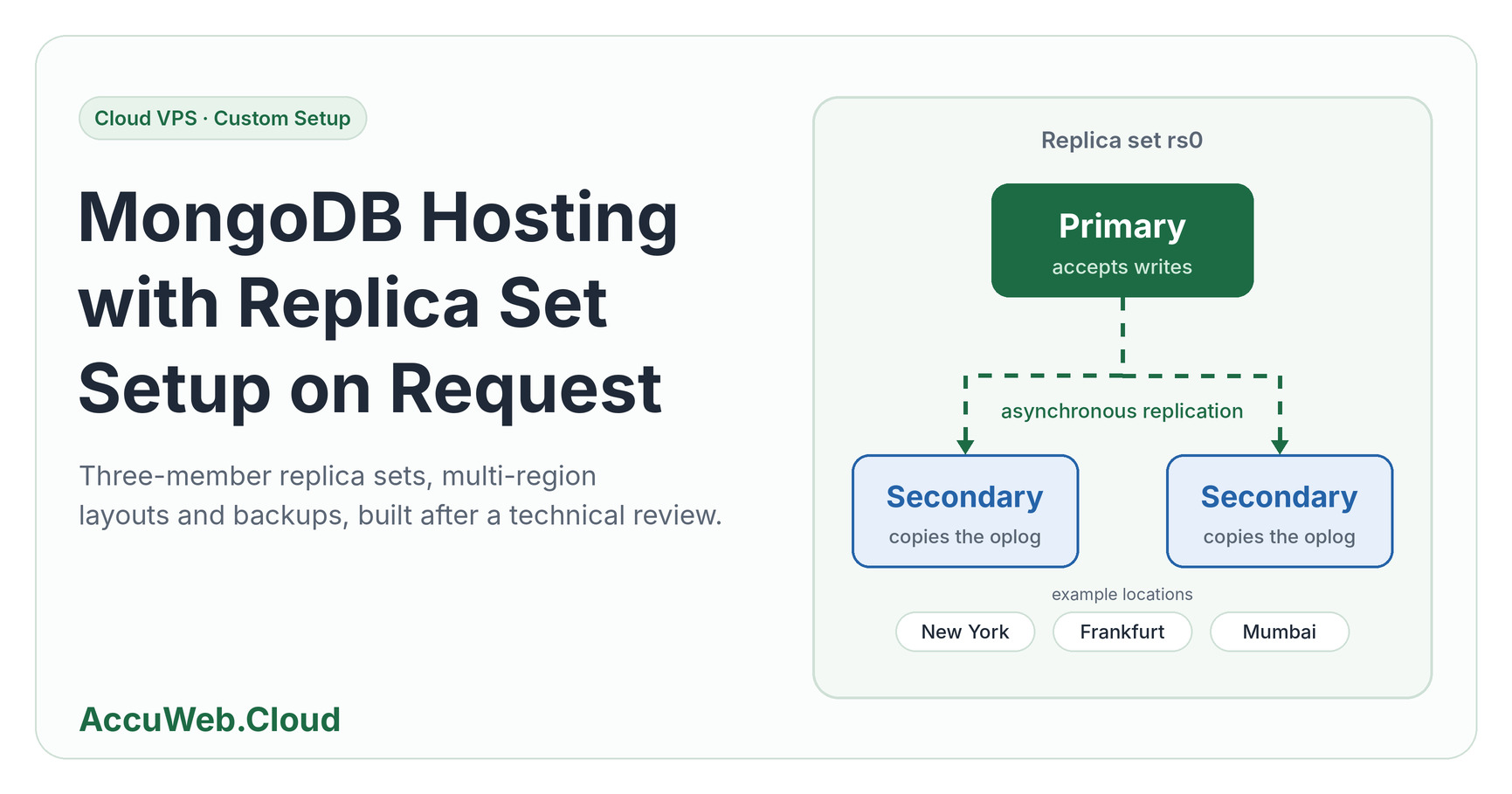
A replica set is a group of MongoDB servers that maintain copies of the same data. MongoDB recommends three members: one primary and two data-bearing secondaries. This gives your database built-in redundancy, automatic failover and the freedom to run maintenance one member at a time.
Primary, Secondaries and Elections
The primary accepts writes. Secondaries replicate those changes and take part in elections according to their configuration. If the primary becomes unavailable, eligible members elect a new primary.
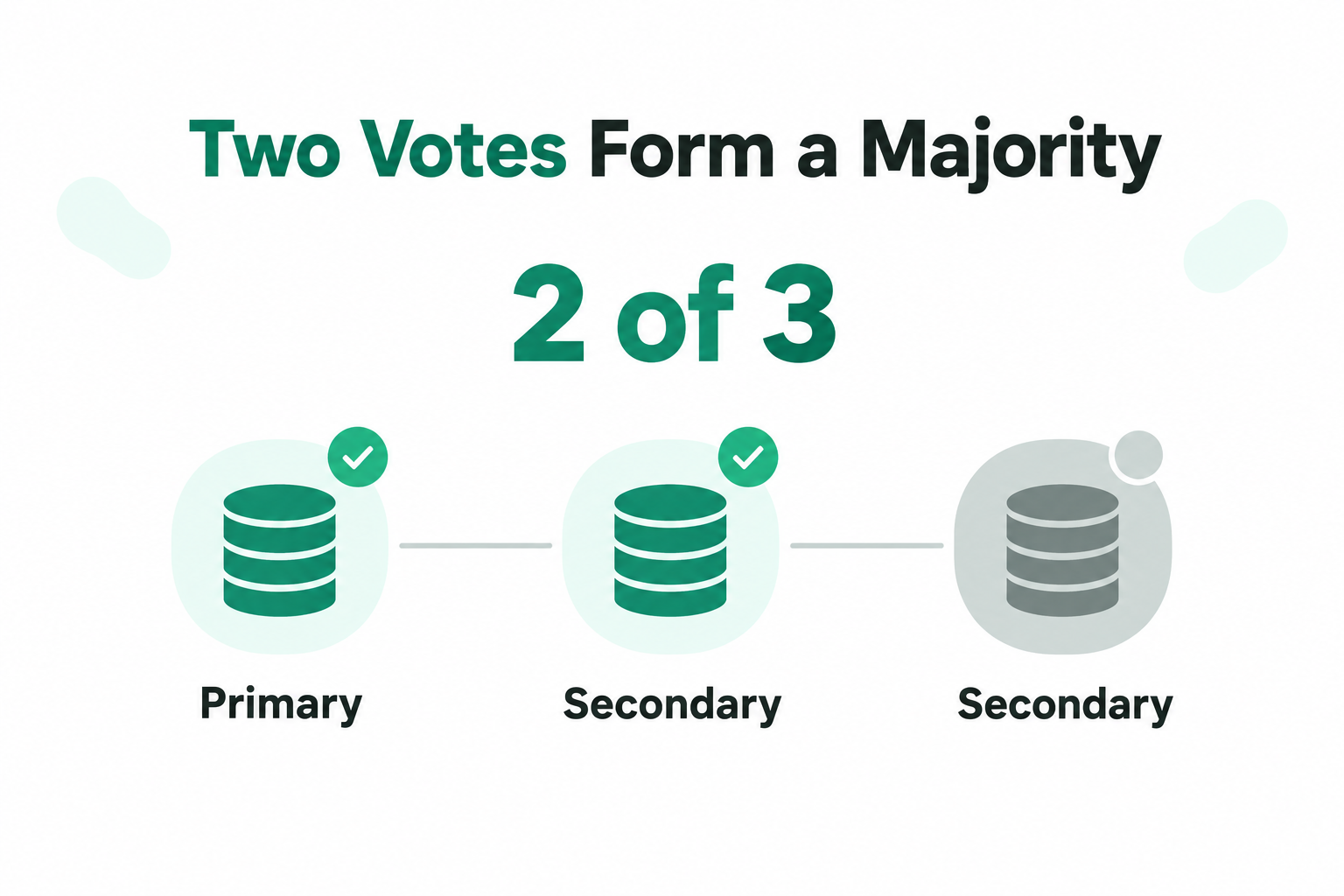
In a three-member set with one vote per member, two connected voters form the majority needed to elect a primary. Losing one member still leaves the other two with a majority, so the set keeps serving your application.
For the smoothest failover, configure your application’s connection string with the replica set name and member addresses, so clients discover the new primary automatically and reconnect.
Replica Sets and Backups Work Together
Replication keeps members in sync, and a backup gives you a separate recovery point you can restore from. Using both gives you the strongest protection: the replica set handles server failures, and the backup covers accidental changes.
AccuWeb.Cloud MongoDB hosting includes a seven-day disaster-recovery backup. You can add hourly, daily and weekly backup policies, plus instance and volume snapshots. Read more about the available backup storage options.
How to Request a Custom MongoDB Replica Set
A useful request describes your workload and the outcome you want from a high availability MongoDB server. AccuWeb.Cloud configures supported multi-node and sharded architectures after technical review, so every design starts from your real requirements.
- Describe your workload. Share your MongoDB version, current data size, expected growth, and read and write patterns.
- Define the topology. Ask for a three-member replica set when you want a primary and two data-bearing secondaries. For a regional design, name the location for each member using the layout table in the next section.
- Set recovery goals. Explain your acceptable data loss and restoration window, then select a backup policy.
- Cover connectivity. Describe where your applications run, how they connect and which network access you need.
- Review the design. Use the resulting node sizes, storage, network design and regions to budget the deployment.
Replica Sets vs Sharded Clusters
Replica sets and sharded clusters solve different problems. A replica set keeps copies of your data and supports elections. Sharding distributes data across shards when your workload needs horizontal scale. AccuWeb.Cloud supports custom MongoDB clusters in three-node, geographically distributed and sharded designs, so you can start with a replica set and add sharding when your data distribution requires it.
The cluster price depends on node count and size, storage, network design and regions. With fully managed support, our engineers help you with setup, monitoring and troubleshooting along the way.
Place Replica Set Members Across Regions
A multi-region replica set spreads members across separate data centers, so a regional outage does not take every copy of your data offline. Cloud VPS offers four locations: New York, Los Angeles, Frankfurt and Mumbai. Review the global data center locations to plan your layout.
Regions shape the design in three ways:
- Replication is asynchronous. Secondaries copy changes from the primary’s oplog, so a member on another continent can trail slightly behind.
- Majority writes cross regions. When a write must be acknowledged by a majority of voting members and that majority spans regions, the write waits for a cross-region round trip.
- Priority decides where the primary lives. Give members in the region closest to your application a higher priority. Give a distant disaster-recovery member a priority of 0 so it never becomes primary.
Count Votes Before You Choose a Layout
When members sit in different regions, the number of voting members in each region decides whether the remaining members can still elect a primary after a regional outage. Write the layout as the number of voting members per region, then compare the majority with the members that stay online.
| Layout | Voting Members | Majority Needed | Fault Tolerance | If One Region Goes Offline |
|---|---|---|---|---|
| 1 + 1 + 1 (three regions) | 3 | 2 | 1 | Two members remain online and elect a primary, whichever region goes offline |
| 2 + 1 (two regions) | 3 | 2 | 1 | If the one-member region goes offline, two members remain and elect a primary. If the two-member region goes offline, one member remains and cannot form a majority |
| 2 + 2 (two regions) | 4 | 3 | 1 | Two members remain, which is below the majority of three, so the set cannot elect a primary |
| 2 + 2 + 1 (three regions) | 5 | 3 | 2 | At least three members remain online after any single region goes offline, so a primary can be elected |
The 2 + 2 layout looks balanced, but four voting members need a majority of three, so each region on its own falls one vote short. Adding a fifth voting member in a third location raises the majority to three and lets either two-member region fail without stopping elections. The same idea applies to 2 + 1: place the primary-priority member in the two-member region if that is where most of your traffic is, and keep the one-member region for recovery.
With four locations available, a practical example is two members in New York, two in Frankfurt and one in Mumbai. That is five voting members with a majority of three, so any single region can go offline and the remaining members still elect a primary.
MongoDB Hosting Entry Price Comparison
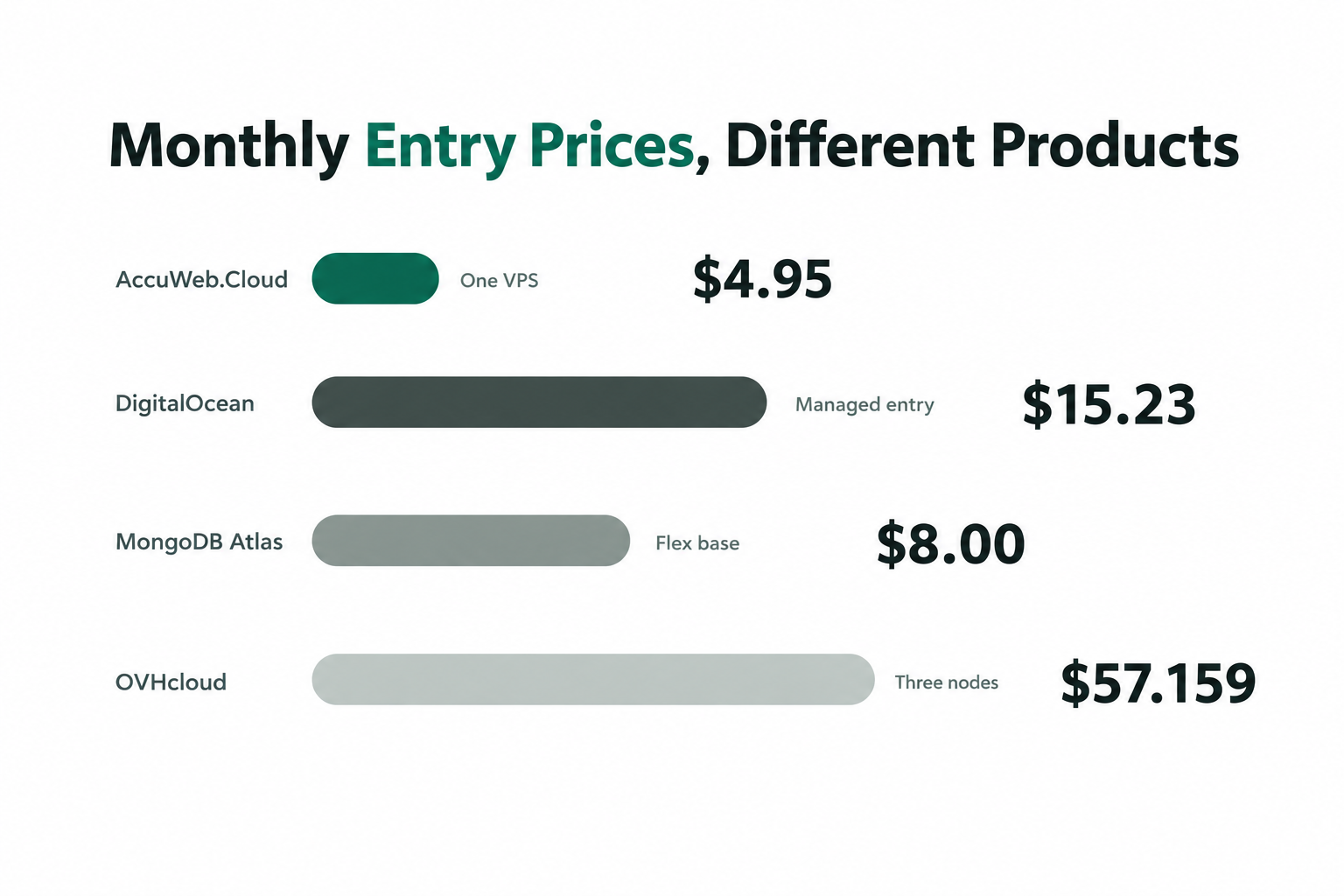
Published entry prices are a quick way to see how providers structure their billing. AccuWeb.Cloud starts at $4.95 per month for one Cloud VPS, and three Essential instances with 2 GB RAM each total $20.85 per month (3 × $6.95). The table below sets that next to published entry prices from other providers.
| Provider and Entry Product | Published Entry Price | Configuration and Billing |
|---|---|---|
| AccuWeb.Cloud Start | $4.95 per month | One Cloud VPS; 1 vCPU, 1 GB RAM and 12 GB NVMe storage |
| AccuWeb.Cloud Essential x 3 | $20.85 per month | Three Cloud VPS instances; 2 GB RAM and 15 GB NVMe storage each |
| DigitalOcean Managed MongoDB Basic | $15.23 monthly cap | 1 GiB RAM, 1 vCPU, zero additional nodes; $0.02266 per hour |
| MongoDB Atlas Flex | $8 per month at base tier | 5 GB storage; $0.011 per hour base rate |
| OVHcloud Managed MongoDB Production DB2-2 | $57.159 for 730 hours | Three nodes with 2 GB RAM per node; $0.0783 per hour total |
Compare the three-node figures directly: three Essential instances at $20.85 per month come to about $36.31 less than the $57.159 published for three OVHcloud nodes with 2 GB RAM each, which is roughly 64% lower. For the OVHcloud example, $0.0783 per hour multiplied by 730 hours equals $57.159.
MongoDB Atlas Dedicated starts at $0.08 per hour, with a published starting figure of $56.94 per month. Because that tier covers a wide range of resources, size your deployment first and use the total design price for the best like-for-like comparison. Third-party names and marks belong to their respective owners and are used for identification only.
Configure a MongoDB Replica Set Yourself
You can also run MongoDB on Cloud VPS nodes and configure the replica set manually. Install MongoDB Community Edition, bring your own Enterprise license (BYOL), or run MongoDB from a custom Docker image. In this model you manage MongoDB configuration, upgrades and licensing, while AccuWeb.Cloud provides the servers and networking.
The steps below use the mongosh shell and three members, with the replica set named rs0. Replace the placeholder addresses with your own.
1. Create the Nodes
Create an environment in each region from the Topology section of the dashboard, using the member count from your chosen layout. Install the same MongoDB version on every node.
2. Configure Each Member
Every member needs the same replica set name and a shared key file for internal authentication. Create the key file once, then copy it to each node with owner-only permissions:
openssl rand -base64 756 > /etc/mongodb/keyfile
chmod 400 /etc/mongodb/keyfile
chown mongod:mongod /etc/mongodb/keyfile
Then set the configuration file on each node:
# /etc/mongod.conf
net:
  port: 27017
  bindIp: 127.0.0.1,NODE_PRIVATE_IP
replication:
  replSetName: rs0
security:
  authorization: enabled
  keyFile: /etc/mongodb/keyfile
Binding to the node’s private IP instead of 0.0.0.0 keeps MongoDB off public interfaces. The replica set name must match on every member, and with authorization enabled the key file lets members authenticate to each other. Restart mongod on each node after saving the file.
3. Initiate the Replica Set
Connect to one node and initiate the set with all members. Run rs.initiate() from a single node only:
mongosh --host NODE1_PRIVATE_IP --port 27017

rs.initiate({
  _id: "rs0",
  members: [
    { _id: 0, host: "NODE1_PRIVATE_IP:27017" },
    { _id: 1, host: "NODE2_PRIVATE_IP:27017" },
    { _id: 2, host: "NODE3_PRIVATE_IP:27017" }
  ]
})
Hostnames work as well as IP addresses, and they are easier to maintain if a node’s address ever changes. Once a primary is elected, create your administrator user on it:
use admin
db.createUser({ user: "admin", pwd: passwordPrompt(), roles: ["root"] })
Run rs.status() to confirm one member shows PRIMARY and the others show SECONDARY.
4. Set Priority for Regional Placement
Control which members can become primary with priority. In this example, the second member sits in the region closest to the application, and the third is a distant recovery member:
cfg = rs.conf()
cfg.members[1].priority = 2
cfg.members[2].priority = 0
rs.reconfig(cfg)
A higher priority makes a member more likely to be elected, and a priority of 0 means it can never become primary. Use rs.add("NODE4_PRIVATE_IP:27017") to add a member later. Prefer data-bearing members over arbiters, because arbiters vote in elections but store no data, so they add no redundancy.
5. Test a Failover
Ask the primary to step down instead of shutting it off, so the test is controlled:
rs.stepDown(60)
rs.status()
The primary steps down for 60 seconds and the remaining members elect a new one. Check that your application reconnects, and repeat the test after any layout change.
Add a Hidden or Delayed Member
A hidden member keeps a full copy of the data but is invisible to applications, which makes it useful for backups and analytics. A delayed member applies changes after a set interval, giving you a window to recover from an accidental deletion. On MongoDB 5.0 or later, one member can do both:
cfg = rs.conf()
cfg.members.push({
  _id: 3,
  host: "HIDDEN_NODE_PRIVATE_IP:27017",
  priority: 0,
  hidden: true,
  secondaryDelaySecs: 3600
})
rs.reconfig(cfg)
Hidden and delayed members must have a priority of 0. Keep the delay shorter than your oplog window, and remember that both still vote by default, so count them when you work out your layout.
Monitor Replication Lag
Run rs.printSecondaryReplicationInfo() to see how far each secondary is behind the primary:
source: NODE2_PRIVATE_IP:27017
{
  syncedTo: 'Fri Jan 10 2025 13:29:26 GMT+0000 (Coordinated Universal Time)',
  replLag: '0 secs (0 hrs) behind the primary '
}
syncedTo is the latest point the secondary has reached, and replLag is its delay behind the primary. Some lag is normal across regions. Lag that keeps growing points to network latency, disk I/O or resource contention, so check it during routine health checks and before maintenance or any planned failover.
Checklist Before You Go Live
- Use the same replica set name and MongoDB version on every member.
- Keep an odd number of voting members, and place them using the layout table.
- Enable authentication with a key file, and use TLS between members.
- Open the MongoDB port only to members and application servers.
- Keep node clocks in sync with NTP.
- Watch disk space and MongoDB logs for replication or election errors.
- Upgrade one member at a time, secondaries first and the primary last.
- Run
rs.reconfig()during low-traffic periods, because it can trigger an election. - Schedule regular backups alongside your replica set.
Moving an Existing MongoDB Deployment
Moving an existing database takes a consistent copy and an application cutover plan. AccuWeb.Cloud offers a free migration service, and for multi-node MongoDB hosting you can include both your source topology and your requested destination topology in the discussion.
Plan the Copy
Record your current MongoDB version and configuration before choosing a transfer method. A database that accepts writes during a long copy needs a way to account for changes before cutover, and the best method depends on your source, destination and acceptable interruption.
Identify the current connection string and the applications that use it. A replica-set-aware connection needs the correct member addresses and replica-set name for the destination, so test application behavior against the new topology before routing production traffic.
Keep a Recovery Path
Keep a usable backup of the source and decide how you would return traffic if a check fails. After the transfer, compare record counts, test a representative write and read, and confirm that clients reconnect after an election test.
When you request help, describe your source environment, recovery requirements, any scheduled maintenance window and the applications that must reconnect. Include the network paths between the application and the proposed members, because every member needs connectivity to count toward the voting majority.
Budget Nodes, Storage and Billing
A replica-set budget starts with the number and size of members. These examples are infrastructure arithmetic, and your reviewed design sets the final total.
Three-Instance Starting Examples
Three Start instances at $4.95 each total $14.85 per month (3 × $4.95), with 1 GB RAM and 12 GB NVMe storage on each. Three Essential instances total $20.85 per month (3 × $6.95), with 2 GB RAM and 15 GB NVMe storage on each.
For dedicated compute, Compute-Nano plus one 10 GB storage volume totals $10.10 per month ($9.50 + $0.60). Compute-Launch plus 50 GB storage totals $32 per month ($29 + $3). These are per-instance infrastructure amounts.
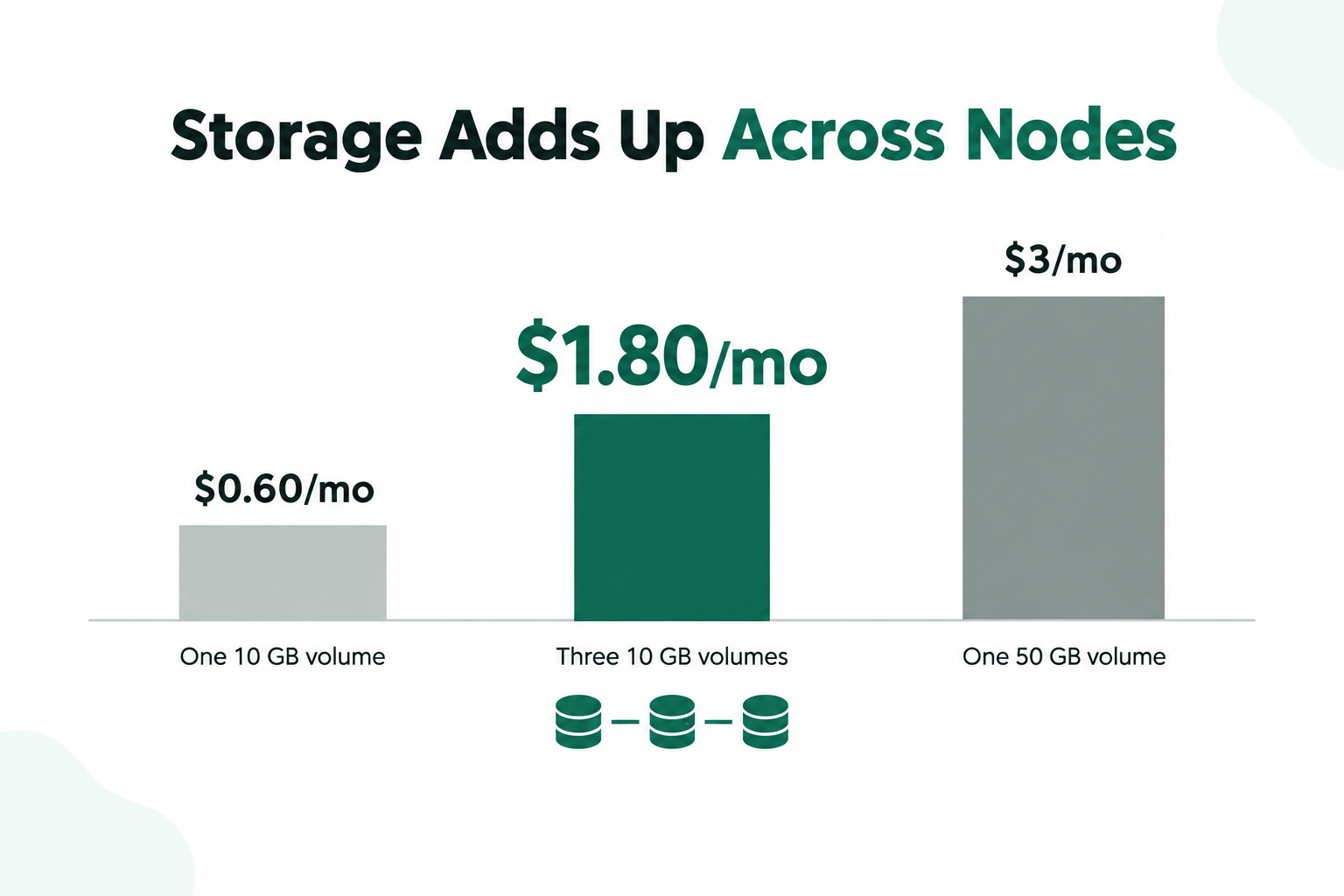
Three separate 10 GB storage volumes cost $1.80 per month (3 × $0.60), and a single 50 GB volume costs $3 per month. Size the storage on each member for your data and the operational headroom your reviewed design calls for.
Hourly or Monthly VPS Billing
Cloud VPS supports pay-as-you-go hourly and monthly billing, and you can upgrade or downgrade instance resources whenever your needs change. Learn more about pay-as-you-go cloud hosting. For a temporary development or test environment, hourly billing aligns your bill with the time the server runs. For a database that runs continuously, add up every node, its storage, your backup choices and the custom configuration for the full monthly figure.
Want to test first? The free trial offers up to 14 days with 1 vCPU, 1 GB RAM and 10 GB storage.
Conclusion
For MongoDB hosting with replica set setup on request, start with the failure scenario you want to handle. A three-member design gives the technical review a clear starting point, and a regional design starts with where the voting majority survives. Add your workload, recovery goals and network needs, and AccuWeb.Cloud turns them into a reviewed configuration on fast NVMe Cloud VPS, backed by fully managed support and a seven-day disaster-recovery backup.
With plans from $4.95 per month and hourly billing, you can begin small and grow your cluster as your data does.
MongoDB Replica Set FAQ
Can I request a three-node MongoDB replica set?
Yes. AccuWeb.Cloud designs custom three-node replica sets after technical review. Share your workload and recovery requirements as part of the request.
How many votes does a three-member set need?
With one vote per member, two connected votes form the majority needed to elect a primary.
How many regions does a replica set need to survive a regional outage?
Three locations is the usual answer. With voting members in three regions, such as 1 + 1 + 1 or 2 + 2 + 1, losing any one region still leaves a majority.
Can I configure the replica set myself on Cloud VPS?
Yes. You can install MongoDB yourself and configure the replica set manually, or request a custom design after technical review. If you self-manage, you handle MongoDB configuration, upgrades and licensing.
How do I check replication lag?
Run rs.printSecondaryReplicationInfo() in mongosh. It shows syncedTo and replLag for each secondary. Lag that keeps growing points to a network, disk or resource issue to investigate.
Is the $4.95 VPS price the cost of a replica set?
It is the monthly starting price for one Start VPS. A three-node set of Start instances totals $14.85 per month, and a custom cluster is priced around its reviewed design.
How does Atlas Flex differ from a custom cluster?
Atlas Flex has a published base-tier price and 5 GB storage. AccuWeb.Cloud configures replica sets and supported cluster architectures on request, with node count, size and regions chosen around your workload.
Can I request a sharded MongoDB architecture?
Yes. Supported sharded architectures are configured after technical review. Include your data distribution needs in the request.
Are backups included with MongoDB hosting?
Yes. MongoDB hosting includes a seven-day disaster-recovery backup, and optional backup schedules plus instance and volume snapshots are available.
Can I use hourly VPS billing for a MongoDB test?
Yes. Cloud VPS supports hourly billing, so you can run a test environment and pay for the hours it runs.
What should I check before switching providers?
Review the MongoDB version, data transfer method, client connection settings, backup recovery path and the node topology you need after the move.

Jilesh Patadiya, the visionary Founder and Chief Technology Officer (CTO) behind AccuWeb.Cloud. Founder & CTO at AccuWebHosting.com. He shares his web hosting insights on the AccuWeb.Cloud blog. He mostly writes on the latest web hosting trends, WordPress, storage technologies, and Windows and Linux hosting platforms.