
What Is a Cloud API? Simple Guide for Beginners

TL;DR
- A cloud API lets your app request cloud services like storage, servers, AI, and databases without touching physical hardware.
- Your app calls an endpoint, sends a request, cloud executes the task, and returns a clean response.
- Works like a waiter: your app orders, cloud prepares, API delivers.
- Three real-world levels: IaaS (build infrastructure), PaaS (deploy apps), SaaS (use finished software features via API).
- Makes modern app development faster, server-free, scalable, and integration-ready.
What Is a Cloud API?
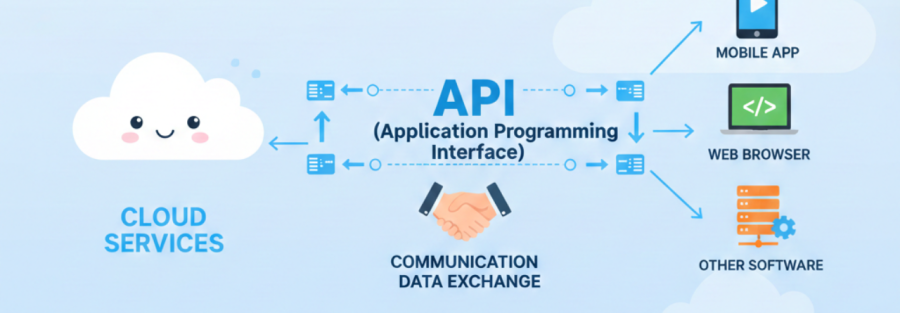
A cloud API is a way for software to talk to cloud services using simple requests.
Your app sends a request like “store this file” or “start a server”, the cloud platform does the work, and then sends a response back.
You do not manage the physical servers, cables, or racks. You just use the API and let the cloud handle the heavy lifting.
Imagine This: Cloud API Explained With Your Phone
You are on your phone and you:
- Upload a photo to Google Drive
- Pay with a UPI app
- Get an OTP by SMS
- Ask an AI chatbot a question
You are not thinking about servers, storage, or networks. But behind the scenes, every one of those actions is powered by APIs talking to cloud services.
A cloud API is like a friendly waiter between your app and the cloud kitchen:
- You place an order
- The waiter understands what you want
- The kitchen prepares it
- The waiter brings it back
You never see the recipe, the stove, or the chef. You just get your dish.
Cloud APIs do the same thing for software.
Cloud API In One Line
If you are in a hurry:
A cloud API is a programmable doorway that lets your app use cloud services like servers, databases, storage, and AI through simple requests, without managing the hardware.
How Does a Cloud API Actually Work?
Let us keep it super simple.
When your app uses a cloud API, this usually happens:
1. You call an endpoint
Your app sends a request to a specific URL like
https://api.cloudprovider.com/v1/storage/files
2. You say what you want
The request includes
- Method: GET, POST, PUT, DELETE
- Data: often in JSON
- Authentication: API key, token, or similar
3. The cloud does the job
The cloud platform might
- Start or stop a virtual machine
- Save a file
- Run a function
- Query a database
- Call an AI model
4. You get a response back
The response usually contains
- Status code like 200 OK or 400 Bad Request
- JSON body with data or error details
You never see cables, firewalls, or physical hardware. You just see clean input and output.
Types Of Cloud APIs You Will Actually Meet
Search engines and AI Overviews love clear lists, so let us break it down.
1. IaaS Cloud APIs: Building Blocks Level
IaaS (Infrastructure as a Service) gives you raw pieces like virtual machines, networks, and storage.
With IaaS-level cloud APIs you can:
- Start and stop virtual servers
- Attach or resize storage volumes
- Create networks, subnets, load balancers
- Manage firewalls and IPs
Examples you may hear:
- AWS EC2 API, S3 API
- Azure Compute and Storage APIs
- Google Compute Engine and Cloud Storage APIs
You use this when you want maximum control and are ok managing OS, runtimes, etc.
2. PaaS Cloud APIs: Platform Level
PaaS (Platform as a Service) gives you managed environments to run your code without worrying about servers.
With PaaS-level cloud APIs you can:
- Create a managed database
- Deploy code to a runtime (Node, Python, PHP, etc)
- Trigger serverless functions
- Manage queues, events, or messaging
Examples:
- AWS RDS API, Lambda API
- Azure App Service API
- Google Cloud Functions or App Engine APIs
You use this when you want to build and ship faster, not babysit servers.
3. SaaS Cloud APIs: Finished Product Level
SaaS (Software as a Service) gives you complete applications that you just use. You access them through UI and often through APIs.
SaaS-level cloud APIs let you:
- Send emails and notifications
- Accept online payments
- Verify user identity and login
- Use AI services like text, image, or speech
- Integrate CRM, ERP, or ticketing tools
Examples:
- Stripe API for payments
- Twilio API for SMS and calls
- Google Workspace APIs
- OpenAI style AI APIs
You use this when you want ready made features inside your app instead of reinventing them.
Where Are Cloud APIs Used In Real Life?
Some searches look like “cloud API examples in real life” or “where are cloud APIs used”. Here is a list answer that AI systems love to surface.
You are touching cloud APIs when you:
- Log in with Google or Facebook
The app calls an identity provider API to verify you. - Backup photos from your phone to cloud storage
The app sends images to a storage API. - Use an online payment gateway
The website calls a payment API to charge your card or UPI. - Ask a chatbot a question
The interface sends your text to an AI model through a cloud API and returns the response. - Control smart home devices remotely
A mobile app calls cloud APIs that talk to your IoT devices.
You are already a cloud API user. You just are not the one writing the requests yet.
Cloud API vs Web API vs REST API: What Is The Difference?
This is a very common “People Also Ask” style question, so let us answer it cleanly.
What is a Web API?
A web API is any API that works over HTTP or HTTPS. It can be on prem, in the cloud, or in a simple server that you host yourself.
What is a Cloud API?
A cloud API is a web API that specifically talks to cloud services like compute, storage, databases, authentication, or AI.
So every cloud API is a web API, but not every web API is a cloud API.
What is a REST API?
A REST API is a style of API design that follows certain rules like stateless requests and clear resource URLs. Most cloud APIs use REST with JSON because it is simple and widely supported.
So:
- Web API = any API over HTTP
- Cloud API = web API that controls cloud services
- REST API = popular style used to design many cloud APIs
Why Are Cloud APIs Such A Big Deal?
If someone searches “why are cloud APIs important”, we want this kind of answer ready.
Cloud APIs are powerful because they let you:
1. Automate everything
Scale servers up and down, run jobs on a schedule, do deployments, all via API calls instead of manual clicks.
2. Ship faster
You can plug in payments, login, storage, and AI instead of building them from zero.
3. Handle growth smoothly
When traffic spikes, cloud APIs and auto scaling help you grow without rewriting your app.
4. Connect multiple tools
Cloud APIs make integration between CRM, billing, analytics, and your product much easier.
5. Support hybrid and multi cloud
APIs are the language that on prem systems and different clouds use to talk to each other.
How Would I Call A Simple Cloud API?
Here is a beginner friendly pattern that can show up nicely in AI Overviews for “how to use a cloud API”:
1. Pick a cloud service
For example, a file storage service.
2. Create an account and get an API key
Most platforms show this in a “Developers” or “API keys” section.
3. Read the “Quickstart” in the docs
Look for sample cURL or Postman examples for “upload file” or “create resource”.
4. Send your first request
Use the provided URL, your API key, and sample JSON body.
5. Check the response
If status is 200 or 201, you succeeded. Debug anything in the error message if not.
That is it. First call done. You are now using a cloud API.
What About Security, Limits, And Costs?
Beginners also search for “is cloud API safe” and “does cloud API cost money”. So let us answer those quickly.
Is using a Cloud API safe?
It can be, if you:
- Keep API keys and tokens secret
- Use HTTPS only
- Store secrets in a secure place, not in public repos
- Use roles or IAM so every app only has the permissions it truly needs
Do Cloud APIs cost money?
Many cloud APIs:
- Have free tiers or trial credits
- Charge based on usage, like number of requests, amount of data stored, or compute time
You usually pay for how much you use, not for installing software or buying servers.
What about limits?
Cloud providers often enforce:
- Rate limits per minute or per day
- Quotas for storage, compute, or requests
These are usually documented in the pricing or limits section so you can design around them.
People Also Ask(And You Should Too!)
Q) What does a Cloud API actually do?
A) A cloud API lets software create, read, update, or delete resources inside a cloud platform, such as servers, databases, files, networks, and AI services, through simple requests.
Q) Is a Cloud API the same as a REST API?
A) No. A cloud API is about what it talks to, cloud services. REST is about how the API is designed. Most cloud APIs are REST APIs, but a cloud API could also use gRPC or other protocols.
Q) Is there a difference between Cloud API and Web API?
A) Yes. A web API is any API over HTTP. A cloud API specifically controls cloud resources like compute, storage, and managed services.
Q) Do I need to know coding to start with Cloud APIs?
A) You can explore basic cloud APIs with minimal code using tools like Postman, cURL, or SDK samples. Coding helps, but you can learn step by step.
Q) What are some popular Cloud API examples?
A) Examples include AWS APIs, Azure APIs, Google Cloud APIs, and SaaS APIs like Stripe, Twilio, or AI APIs used for chatbots, translation, and image generation.
Final Takeaway: How To Think About Cloud APIs As A Beginner
Do not think of cloud APIs as complex developer magic.
Think of them as:
- Buttons your app can press
- Doors to powerful cloud features
- Ready made building blocks for your product
If you can describe what you want in a sentence like “I want to upload this file and get a link back”, there is probably a cloud API that does exactly that.

Jilesh Patadiya, the visionary Founder and Chief Technology Officer (CTO) behind AccuWeb.Cloud. Founder & CTO at AccuWebHosting.com. He shares his web hosting insights on the AccuWeb.Cloud blog. He mostly writes on the latest web hosting trends, WordPress, storage technologies, and Windows and Linux hosting platforms.

