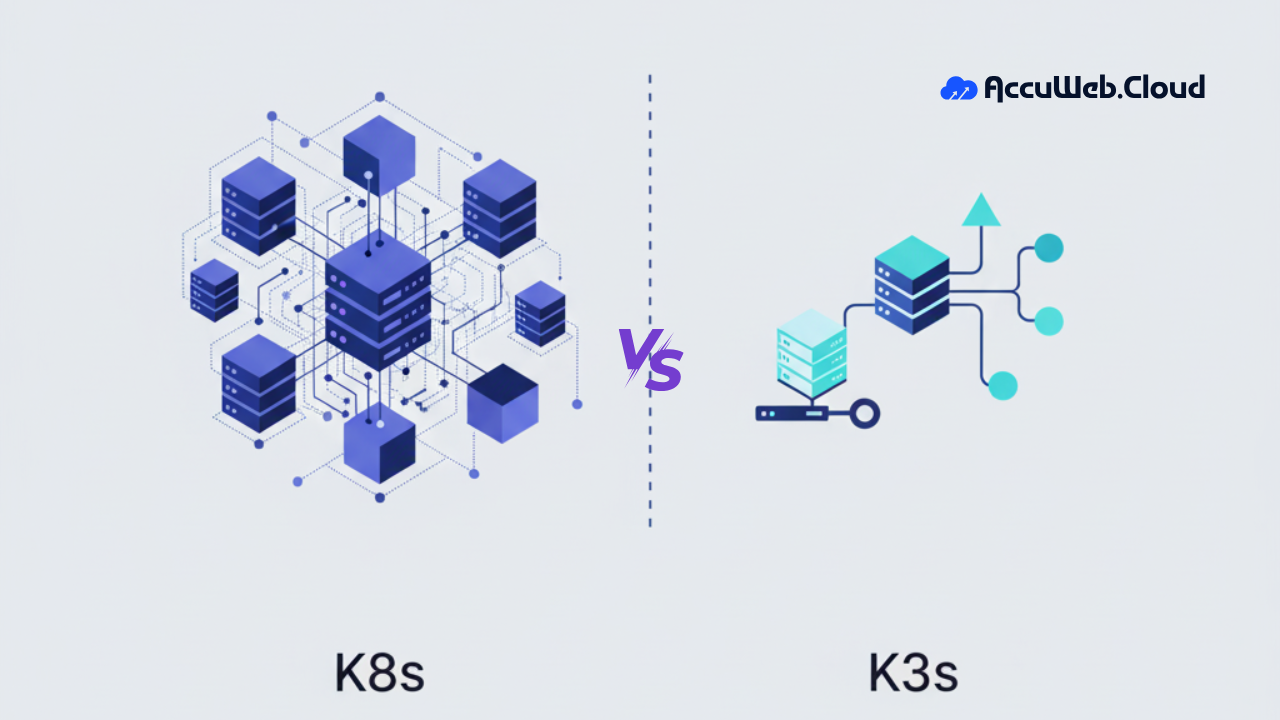
K8s Vs K3s – What’s The Difference?
TL;DR
- Kubernetes (K8s) is the full-scale orchestration system for large, distributed, high-traffic environments.
- K3s is a lightweight, CNCF-certified Kubernetes distribution optimized for edge, IoT, and small-footprint deployments.
- K8s offers advanced security, strong scalability, multi-node architecture, and robust ecosystem tooling.
- K3s uses a single small binary (<50 MB) with no external dependencies, making installation and upgrades extremely fast.
- K8s is ideal for cloud-native apps, ML workloads, and enterprise clusters needing high availability and extended integrations.
- K3s fits resource-constrained environments, field devices, small teams, and environments needing minimal operational overhead.
- K8s require more maintenance effort and external components; K3s bundles components to simplify cluster management.
- Choose K8s for large-scale, mission-critical deployments and K3s for edge computing, IoT, and lightweight Kubernetes operations.
Kubernetes (K8s) and K3s are containers and container orchestration systems commonly used in cloud computing. Kubernetes is widely used for deploying and managing cloud-native applications. Cloud hosting providers offer managed Kubernetes services (like Amazon EKS, Google Kubernetes Engine, and Azure Kubernetes Service) that simplify the deployment and management of Kubernetes clusters in the cloud. K3s, a lightweight Kubernetes distribution, is suitable for edge computing scenarios, including those parts of cloud computing environments.
What are K8s and K3s?
K8s and K3s, as container orchestration systems, support automated scaling, deploying, and distributing the container’s workload, helping to make work easy. K8s is a general-purpose container distribution with a load balancer, application server, and database.

It is just an abbreviation of Kubernetes; Ten alphabets and eight between K and S make full-fat Kubernetes. On the other hand, K3s is just a simple abbreviation of the Kubernetes distribution, which can come under five alphabets and is certified by the Cloud Native Computing Foundation (CNCF).

Comparison between K8s and K3s
| Features | K8s | K3s |
| Performance | K8s’ performance is a general-purpose, high-scale application, and its distribution. | K3s’ lightweight, fast, and self-upgraded abilities are ideal for IoT and edge computing. |
| Speed | K8s handles big data and containers, so its speed is not enough; it takes some minutes for deployment. | K3s is faster than full-fat Kubernetes because it is a single binary that takes under 50 MB of storage. |
| Security | K8s offers role-based access control, which allows administrators to define access and pod security policies. | K3s also provides role-based access control but not the same advanced security as K8. |
| Ease of Deployment | Difficulty in deployment and distribution of containers | Effortless deployment because of a single server |
| Components | K8s have a control panel and have at least one worker node. | The control panel and database components are not on the worker node since K3s manages them on the server node. |
| External dependencies | Large-scale deployment needs more external dependencies like proxy, database, and extra storage. | No external dependencies |
| Use cases | For high storage container distribution, high machine learning | For IoT and edge computing |
| Installation | Installation takes a few minutes to create all container and their securities. | It supports an effortless installation process and has capabilities for auto-upgradation. |
| Scaling | Unbeatable scaling ability for large-scale deployment. | K3s need low scalability because they have minimal resources. |
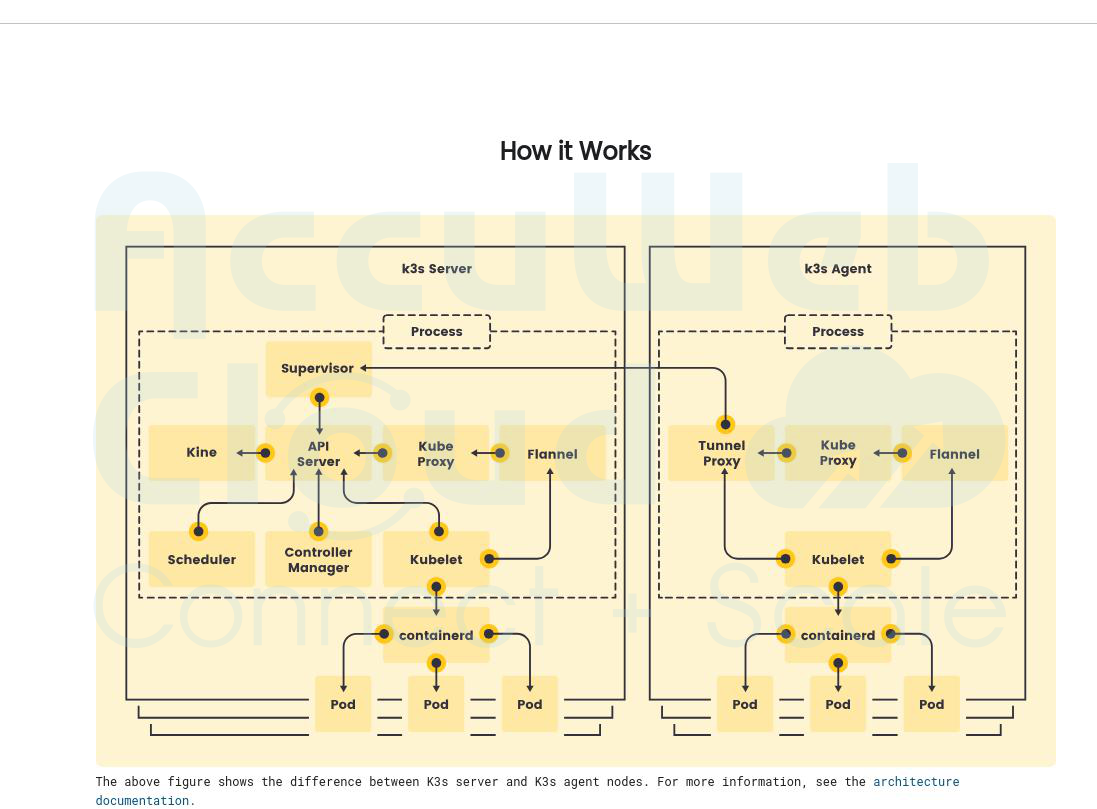
- K3s works on different processes, Server, and Agent; both run single processes on one node.
- The K3s server node is a host running with a control plane and datastore; the K3s agent node runs without any control plane or datastore.
- An API server, Controller manager, scheduler, and Kubelet are all included in the K3s server. Container runtime, Kube proxy, and other components are included in K3s Agent.
Choose the right Kubernetes Platform
There are many things to consider when choosing the right Kubernetes platform, such as –
Management: The platform should be able to manage virtual machines and all container types.
Platform Performance: Whether or not the Kubernetes platform can deploy containers and install tools rapidly.
System Integration: Whether it integrates the current system with the native cloud’s applications.
Scaling Capability: Platforms should be able to scale containers by their workload. (Note: AccuWeb.Cloud (link) offers horizontal and vertical auto-scaling options.)
Security: Kubernetes needs security for every container and worker node, so the platform should have robust security for all of Kubernetes’ containers.
Ease of Use: Check whether the platform is easy for any deployment and easy to understand for a particular person.
Advantages of K8s
- Full-fat Kubernetes manages and deploys containers for high-scale performance and infrastructure.
- K8s have more capability to scale and more extensive tools to manage containers.
- For large and complex platforms, K8s provide more than 2 GB of space so containers and applications can run perfectly and deployed.
- For storage capacity, K8s has the advantage of being able to add external storage applications like MySQL, PostgreSQL, and MariaDB.
Disadvantages of K8s
- K8s are more complex to understand and hard to deploy.
- It is hard to secure all nodes because all containers have at least one worker node.
- There is no built-in database, middleware, or load balancer with Kubernetes. If external platform providers supply these containers to the Kubernetes cluster, that is great; if not, it becomes challenging to deploy every container.
- If K8s is used for small structures, it is more complicated and costly for any business.
- K8s does not come pre-installed with the ingress controller and load balancer.
Advantages of K3s
- Lightweight and faster compared to K8s.
- K3s need only 50 to 100 MB of space because of the single binary storage technology.
- Best for edge computing, IoT products, and small infrastructure and environments.
- K3s uses all container services in one CPU with embedded data storage capacity.
- It has an ingress controller and is attached to a load balancer.
- K3s is customized for easy, understandable, and fast deployment.
- K3s can automatically update their nodes, eliminating the need for users to stop and restart the system manually.
Disadvantages of K3s
- The primary scalability issue with K3s is the inability to scale in large-scale environments.
- Large-scale infrastructure cannot make greater use of it because there are limited options for databases and some extensions.
- The main disadvantage of K3s is its lack of external database support, as it only comes with built-in MySQlite support.
- Since K3s lack data codes, they do not have as many security options as K8s.
Conclusion
The work and procedures of K8s and K3s are similar; they use container orchestration and auto-deployment features, each with unique benefits and drawbacks depending on their usage.
Selecting between K8s and K3s is crucial as it depends on the business, your needs, whether you want to operate on-site, and whether you currently handle containers. After these questions, we can decide whether K8s or K3s suit your business.

Jilesh Patadiya, the visionary Founder and Chief Technology Officer (CTO) behind AccuWeb.Cloud. Founder & CTO at AccuWebHosting.com. He shares his web hosting insights on the AccuWeb.Cloud blog. He mostly writes on the latest web hosting trends, WordPress, storage technologies, and Windows and Linux hosting platforms.